
10 - Segmentation and Pose Estimation with Ultralytics YOLO#
In this notebook we go beyond bounding boxes and explore two advanced vision tasks supported by Ultralytics YOLO models:
Instance segmentation (pixel-level object masks)
Pose estimation (keypoints on human bodies)
We will use the same YOLO11 family of models and the example images downloaded in the Ultralytics introduction notebook.
Setup and Models#
Let’s import the necessary libraries. This notebook loads all images directly from the course GitHub repository using the load_image_from_url() helper function.
from ultralytics import YOLO
import cv2
import numpy as np
import matplotlib.pyplot as plt
import os
import requests

%matplotlib inline

# Base URL for images hosted on GitHub
BASE_URL = "https://raw.githubusercontent.com/ezponda/ai-application-course-materials/main/images/"

def load_image_from_url(filename, flags=cv2.IMREAD_COLOR):
    """Load an image from GitHub repository using OpenCV."""
    url = BASE_URL + filename
    response = requests.get(url)
    image_array = np.asarray(bytearray(response.content), dtype=np.uint8)
    return cv2.imdecode(image_array, flags)

print("Image loading helper function ready. Ready to proceed.")
Image loading helper function ready. Ready to proceed.
What Is Instance Segmentation?#
Instance segmentation combines object detection with semantic segmentation. Instead of just drawing a bounding box around an object, it identifies the exact pixels that belong to each object instance.
Detection vs. Segmentation#
Object Detection: Outputs bounding boxes (rectangles) around objects
Fast and efficient
Good for counting and localization
Less precise (includes background pixels)
Instance Segmentation: Outputs pixel-level masks for each object
More computationally expensive
Precise object boundaries
Useful for applications requiring exact shapes (medical imaging, video editing)
Semantic vs. Instance Segmentation#
Semantic Segmentation: Labels every pixel with a class (all cars are “car”)
Instance Segmentation: Distinguishes between different instances of the same class (car #1, car #2, etc.)
YOLO models with the -seg suffix perform instance segmentation.
Segmentation with YOLO11#
Let’s load a segmentation model and run it on one of our example images.
# Load YOLO12 segmentation model (nano version)
seg_model = YOLO("yolo12n-seg.pt")

print(f"Segmentation model loaded: {seg_model.model_name}")
Segmentation model loaded: yolo11n-seg.pt
# Run segmentation on a traffic image
image_path = "yolo_traffic.jpg"
img_bgr = load_image_from_url(image_path)
img_rgb = cv2.cvtColor(img_bgr, cv2.COLOR_BGR2RGB)

results = seg_model(img_bgr, conf=0.06, iou=0.5)
result = results[0]

# Plot the annotated result
annotated = result.plot()

plt.figure(figsize=(12, 8))
plt.imshow(annotated[:, :, ::-1])  # Convert BGR to RGB for display
plt.title("Instance Segmentation Result")
plt.axis("off")
plt.show()

# Check mask availability
if result.masks is not None:
    print(f"Number of detected objects: {len(result.masks)}")
    print(f"Mask shape for first object: {result.masks[0].data.shape}")
else:
    print("No masks detected in this image")
0: 384x640 16 persons, 10 cars, 5 motorcycles, 4 buss, 1 truck, 1 traffic light, 109.5ms
Speed: 3.5ms preprocess, 109.5ms inference, 8.2ms postprocess per image at shape (1, 3, 384, 640)
Number of detected objects: 37
Mask shape for first object: torch.Size([1, 384, 640])
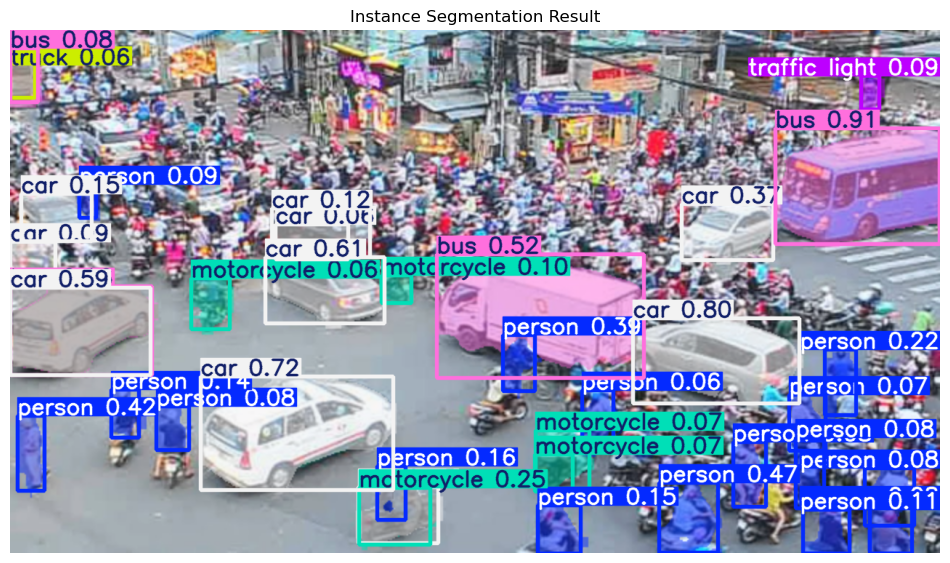
What we see:
Colored masks showing the exact shape of each object
Different colors for different instances (even of the same class)
Bounding boxes and class labels overlaid on the masks
Much more precise than simple rectangles
result
ultralytics.engine.results.Results object with attributes:

boxes: ultralytics.engine.results.Boxes object
keypoints: None
masks: ultralytics.engine.results.Masks object
names: {0: 'person', 1: 'bicycle', 2: 'car', 3: 'motorcycle', 4: 'airplane', 5: 'bus', 6: 'train', 7: 'truck', 8: 'boat', 9: 'traffic light', 10: 'fire hydrant', 11: 'stop sign', 12: 'parking meter', 13: 'bench', 14: 'bird', 15: 'cat', 16: 'dog', 17: 'horse', 18: 'sheep', 19: 'cow', 20: 'elephant', 21: 'bear', 22: 'zebra', 23: 'giraffe', 24: 'backpack', 25: 'umbrella', 26: 'handbag', 27: 'tie', 28: 'suitcase', 29: 'frisbee', 30: 'skis', 31: 'snowboard', 32: 'sports ball', 33: 'kite', 34: 'baseball bat', 35: 'baseball glove', 36: 'skateboard', 37: 'surfboard', 38: 'tennis racket', 39: 'bottle', 40: 'wine glass', 41: 'cup', 42: 'fork', 43: 'knife', 44: 'spoon', 45: 'bowl', 46: 'banana', 47: 'apple', 48: 'sandwich', 49: 'orange', 50: 'broccoli', 51: 'carrot', 52: 'hot dog', 53: 'pizza', 54: 'donut', 55: 'cake', 56: 'chair', 57: 'couch', 58: 'potted plant', 59: 'bed', 60: 'dining table', 61: 'toilet', 62: 'tv', 63: 'laptop', 64: 'mouse', 65: 'remote', 66: 'keyboard', 67: 'cell phone', 68: 'microwave', 69: 'oven', 70: 'toaster', 71: 'sink', 72: 'refrigerator', 73: 'book', 74: 'clock', 75: 'vase', 76: 'scissors', 77: 'teddy bear', 78: 'hair drier', 79: 'toothbrush'}
obb: None
orig_img: array([[[107,  77,  96],
        [118,  90, 113],
        [123, 104, 131],
        ...,
        [165, 163, 163],
        [170, 168, 168],
        [182, 180, 180]],

       [[122,  94, 113],
        [142, 117, 137],
        [151, 134, 161],
        ...,
        [192, 190, 189],
        [187, 185, 185],
        [192, 190, 189]],

       [[128, 105, 120],
        [156, 136, 155],
        [175, 160, 187],
        ...,
        [200, 197, 193],
        [192, 188, 187],
        [194, 191, 187]],

       ...,

       [[181, 176, 167],
        [181, 176, 167],
        [181, 176, 167],
        ...,
        [ 89,  78,  70],
        [ 95,  83,  77],
        [106,  94,  88]],

       [[181, 176, 167],
        [181, 176, 167],
        [181, 176, 167],
        ...,
        [102,  92,  85],
        [104,  94,  87],
        [116, 106,  99]],

       [[181, 176, 167],
        [181, 176, 167],
        [181, 176, 167],
        ...,
        [108,  98,  91],
        [107,  97,  90],
        [119, 109, 102]]], dtype=uint8)
orig_shape: (720, 1280)
path: 'image0.jpg'
probs: None
save_dir: 'runs/segment/predict'
speed: {'preprocess': 3.453083016211167, 'inference': 109.49662499479018, 'postprocess': 8.210416999645531}
result.masks
ultralytics.engine.results.Masks object with attributes:
data: tensor([[[0., 0., 0., ..., 0., 0., 0.],
[0., 0., 0., ..., 0., 0., 0.],
[0., 0., 0., ..., 0., 0., 0.],
...,
[0., 0., 0., ..., 0., 0., 0.],
[0., 0., 0., ..., 0., 0., 0.],
[0., 0., 0., ..., 0., 0., 0.]],
[[0., 0., 0., ..., 0., 0., 0.],
[0., 0., 0., ..., 0., 0., 0.],
[0., 0., 0., ..., 0., 0., 0.],
...,
[0., 0., 0., ..., 0., 0., 0.],
[0., 0., 0., ..., 0., 0., 0.],
[0., 0., 0., ..., 0., 0., 0.]],
[[0., 0., 0., ..., 0., 0., 0.],
[0., 0., 0., ..., 0., 0., 0.],
[0., 0., 0., ..., 0., 0., 0.],
...,
[0., 0., 0., ..., 0., 0., 0.],
[0., 0., 0., ..., 0., 0., 0.],
[0., 0., 0., ..., 0., 0., 0.]],
[[0., 0., 0., ..., 0., 0., 0.],
[0., 0., 0., ..., 0., 0., 0.],
[0., 0., 0., ..., 0., 0., 0.],
...,
[0., 0., 0., ..., 0., 0., 0.],
[0., 0., 0., ..., 0., 0., 0.],
[0., 0., 0., ..., 0., 0., 0.]]])
orig_shape: (720, 1280)
shape: torch.Size([4, 384, 640])
xy: [array([[ 1186, 140],
[ 1186, 146],
[ 1184, 148],
[ 1178, 148],
[ 1176, 150],
[ 1158, 150],
[ 1156, 152],
[ 1146, 152],
[ 1144, 154],
[ 1140, 154],
[ 1138, 156],
[ 1130, 156],
[ 1128, 158],
[ 1126, 158],
[ 1124, 160],
[ 1118, 160],
[ 1116, 162],
[ 1106, 162],
[ 1104, 164],
[ 1100, 164],
[ 1098, 166],
[ 1092, 166],
[ 1090, 168],
[ 1086, 168],
[ 1084, 170],
[ 1078, 170],
[ 1074, 174],
[ 1072, 174],
[ 1066, 180],
[ 1066, 182],
[ 1068, 184],
[ 1068, 194],
[ 1066, 196],
[ 1066, 200],
[ 1064, 202],
[ 1064, 204],
[ 1062, 206],
[ 1062, 210],
[ 1058, 214],
[ 1052, 214],
[ 1052, 258],
[ 1058, 258],
[ 1062, 262],
[ 1062, 264],
[ 1066, 268],
[ 1066, 270],
[ 1070, 274],
[ 1072, 274],
[ 1076, 278],
[ 1078, 278],
[ 1080, 280],
[ 1082, 280],
[ 1084, 282],
[ 1088, 282],
[ 1090, 284],
[ 1094, 284],
[ 1096, 286],
[ 1100, 286],
[ 1102, 288],
[ 1104, 288],
[ 1108, 292],
[ 1108, 298],
[ 1140, 298],
[ 1140, 292],
[ 1142, 290],
[ 1158, 290],
[ 1160, 288],
[ 1170, 288],
[ 1172, 286],
[ 1180, 286],
[ 1182, 284],
[ 1184, 284],
[ 1186, 282],
[ 1190, 282],
[ 1192, 280],
[ 1194, 280],
[ 1196, 278],
[ 1198, 278],
[ 1200, 276],
[ 1204, 276],
[ 1206, 274],
[ 1216, 274],
[ 1218, 272],
[ 1230, 272],
[ 1232, 270],
[ 1240, 270],
[ 1242, 268],
[ 1262, 268],
[ 1264, 266],
[ 1274, 266],
[ 1276, 268],
[ 1278, 268],
[ 1278, 140]], dtype=float32), array([[ 932, 396],
[ 932, 402],
[ 930, 404],
[ 926, 404],
[ 924, 406],
[ 922, 406],
[ 920, 404],
[ 904, 404],
[ 902, 406],
[ 890, 406],
[ 888, 408],
[ 884, 408],
[ 882, 410],
[ 880, 410],
[ 878, 412],
[ 876, 412],
[ 874, 414],
[ 872, 414],
[ 870, 416],
[ 860, 416],
[ 860, 464],
[ 868, 464],
[ 870, 466],
[ 872, 466],
[ 876, 470],
[ 878, 470],
[ 880, 472],
[ 882, 472],
[ 884, 474],
[ 886, 474],
[ 888, 476],
[ 890, 476],
[ 896, 482],
[ 898, 482],
[ 900, 484],
[ 902, 484],
[ 904, 486],
[ 906, 486],
[ 908, 488],
[ 916, 488],
[ 918, 490],
[ 924, 490],
[ 926, 492],
[ 930, 492],
[ 932, 494],
[ 936, 494],
[ 938, 496],
[ 944, 496],
[ 946, 498],
[ 952, 498],
[ 954, 500],
[ 958, 500],
[ 960, 502],
[ 966, 502],
[ 968, 504],
[ 970, 504],
[ 972, 502],
[ 972, 500],
[ 978, 494],
[ 980, 494],
[ 982, 492],
[ 984, 492],
[ 986, 490],
[ 990, 490],
[ 992, 492],
[ 994, 492],
[ 1000, 498],
[ 1000, 502],
[ 1002, 504],
[ 1002, 508],
[ 1004, 510],
[ 1006, 510],
[ 1008, 512],
[ 1010, 512],
[ 1014, 516],
[ 1014, 522],
[ 1028, 522],
[ 1028, 516],
[ 1030, 514],
[ 1030, 512],
[ 1032, 510],
[ 1032, 504],
[ 1034, 502],
[ 1034, 498],
[ 1036, 496],
[ 1036, 494],
[ 1042, 488],
[ 1048, 488],
[ 1050, 490],
[ 1054, 490],
[ 1056, 492],
[ 1066, 492],
[ 1070, 488],
[ 1070, 486],
[ 1074, 482],
[ 1074, 480],
[ 1076, 478],
[ 1076, 474],
[ 1078, 472],
[ 1078, 470],
[ 1080, 468],
[ 1080, 466],
[ 1082, 464],
[ 1090, 464],
[ 1090, 448],
[ 1084, 448],
[ 1080, 444],
[ 1080, 440],
[ 1078, 438],
[ 1078, 436],
[ 1068, 426],
[ 1066, 426],
[ 1064, 424],
[ 1060, 424],
[ 1058, 422],
[ 1056, 422],
[ 1054, 420],
[ 1052, 420],
[ 1050, 418],
[ 1048, 418],
[ 1046, 416],
[ 1042, 416],
[ 1040, 414],
[ 1034, 414],
[ 1032, 412],
[ 1030, 412],
[ 1028, 410],
[ 1024, 410],
[ 1022, 408],
[ 1018, 408],
[ 1016, 406],
[ 1014, 406],
[ 1010, 402],
[ 1010, 396]], dtype=float32), array([[ 360, 476],
[ 360, 482],
[ 356, 486],
[ 354, 486],
[ 352, 488],
[ 350, 488],
[ 346, 492],
[ 344, 492],
[ 342, 494],
[ 340, 494],
[ 338, 496],
[ 334, 496],
[ 332, 498],
[ 328, 498],
[ 326, 500],
[ 324, 500],
[ 322, 502],
[ 320, 502],
[ 318, 504],
[ 316, 504],
[ 314, 506],
[ 312, 506],
[ 310, 508],
[ 308, 508],
[ 306, 510],
[ 304, 510],
[ 302, 512],
[ 298, 512],
[ 296, 514],
[ 294, 514],
[ 292, 516],
[ 290, 516],
[ 286, 520],
[ 284, 520],
[ 272, 532],
[ 272, 534],
[ 270, 536],
[ 270, 538],
[ 266, 542],
[ 260, 542],
[ 260, 598],
[ 268, 598],
[ 274, 604],
[ 276, 604],
[ 282, 610],
[ 284, 610],
[ 288, 614],
[ 290, 614],
[ 296, 620],
[ 298, 620],
[ 300, 622],
[ 302, 622],
[ 306, 626],
[ 308, 626],
[ 310, 628],
[ 314, 628],
[ 316, 630],
[ 340, 630],
[ 342, 632],
[ 370, 632],
[ 372, 630],
[ 376, 630],
[ 378, 628],
[ 380, 628],
[ 382, 626],
[ 382, 624],
[ 384, 622],
[ 384, 620],
[ 386, 618],
[ 386, 616],
[ 388, 614],
[ 388, 612],
[ 390, 610],
[ 390, 608],
[ 392, 606],
[ 392, 604],
[ 396, 600],
[ 398, 600],
[ 402, 596],
[ 406, 596],
[ 408, 594],
[ 412, 594],
[ 414, 592],
[ 418, 592],
[ 420, 590],
[ 424, 590],
[ 426, 588],
[ 428, 588],
[ 430, 586],
[ 434, 586],
[ 436, 584],
[ 440, 584],
[ 442, 582],
[ 444, 582],
[ 446, 580],
[ 452, 580],
[ 454, 578],
[ 460, 578],
[ 462, 576],
[ 498, 576],
[ 500, 574],
[ 506, 574],
[ 508, 572],
[ 510, 572],
[ 512, 570],
[ 512, 568],
[ 518, 562],
[ 518, 560],
[ 524, 554],
[ 530, 554],
[ 530, 514],
[ 522, 514],
[ 518, 510],
[ 518, 508],
[ 516, 506],
[ 514, 506],
[ 508, 500],
[ 506, 500],
[ 504, 498],
[ 502, 498],
[ 500, 496],
[ 496, 496],
[ 494, 494],
[ 492, 494],
[ 490, 492],
[ 488, 492],
[ 486, 490],
[ 484, 490],
[ 482, 488],
[ 478, 488],
[ 476, 486],
[ 462, 486],
[ 460, 484],
[ 452, 484],
[ 450, 482],
[ 450, 476]], dtype=float32), array([[ 376, 316],
[ 376, 322],
[ 372, 326],
[ 368, 326],
[ 366, 328],
[ 362, 328],
[ 360, 330],
[ 358, 330],
[ 356, 332],
[ 348, 332],
[ 348, 360],
[ 354, 360],
[ 356, 362],
[ 358, 362],
[ 362, 366],
[ 364, 366],
[ 366, 368],
[ 370, 368],
[ 372, 370],
[ 378, 370],
[ 380, 372],
[ 384, 372],
[ 386, 374],
[ 388, 374],
[ 390, 376],
[ 392, 376],
[ 394, 378],
[ 396, 378],
[ 398, 380],
[ 400, 380],
[ 402, 382],
[ 404, 382],
[ 406, 384],
[ 408, 384],
[ 410, 386],
[ 412, 386],
[ 414, 388],
[ 416, 388],
[ 426, 398],
[ 428, 398],
[ 430, 400],
[ 432, 400],
[ 434, 402],
[ 434, 410],
[ 454, 410],
[ 454, 404],
[ 456, 402],
[ 462, 402],
[ 464, 400],
[ 472, 400],
[ 474, 398],
[ 480, 398],
[ 482, 396],
[ 486, 396],
[ 488, 394],
[ 494, 394],
[ 496, 392],
[ 500, 392],
[ 504, 388],
[ 506, 388],
[ 510, 384],
[ 510, 382],
[ 512, 380],
[ 512, 358],
[ 510, 356],
[ 510, 354],
[ 508, 354],
[ 488, 334],
[ 488, 332],
[ 480, 324],
[ 480, 316]], dtype=float32)]
xyn: [array([[ 0.92656, 0.19444],
[ 0.92656, 0.20278],
[ 0.925, 0.20556],
[ 0.92031, 0.20556],
[ 0.91875, 0.20833],
[ 0.90469, 0.20833],
[ 0.90312, 0.21111],
[ 0.89531, 0.21111],
[ 0.89375, 0.21389],
[ 0.89062, 0.21389],
[ 0.88906, 0.21667],
[ 0.88281, 0.21667],
[ 0.88125, 0.21944],
[ 0.87969, 0.21944],
[ 0.87813, 0.22222],
[ 0.87344, 0.22222],
[ 0.87187, 0.225],
[ 0.86406, 0.225],
[ 0.8625, 0.22778],
[ 0.85938, 0.22778],
[ 0.85781, 0.23056],
[ 0.85312, 0.23056],
[ 0.85156, 0.23333],
[ 0.84844, 0.23333],
[ 0.84688, 0.23611],
[ 0.84219, 0.23611],
[ 0.83906, 0.24167],
[ 0.8375, 0.24167],
[ 0.83281, 0.25],
[ 0.83281, 0.25278],
[ 0.83438, 0.25556],
[ 0.83438, 0.26944],
[ 0.83281, 0.27222],
[ 0.83281, 0.27778],
[ 0.83125, 0.28056],
[ 0.83125, 0.28333],
[ 0.82969, 0.28611],
[ 0.82969, 0.29167],
[ 0.82656, 0.29722],
[ 0.82187, 0.29722],
[ 0.82187, 0.35833],
[ 0.82656, 0.35833],
[ 0.82969, 0.36389],
[ 0.82969, 0.36667],
[ 0.83281, 0.37222],
[ 0.83281, 0.375],
[ 0.83594, 0.38056],
[ 0.8375, 0.38056],
[ 0.84062, 0.38611],
[ 0.84219, 0.38611],
[ 0.84375, 0.38889],
[ 0.84531, 0.38889],
[ 0.84688, 0.39167],
[ 0.85, 0.39167],
[ 0.85156, 0.39444],
[ 0.85469, 0.39444],
[ 0.85625, 0.39722],
[ 0.85938, 0.39722],
[ 0.86094, 0.4],
[ 0.8625, 0.4],
[ 0.86563, 0.40556],
[ 0.86563, 0.41389],
[ 0.89062, 0.41389],
[ 0.89062, 0.40556],
[ 0.89219, 0.40278],
[ 0.90469, 0.40278],
[ 0.90625, 0.4],
[ 0.91406, 0.4],
[ 0.91562, 0.39722],
[ 0.92188, 0.39722],
[ 0.92344, 0.39444],
[ 0.925, 0.39444],
[ 0.92656, 0.39167],
[ 0.92969, 0.39167],
[ 0.93125, 0.38889],
[ 0.93281, 0.38889],
[ 0.93437, 0.38611],
[ 0.93594, 0.38611],
[ 0.9375, 0.38333],
[ 0.94063, 0.38333],
[ 0.94219, 0.38056],
[ 0.95, 0.38056],
[ 0.95156, 0.37778],
[ 0.96094, 0.37778],
[ 0.9625, 0.375],
[ 0.96875, 0.375],
[ 0.97031, 0.37222],
[ 0.98594, 0.37222],
[ 0.9875, 0.36944],
[ 0.99531, 0.36944],
[ 0.99687, 0.37222],
[ 0.99844, 0.37222],
[ 0.99844, 0.19444]], dtype=float32), array([[ 0.72812, 0.55],
[ 0.72812, 0.55833],
[ 0.72656, 0.56111],
[ 0.72344, 0.56111],
[ 0.72188, 0.56389],
[ 0.72031, 0.56389],
[ 0.71875, 0.56111],
[ 0.70625, 0.56111],
[ 0.70469, 0.56389],
[ 0.69531, 0.56389],
[ 0.69375, 0.56667],
[ 0.69063, 0.56667],
[ 0.68906, 0.56944],
[ 0.6875, 0.56944],
[ 0.68594, 0.57222],
[ 0.68437, 0.57222],
[ 0.68281, 0.575],
[ 0.68125, 0.575],
[ 0.67969, 0.57778],
[ 0.67188, 0.57778],
[ 0.67188, 0.64444],
[ 0.67813, 0.64444],
[ 0.67969, 0.64722],
[ 0.68125, 0.64722],
[ 0.68437, 0.65278],
[ 0.68594, 0.65278],
[ 0.6875, 0.65556],
[ 0.68906, 0.65556],
[ 0.69063, 0.65833],
[ 0.69219, 0.65833],
[ 0.69375, 0.66111],
[ 0.69531, 0.66111],
[ 0.7, 0.66944],
[ 0.70156, 0.66944],
[ 0.70312, 0.67222],
[ 0.70469, 0.67222],
[ 0.70625, 0.675],
[ 0.70781, 0.675],
[ 0.70938, 0.67778],
[ 0.71562, 0.67778],
[ 0.71719, 0.68056],
[ 0.72188, 0.68056],
[ 0.72344, 0.68333],
[ 0.72656, 0.68333],
[ 0.72812, 0.68611],
[ 0.73125, 0.68611],
[ 0.73281, 0.68889],
[ 0.7375, 0.68889],
[ 0.73906, 0.69167],
[ 0.74375, 0.69167],
[ 0.74531, 0.69444],
[ 0.74844, 0.69444],
[ 0.75, 0.69722],
[ 0.75469, 0.69722],
[ 0.75625, 0.7],
[ 0.75781, 0.7],
[ 0.75937, 0.69722],
[ 0.75937, 0.69444],
[ 0.76406, 0.68611],
[ 0.76562, 0.68611],
[ 0.76719, 0.68333],
[ 0.76875, 0.68333],
[ 0.77031, 0.68056],
[ 0.77344, 0.68056],
[ 0.775, 0.68333],
[ 0.77656, 0.68333],
[ 0.78125, 0.69167],
[ 0.78125, 0.69722],
[ 0.78281, 0.7],
[ 0.78281, 0.70556],
[ 0.78438, 0.70833],
[ 0.78594, 0.70833],
[ 0.7875, 0.71111],
[ 0.78906, 0.71111],
[ 0.79219, 0.71667],
[ 0.79219, 0.725],
[ 0.80313, 0.725],
[ 0.80313, 0.71667],
[ 0.80469, 0.71389],
[ 0.80469, 0.71111],
[ 0.80625, 0.70833],
[ 0.80625, 0.7],
[ 0.80781, 0.69722],
[ 0.80781, 0.69167],
[ 0.80937, 0.68889],
[ 0.80937, 0.68611],
[ 0.81406, 0.67778],
[ 0.81875, 0.67778],
[ 0.82031, 0.68056],
[ 0.82344, 0.68056],
[ 0.825, 0.68333],
[ 0.83281, 0.68333],
[ 0.83594, 0.67778],
[ 0.83594, 0.675],
[ 0.83906, 0.66944],
[ 0.83906, 0.66667],
[ 0.84062, 0.66389],
[ 0.84062, 0.65833],
[ 0.84219, 0.65556],
[ 0.84219, 0.65278],
[ 0.84375, 0.65],
[ 0.84375, 0.64722],
[ 0.84531, 0.64444],
[ 0.85156, 0.64444],
[ 0.85156, 0.62222],
[ 0.84688, 0.62222],
[ 0.84375, 0.61667],
[ 0.84375, 0.61111],
[ 0.84219, 0.60833],
[ 0.84219, 0.60556],
[ 0.83438, 0.59167],
[ 0.83281, 0.59167],
[ 0.83125, 0.58889],
[ 0.82812, 0.58889],
[ 0.82656, 0.58611],
[ 0.825, 0.58611],
[ 0.82344, 0.58333],
[ 0.82187, 0.58333],
[ 0.82031, 0.58056],
[ 0.81875, 0.58056],
[ 0.81719, 0.57778],
[ 0.81406, 0.57778],
[ 0.8125, 0.575],
[ 0.80781, 0.575],
[ 0.80625, 0.57222],
[ 0.80469, 0.57222],
[ 0.80313, 0.56944],
[ 0.8, 0.56944],
[ 0.79844, 0.56667],
[ 0.79531, 0.56667],
[ 0.79375, 0.56389],
[ 0.79219, 0.56389],
[ 0.78906, 0.55833],
[ 0.78906, 0.55]], dtype=float32), array([[ 0.28125, 0.66111],
[ 0.28125, 0.66944],
[ 0.27812, 0.675],
[ 0.27656, 0.675],
[ 0.275, 0.67778],
[ 0.27344, 0.67778],
[ 0.27031, 0.68333],
[ 0.26875, 0.68333],
[ 0.26719, 0.68611],
[ 0.26562, 0.68611],
[ 0.26406, 0.68889],
[ 0.26094, 0.68889],
[ 0.25938, 0.69167],
[ 0.25625, 0.69167],
[ 0.25469, 0.69444],
[ 0.25313, 0.69444],
[ 0.25156, 0.69722],
[ 0.25, 0.69722],
[ 0.24844, 0.7],
[ 0.24688, 0.7],
[ 0.24531, 0.70278],
[ 0.24375, 0.70278],
[ 0.24219, 0.70556],
[ 0.24062, 0.70556],
[ 0.23906, 0.70833],
[ 0.2375, 0.70833],
[ 0.23594, 0.71111],
[ 0.23281, 0.71111],
[ 0.23125, 0.71389],
[ 0.22969, 0.71389],
[ 0.22813, 0.71667],
[ 0.22656, 0.71667],
[ 0.22344, 0.72222],
[ 0.22187, 0.72222],
[ 0.2125, 0.73889],
[ 0.2125, 0.74167],
[ 0.21094, 0.74444],
[ 0.21094, 0.74722],
[ 0.20781, 0.75278],
[ 0.20312, 0.75278],
[ 0.20312, 0.83056],
[ 0.20937, 0.83056],
[ 0.21406, 0.83889],
[ 0.21563, 0.83889],
[ 0.22031, 0.84722],
[ 0.22187, 0.84722],
[ 0.225, 0.85278],
[ 0.22656, 0.85278],
[ 0.23125, 0.86111],
[ 0.23281, 0.86111],
[ 0.23438, 0.86389],
[ 0.23594, 0.86389],
[ 0.23906, 0.86944],
[ 0.24062, 0.86944],
[ 0.24219, 0.87222],
[ 0.24531, 0.87222],
[ 0.24688, 0.875],
[ 0.26562, 0.875],
[ 0.26719, 0.87778],
[ 0.28906, 0.87778],
[ 0.29063, 0.875],
[ 0.29375, 0.875],
[ 0.29531, 0.87222],
[ 0.29688, 0.87222],
[ 0.29844, 0.86944],
[ 0.29844, 0.86667],
[ 0.3, 0.86389],
[ 0.3, 0.86111],
[ 0.30156, 0.85833],
[ 0.30156, 0.85556],
[ 0.30312, 0.85278],
[ 0.30312, 0.85],
[ 0.30469, 0.84722],
[ 0.30469, 0.84444],
[ 0.30625, 0.84167],
[ 0.30625, 0.83889],
[ 0.30937, 0.83333],
[ 0.31094, 0.83333],
[ 0.31406, 0.82778],
[ 0.31719, 0.82778],
[ 0.31875, 0.825],
[ 0.32188, 0.825],
[ 0.32344, 0.82222],
[ 0.32656, 0.82222],
[ 0.32812, 0.81944],
[ 0.33125, 0.81944],
[ 0.33281, 0.81667],
[ 0.33437, 0.81667],
[ 0.33594, 0.81389],
[ 0.33906, 0.81389],
[ 0.34062, 0.81111],
[ 0.34375, 0.81111],
[ 0.34531, 0.80833],
[ 0.34688, 0.80833],
[ 0.34844, 0.80556],
[ 0.35313, 0.80556],
[ 0.35469, 0.80278],
[ 0.35938, 0.80278],
[ 0.36094, 0.8],
[ 0.38906, 0.8],
[ 0.39062, 0.79722],
[ 0.39531, 0.79722],
[ 0.39687, 0.79444],
[ 0.39844, 0.79444],
[ 0.4, 0.79167],
[ 0.4, 0.78889],
[ 0.40469, 0.78056],
[ 0.40469, 0.77778],
[ 0.40938, 0.76944],
[ 0.41406, 0.76944],
[ 0.41406, 0.71389],
[ 0.40781, 0.71389],
[ 0.40469, 0.70833],
[ 0.40469, 0.70556],
[ 0.40312, 0.70278],
[ 0.40156, 0.70278],
[ 0.39687, 0.69444],
[ 0.39531, 0.69444],
[ 0.39375, 0.69167],
[ 0.39219, 0.69167],
[ 0.39062, 0.68889],
[ 0.3875, 0.68889],
[ 0.38594, 0.68611],
[ 0.38438, 0.68611],
[ 0.38281, 0.68333],
[ 0.38125, 0.68333],
[ 0.37969, 0.68056],
[ 0.37813, 0.68056],
[ 0.37656, 0.67778],
[ 0.37344, 0.67778],
[ 0.37187, 0.675],
[ 0.36094, 0.675],
[ 0.35938, 0.67222],
[ 0.35313, 0.67222],
[ 0.35156, 0.66944],
[ 0.35156, 0.66111]], dtype=float32), array([[ 0.29375, 0.43889],
[ 0.29375, 0.44722],
[ 0.29063, 0.45278],
[ 0.2875, 0.45278],
[ 0.28594, 0.45556],
[ 0.28281, 0.45556],
[ 0.28125, 0.45833],
[ 0.27969, 0.45833],
[ 0.27812, 0.46111],
[ 0.27187, 0.46111],
[ 0.27187, 0.5],
[ 0.27656, 0.5],
[ 0.27812, 0.50278],
[ 0.27969, 0.50278],
[ 0.28281, 0.50833],
[ 0.28438, 0.50833],
[ 0.28594, 0.51111],
[ 0.28906, 0.51111],
[ 0.29063, 0.51389],
[ 0.29531, 0.51389],
[ 0.29688, 0.51667],
[ 0.3, 0.51667],
[ 0.30156, 0.51944],
[ 0.30312, 0.51944],
[ 0.30469, 0.52222],
[ 0.30625, 0.52222],
[ 0.30781, 0.525],
[ 0.30937, 0.525],
[ 0.31094, 0.52778],
[ 0.3125, 0.52778],
[ 0.31406, 0.53056],
[ 0.31563, 0.53056],
[ 0.31719, 0.53333],
[ 0.31875, 0.53333],
[ 0.32031, 0.53611],
[ 0.32188, 0.53611],
[ 0.32344, 0.53889],
[ 0.325, 0.53889],
[ 0.33281, 0.55278],
[ 0.33437, 0.55278],
[ 0.33594, 0.55556],
[ 0.3375, 0.55556],
[ 0.33906, 0.55833],
[ 0.33906, 0.56944],
[ 0.35469, 0.56944],
[ 0.35469, 0.56111],
[ 0.35625, 0.55833],
[ 0.36094, 0.55833],
[ 0.3625, 0.55556],
[ 0.36875, 0.55556],
[ 0.37031, 0.55278],
[ 0.375, 0.55278],
[ 0.37656, 0.55],
[ 0.37969, 0.55],
[ 0.38125, 0.54722],
[ 0.38594, 0.54722],
[ 0.3875, 0.54444],
[ 0.39062, 0.54444],
[ 0.39375, 0.53889],
[ 0.39531, 0.53889],
[ 0.39844, 0.53333],
[ 0.39844, 0.53056],
[ 0.4, 0.52778],
[ 0.4, 0.49722],
[ 0.39844, 0.49444],
[ 0.39844, 0.49167],
[ 0.39687, 0.49167],
[ 0.38125, 0.46389],
[ 0.38125, 0.46111],
[ 0.375, 0.45],
[ 0.375, 0.43889]], dtype=float32)]
# Inspect the segmentation results
print("Segmentation results structure:")
print(f"  Number of detected objects: {len(result.boxes)}")
print(f"  Masks available: {result.masks is not None}")

if result.masks is not None:
    print(f"  Number of masks: {len(result.masks)}")
    print(f"  Mask data shape: {result.masks.data.shape}")

# List detected objects
print("\nDetected objects:")
for i, box in enumerate(result.boxes):
    cls_id = int(box.cls)
    cls_name = result.names[cls_id]
    conf = float(box.conf)
    print(f"  {i+1}. {cls_name} (conf: {conf:.2f})")
Segmentation results structure:
  Number of detected objects: 4
  Masks available: True
  Number of masks: 4
  Mask data shape: torch.Size([4, 384, 640])

Detected objects:
  1. bus (conf: 0.91)
  2. car (conf: 0.80)
  3. car (conf: 0.72)
  4. car (conf: 0.61)
Binary Masks and Pixel Operations#
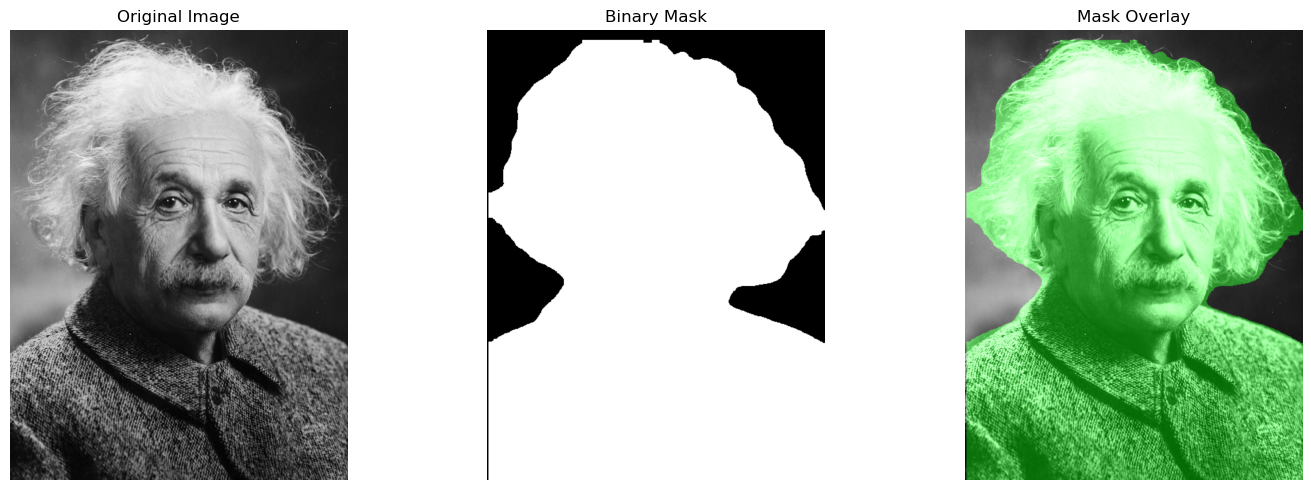
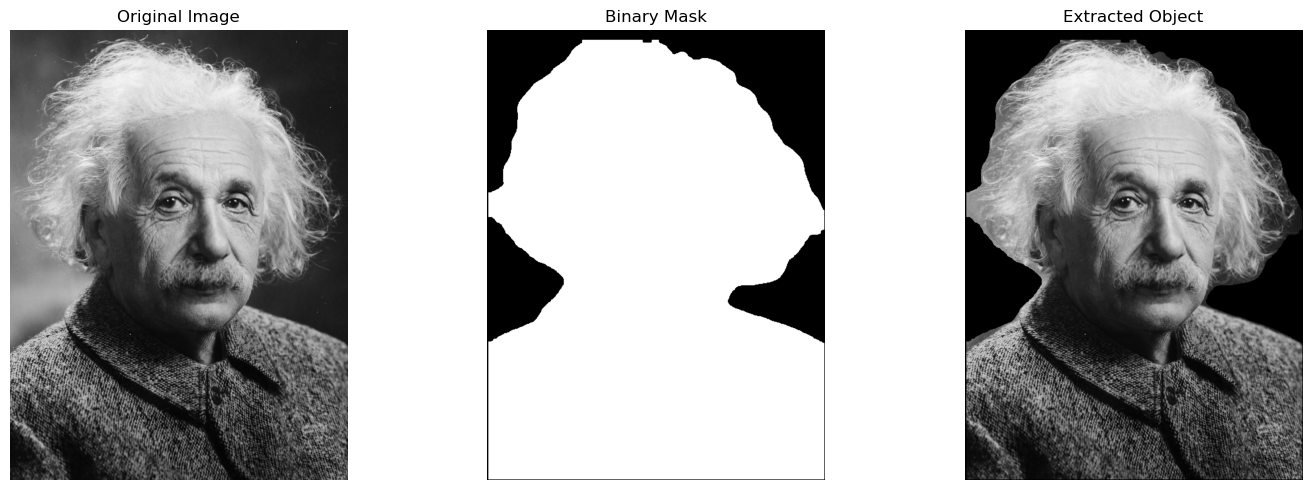
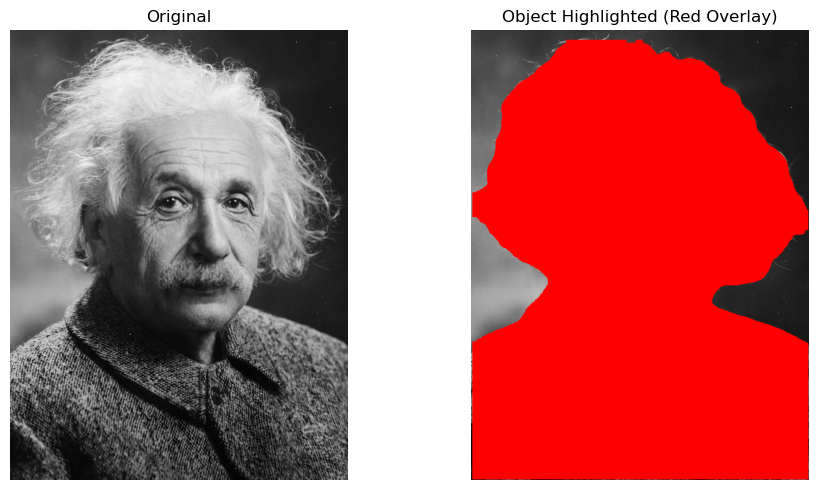
A binary mask is a 2D array where pixels are either True (object) or False (background). We can use masks to:
Extract only the object (remove background)
Blur or pixelate specific regions
Anonymize faces or people for privacy
Replace backgrounds in images
Let’s create a helper function to extract boolean masks from YOLO segmentation results.
from ultralytics.engine.results import Results

def extract_segmentation_mask(detection_result: Results, object_index: int = 0) -> np.ndarray:
    """
    Extract a boolean mask for one detected instance from YOLO segmentation results.

    Args:
        detection_result: YOLO Results object containing segmentation data
        object_index: Index of the object to extract (0 for first detection)

    Returns:
        Binary mask as a boolean NumPy array (True for object pixels, False for background)
    """
    # Verify the inputs
    if detection_result.masks is None:
        raise ValueError("No segmentation masks found in detection results")

    if object_index >= len(detection_result.masks.xy):
        raise IndexError(f"Object index {object_index} is out of range. "
                         f"Only {len(detection_result.masks.xy)} objects detected.")

    # Get original image dimensions
    height, width = detection_result.orig_img.shape[:2]

    # Create an empty mask with the original image dimensions
    mask = np.zeros((height, width), dtype=np.uint8)

    # Get the contour points from the detection result
    # This can be either a single polygon (2D array) or a list of polygons
    polygon_data = detection_result.masks.xy[object_index]

    # Handle both cases: single polygon or list of polygons
    if isinstance(polygon_data, np.ndarray) and polygon_data.ndim == 2:
        # Single polygon: shape (N, 2)
        contours = [polygon_data.astype(np.int32).reshape(-1, 1, 2)]
    elif isinstance(polygon_data, list):
        # List of polygons
        contours = [p.astype(np.int32).reshape(-1, 1, 2) for p in polygon_data]
    else:
        # Fallback: treat as single polygon
        contours = [np.array(polygon_data).astype(np.int32).reshape(-1, 1, 2)]

    # Fill all polygons into the mask
    cv2.fillPoly(mask, contours, 255)

    # Convert to boolean mask
    binary_mask = mask.astype(bool)

    return binary_mask
# Demonstrate extracting and visualizing a mask
# Use Einstein image for a clearer example
einstein_path = "yolo_einstein_head.jpg"
einstein_bgr = load_image_from_url(einstein_path)
einstein_rgb = cv2.cvtColor(einstein_bgr, cv2.COLOR_BGR2RGB)

results = seg_model(einstein_bgr)
result = results[0]

if result.masks is not None and len(result.masks) > 0:
    # Get the first detected mask
    mask_data = result.masks[0].data.cpu().numpy()  # Shape: (1, H, W) at model resolution
    mask = mask_data.squeeze()  # Remove batch dimension → (H, W)

    # Resize mask to match original image dimensions
    h, w = einstein_rgb.shape[:2]
    mask_resized = cv2.resize(mask, (w, h), interpolation=cv2.INTER_NEAREST)

    # Convert to binary mask (0 or 255)
    binary_mask = (mask_resized > 0.5).astype(np.uint8) * 255

    # Create a colorized mask overlay
    colored_mask = np.zeros_like(einstein_rgb)
    colored_mask[binary_mask > 0] = [0, 255, 0]  # Green overlay

    # Blend mask with original image
    alpha = 0.4
    overlaid = cv2.addWeighted(einstein_rgb, 1, colored_mask, alpha, 0)

    # Visualize
    fig, axes = plt.subplots(1, 3, figsize=(15, 5))

    axes[0].imshow(einstein_rgb)
    axes[0].set_title("Original Image")
    axes[0].axis("off")

    axes[1].imshow(binary_mask, cmap='gray')
    axes[1].set_title("Binary Mask")
    axes[1].axis("off")

    axes[2].imshow(overlaid)
    axes[2].set_title("Mask Overlay")
    axes[2].axis("off")

    plt.tight_layout()
    plt.show()
else:
    print("No masks detected")
0: 640x480 1 person, 119.1ms
Speed: 2.1ms preprocess, 119.1ms inference, 1.3ms postprocess per image at shape (1, 3, 640, 480)
binary_mask
array([[  0,   0,   0, ...,   0,   0,   0],
       [  0,   0,   0, ...,   0,   0,   0],
       [  0,   0,   0, ...,   0,   0,   0],
       ...,
       [  0,   0,   0, ..., 255, 255, 255],
       [  0,   0,   0, ..., 255, 255, 255],
       [  0,   0,   0, ..., 255, 255, 255]], dtype=uint8)
# Extract and visualize the binary mask
if result.masks is not None and len(result.masks) > 0:
    # Extract mask for the first detected object
    binary_mask = extract_segmentation_mask(result, 0)

    # Visualize the mask
    fig, axes = plt.subplots(1, 3, figsize=(15, 5))

    # Original image
    axes[0].imshow(einstein_rgb)
    axes[0].set_title("Original Image")
    axes[0].axis("off")

    # Binary mask
    axes[1].imshow(binary_mask, cmap="gray")
    axes[1].set_title("Binary Mask")
    axes[1].axis("off")

    # Masked image (object only)
    masked_img = einstein_rgb.copy()
    masked_img[~binary_mask] = 0  # Set background to black
    axes[2].imshow(masked_img)
    axes[2].set_title("Extracted Object")
    axes[2].axis("off")

    plt.tight_layout()
    plt.show()
else:
    print("No masks detected. Try with a different image or lower confidence threshold.")
# Demonstrate mask overlay: tint the detected object in red
if result.masks is not None and len(result.masks) > 0:
    overlay = einstein_rgb.copy()
    overlay[binary_mask] = [255, 0, 0]  # Set object pixels to red

    plt.figure(figsize=(10, 5))
    plt.subplot(1, 2, 1)
    plt.imshow(einstein_rgb)
    plt.title("Original")
    plt.axis("off")

    plt.subplot(1, 2, 2)
    plt.imshow(overlay)
    plt.title("Object Highlighted (Red Overlay)")
    plt.axis("off")

    plt.tight_layout()
    plt.show()
Exercise: Pixelate a Person Using a Segmentation Mask#
Detect a person, get their mask, and pixelate only that region.
Key API:
results[0].masks.data- binary masks (tensor)mask.cpu().numpy()- convert mask to numpyPixelate: resize down then up with
cv2.INTER_NEAREST
# Exercise: Pixelate a person using a segmentation mask

# Load an image with people (beach scene or traffic)
image_path = "yolo_beach_scene.jpg"
img_bgr = load_image_from_url(image_path)
img_rgb = cv2.cvtColor(img_bgr, cv2.COLOR_BGR2RGB)

# TODO: Run segmentation on the image
# Hint: Use seg_model(img_bgr) to get results (pass BGR image to model)
results = seg_model(img_bgr, conf=0.06, iou=0.5)

# TODO: Extract the first detected person
# Hint: Loop over results[0].boxes and results[0].masks
# Hint: Check if box.cls == class_id for "person" (use seg_model.names to find the ID)

# TODO: Create a pixelated version of the image
# Hint: Resize the image down (e.g., to 1/10 size) using cv2.resize()
# Hint: Then resize back up to original size with cv2.INTER_NEAREST interpolation

# TODO: Apply the mask to blend pixelated and original
# Hint: Use the binary mask to decide which pixels to keep from each image

# TODO: Visualize the result
# Hint: Display original, mask, and pixelated result side by side

annotated_bgr = results[0].plot()
# imshow
plt.figure(figsize=(12, 8))
plt.imshow(annotated_bgr[:, :, ::-1])  # Convert BGR to
plt.title("Instance Segmentation Result")
plt.axis("off")
plt.show()
0: 448x640 10 persons, 1 handbag, 6 kites, 97.7ms
Speed: 1.5ms preprocess, 97.7ms inference, 4.2ms postprocess per image at shape (1, 3, 448, 640)
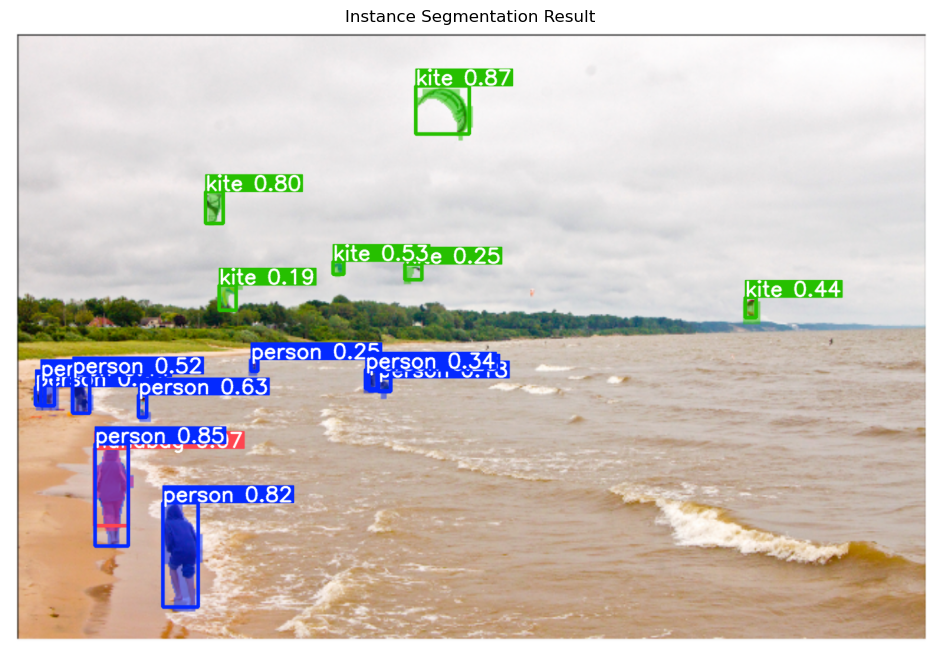
Use cases for mask-based pixelation:
Privacy protection: Anonymize faces or people in public datasets
Content moderation: Blur sensitive content automatically
Data compliance: Meet GDPR or other privacy regulations
Creative effects: Highlight subjects by blurring backgrounds
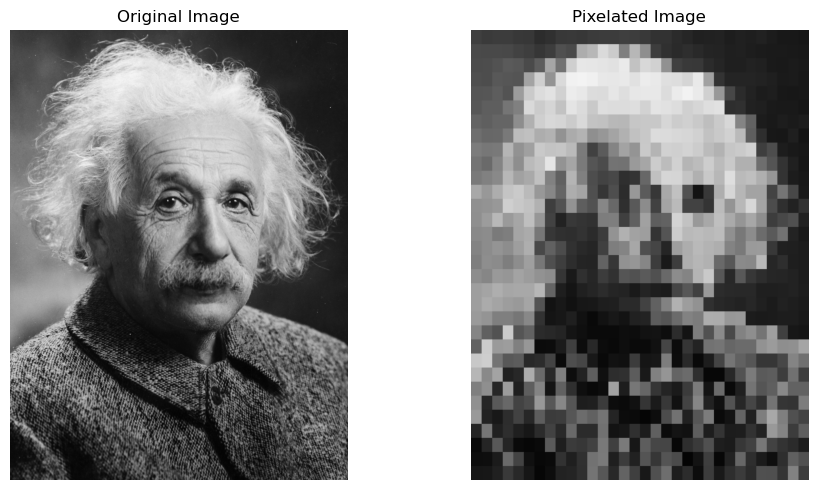
def pixelate(image, blocks=16):
    """
    Pixelate an image by downsampling and upsampling.

    Args:
        image: Input image (numpy array)
        blocks: Number of blocks for downsampling (lower = more pixelated)

    Returns:
        Pixelated image with same dimensions as input
    """
    h, w = image.shape[:2]

    # Downsample to small size
    temp = cv2.resize(image, (blocks, blocks), interpolation=cv2.INTER_LINEAR)

    # Upsample back to original size with nearest neighbor (blocky look)
    return cv2.resize(temp, (w, h), interpolation=cv2.INTER_NEAREST)
## Add a pixelation example here
sample_image = load_image_from_url("yolo_einstein_head.jpg")
pixelated_image = pixelate(sample_image, blocks=32)
plt.figure(figsize=(10, 5))
plt.subplot(1, 2, 1)
plt.imshow(cv2.cvtColor(sample_image, cv2.COLOR_BGR2RGB))
plt.title("Original Image")
plt.axis("off")
plt.subplot(1, 2, 2)
plt.imshow(cv2.cvtColor(pixelated_image, cv2.COLOR_BGR2RGB))
plt.title("Pixelated Image")
plt.axis("off")
plt.tight_layout()
plt.show()
Optional Exercise: Real-time Person Pixelation with Webcam#
This exercise creates a webcam application that automatically detects and pixelates all people in the frame while keeping the rest of the image clear. This is a practical privacy filter.
Note: This exercise requires webcam access and works best in a local environment. It may not work in hosted notebooks like Google Colab.
Key concepts:
Real-time segmentation with YOLO
Combining masks for multiple detected people
Applying pixelation only to masked regions
Creating GIF animations from processed frames
# Optional Exercise: Real-time Person Pixelation with Webcam
# This code requires webcam access - uncomment to run locally

from PIL import Image
from IPython.display import Image as IPyImage
import time

# Parameters
NUM_FRAMES = 100  # Number of frames to capture
PIXELATION_BLOCKS = 10  # Lower = more pixelated

def run_webcam_pixelation(model=seg_model):
    """
    Capture webcam frames and pixelate detected people.
    Press 'q' to quit early.
    """
    # TODO: Load the YOLO segmentation model
    # Hint: Use YOLO("yolo11n-seg.pt") for fast inference
    # model = ...

    # TODO: Find the class ID for "person" in model.names
    # Hint: Loop through model.names.items() to find the ID where value == "person"
    # person_class_id = ...

    # Initialize webcam
    cap = cv2.VideoCapture(0)
    time.sleep(1)  # Let camera autofocus

    processed_imgs = []

    print(f"Processing {NUM_FRAMES} frames... Press 'q' to quit early.")

    for i in range(NUM_FRAMES):
        ret, frame = cap.read()
        if not ret:
            break

        # Make a copy for visualization
        display_frame = frame.copy()

        # TODO: Run segmentation on the frame
        # Hint: Pass the BGR frame directly to the model
        results = model(frame, verbose=False)
        result = results[0]

        # Create pixelated version of the entire frame
        pixelated_frame = pixelate(frame, blocks=PIXELATION_BLOCKS)

        # TODO: Check if any masks were detected
        if result.masks is not None and len(result.boxes) > 0:
        # Create a combined mask for all people
            h, w = frame.shape[:2]
            people_mask = np.zeros((h, w), dtype=bool)
        # TODO: Loop over detected objects and combine person masks
        for idx, box in enumerate(result.boxes):
            # Check if this detection is a person
            # Hint: Compare int(box.cls) with person_class_id
            if int(box.cls) == person_class_id:
                # Extract mask for this person
                # Hint: Use extract_segmentation_mask(result, idx)
                current_mask = extract_segmentation_mask(result, idx)

                # Combine with overall people mask using OR
                # Hint: people_mask = people_mask | current_mask
                people_mask = people_mask | current_mask

        # TODO: Apply pixelation only to people areas
        # Hint: display_frame[people_mask] = pixelated_frame[people_mask]
        display_frame[people_mask] = pixelated_frame[people_mask]

        # Add text overlay
        cv2.putText(display_frame, f"Frame {i+1}/{NUM_FRAMES}", (10, 30),
                    cv2.FONT_HERSHEY_SIMPLEX, 0.7, (0, 255, 0), 2)

        # Display the frame
        cv2.imshow("Privacy Filter - Person Pixelation", display_frame)

        # Convert to RGB and save for GIF
        display_rgb = cv2.cvtColor(display_frame, cv2.COLOR_BGR2RGB)
        img = Image.fromarray(np.uint8(display_rgb))
        processed_imgs.append(img)

        # Exit if 'q' is pressed
        if cv2.waitKey(1) & 0xFF == ord('q'):
            break

    # Release resources
    cap.release()
    cv2.destroyAllWindows()

    return processed_imgs

# Uncomment to run the webcam pixelation
# processed_imgs = run_webcam_pixelation()

# TODO: Save processed frames as a GIF
# if processed_imgs:
#     processed_imgs[0].save(
#         'webcam_pixelated_people.gif',
#         format='GIF',
#         append_images=processed_imgs[1:],
#         save_all=True,
#         duration=100,
#         loop=0
#     )
#     print("Saved: webcam_pixelated_people.gif")

print("Webcam pixelation code ready. Uncomment the function call to run.")
Webcam pixelation code ready. Uncomment the function call to run.
What Is Pose Estimation?#
Pose estimation detects human figures and identifies key body points (keypoints). These keypoints typically include:
Face: Nose, eyes, ears
Upper body: Shoulders, elbows, wrists
Lower body: Hips, knees, ankles
What the Model Outputs#
For each detected person:
Bounding box: Location of the person
Keypoints: (x, y) coordinates for each body point
Confidence: How certain the model is about each keypoint
Applications#
Fitness tracking: Analyze exercise form
Sports analytics: Track athlete movements
Human-computer interaction: Gesture recognition
Animation: Motion capture for games and movies
Surveillance: Detect abnormal behavior
Pose Estimation with YOLO11#
Let’s load a pose estimation model and run it on yoga images.
# Load YOLO11 pose estimation model
pose_model = YOLO("yolo11n-pose.pt")

print(f"Pose model loaded: {pose_model.model_name}")
Pose model loaded: yolo11n-pose.pt
result
ultralytics.engine.results.Results object with attributes:

boxes: ultralytics.engine.results.Boxes object
keypoints: None
masks: ultralytics.engine.results.Masks object
names: {0: 'person', 1: 'bicycle', 2: 'car', 3: 'motorcycle', 4: 'airplane', 5: 'bus', 6: 'train', 7: 'truck', 8: 'boat', 9: 'traffic light', 10: 'fire hydrant', 11: 'stop sign', 12: 'parking meter', 13: 'bench', 14: 'bird', 15: 'cat', 16: 'dog', 17: 'horse', 18: 'sheep', 19: 'cow', 20: 'elephant', 21: 'bear', 22: 'zebra', 23: 'giraffe', 24: 'backpack', 25: 'umbrella', 26: 'handbag', 27: 'tie', 28: 'suitcase', 29: 'frisbee', 30: 'skis', 31: 'snowboard', 32: 'sports ball', 33: 'kite', 34: 'baseball bat', 35: 'baseball glove', 36: 'skateboard', 37: 'surfboard', 38: 'tennis racket', 39: 'bottle', 40: 'wine glass', 41: 'cup', 42: 'fork', 43: 'knife', 44: 'spoon', 45: 'bowl', 46: 'banana', 47: 'apple', 48: 'sandwich', 49: 'orange', 50: 'broccoli', 51: 'carrot', 52: 'hot dog', 53: 'pizza', 54: 'donut', 55: 'cake', 56: 'chair', 57: 'couch', 58: 'potted plant', 59: 'bed', 60: 'dining table', 61: 'toilet', 62: 'tv', 63: 'laptop', 64: 'mouse', 65: 'remote', 66: 'keyboard', 67: 'cell phone', 68: 'microwave', 69: 'oven', 70: 'toaster', 71: 'sink', 72: 'refrigerator', 73: 'book', 74: 'clock', 75: 'vase', 76: 'scissors', 77: 'teddy bear', 78: 'hair drier', 79: 'toothbrush'}
obb: None
orig_img: array([[[64, 64, 64],
        [62, 62, 62],
        [59, 59, 59],
        ...,
        [28, 28, 28],
        [25, 25, 25],
        [25, 25, 25]],

       [[59, 59, 59],
        [62, 62, 62],
        [63, 63, 63],
        ...,
        [25, 25, 25],
        [26, 26, 26],
        [26, 26, 26]],

       [[58, 58, 58],
        [62, 62, 62],
        [66, 66, 66],
        ...,
        [24, 24, 24],
        [27, 27, 27],
        [27, 27, 27]],

       ...,

       [[17, 17, 17],
        [18, 18, 18],
        [19, 19, 19],
        ...,
        [64, 64, 64],
        [68, 68, 68],
        [76, 76, 76]],

       [[17, 17, 17],
        [19, 19, 19],
        [19, 19, 19],
        ...,
        [70, 70, 70],
        [77, 77, 77],
        [85, 85, 85]],

       [[17, 17, 17],
        [19, 19, 19],
        [20, 20, 20],
        ...,
        [76, 76, 76],
        [85, 85, 85],
        [93, 93, 93]]], dtype=uint8)
orig_shape: (4333, 3250)
path: 'image0.jpg'
probs: None
save_dir: 'runs/segment/predict'
speed: {'preprocess': 1.6774579999037087, 'inference': 107.10237501189113, 'postprocess': 1.063458010321483}
# Run pose estimation on yoga images
yoga_images = [
    "yolo_yoga_1.jpg",
    "yolo_yoga_2.jpg",
]

for filename in yoga_images:
    img_bgr = load_image_from_url(filename)
    img_rgb = cv2.cvtColor(img_bgr, cv2.COLOR_BGR2RGB)

    results = pose_model(img_bgr)
    result = results[0]

    # Plot annotated result with skeleton
    annotated = result.plot()

    plt.figure(figsize=(10, 8))
    plt.imshow(annotated[:, :, ::-1])
    plt.title(f"{filename} - Pose Estimation")
    plt.axis("off")
    plt.show()

    # Print keypoint info
    if result.keypoints is not None:
        print(f"{filename}: Detected {len(result.keypoints)} person(s)")
    else:
        print(f"{filename}: No keypoints detected")
0: 640x416 1 person, 86.7ms
Speed: 2.7ms preprocess, 86.7ms inference, 0.7ms postprocess per image at shape (1, 3, 640, 416)
yolo_yoga_1.jpg: Detected 1 person(s)

0: 448x640 6 persons, 87.4ms
Speed: 2.0ms preprocess, 87.4ms inference, 0.4ms postprocess per image at shape (1, 3, 448, 640)
yolo_yoga_2.jpg: Detected 6 person(s)
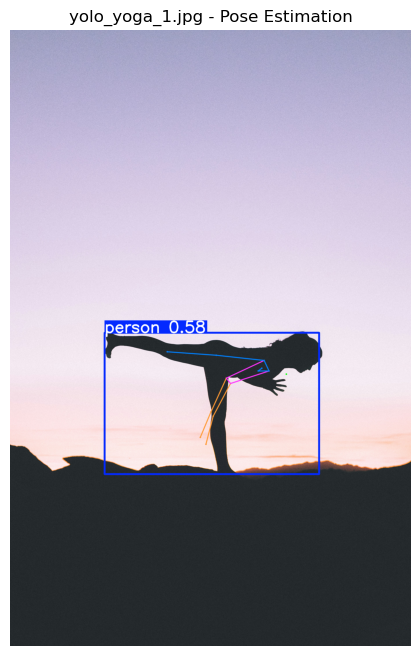
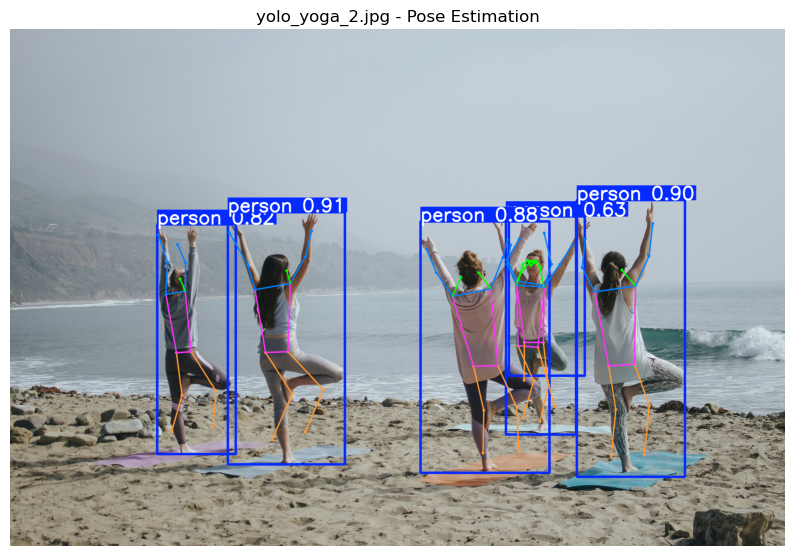
What we see:
Keypoints drawn as circles on body joints
Lines (skeleton) connecting related keypoints
Different colors for different body parts
Bounding boxes around detected people
# Inspect the keypoints structure
if result.keypoints is not None:
    print("Keypoints data structure:")
    print(f"  Shape: {result.keypoints.data.shape}")
    print(f"  Interpretation: (num_people, num_keypoints, coordinates)")
    print(f"  Coordinates: [x, y, confidence] for each keypoint")

    if result.keypoints.conf is not None:
        print(f"\nKeypoint confidences shape: {result.keypoints.conf.shape}")
        print(f"  Interpretation: (num_people, num_keypoints)")

        # Show confidence for first person
        if len(result.keypoints.conf) > 0:
            first_person_conf = result.keypoints.conf[0].cpu().numpy()
            print(f"\nFirst person keypoint confidences:")
            print(f"  Mean: {np.mean(first_person_conf):.3f}")
            print(f"  Min: {np.min(first_person_conf):.3f}")
            print(f"  Max: {np.max(first_person_conf):.3f}")
else:
    print("No keypoints detected.")
Keypoints data structure:
  Shape: torch.Size([6, 17, 3])
  Interpretation: (num_people, num_keypoints, coordinates)
  Coordinates: [x, y, confidence] for each keypoint

Keypoint confidences shape: torch.Size([6, 17])
  Interpretation: (num_people, num_keypoints)

First person keypoint confidences:
  Mean: 0.771
  Min: 0.017
  Max: 1.000
Exercise: Explore Keypoints on Yoga Images#
Analyze keypoint detection confidence across detected people.
Key API:
results[0].keypoints.conf- confidence per keypointresults[0].keypoints.xy- keypoint coordinatesLow confidence threshold:
< 0.5
# Exercise: Analyze keypoints on yoga images

def summarize_pose_results(result):
    """
    Print a short summary of pose estimation results:
    - Number of people detected
    - Average keypoint confidence
    - Which keypoints have low confidence
    """
    # TODO: Count people
    # Hint: len(result.keypoints) gives number of detected people

    # TODO: For each person, calculate average keypoint confidence
    # Hint: result.keypoints.conf gives confidence values
    # Hint: Average over the last dimension (keypoints)

    # TODO: Find keypoints with low confidence (< 0.5)
    # Hint: Use result.keypoints.conf and compare to threshold
    # Hint: Print which keypoint indices have low confidence

    pass  # Remove this when you complete the TODO

# TODO: Load yoga images and run pose estimation
# Hint: Use load_image_from_url() to load each image (returns BGR)
# Hint: Run pose_model(img_bgr) to get results (pass BGR image to model)
# Hint: Call summarize_pose_results(results[0]) for each image
Recap#
Key Takeaways#
Instance Segmentation provides pixel-level masks for each object, not just bounding boxes
Binary masks (0/1 arrays) can be used to isolate objects, blur regions, or anonymize content
Pose Estimation detects human keypoints (joints) and their connections (skeleton)
Keypoint confidence tells us how certain the model is about each body joint
Ultralytics API is consistent:
YOLO("yolo11n-seg.pt")for segmentation,YOLO("yolo11n-pose.pt")for poseApplications: Privacy protection, content moderation, fitness tracking, sports analytics, motion capture