
01 - Computer Vision Applications#
Computer Vision is the area of AI that teaches computers to interpret and understand images and videos.
To understand why Computer Vision is so important today, let’s look at how much visual content we generate every day:
Explosion of Visual Content Online#
YouTube: ~500 hours of video uploaded every minute (≈ 720,000 hours per day), with 2.53 billion monthly users watching over 1 billion hours of video daily.
TikTok: 1.59 billion monthly active users spending an average of 95 minutes per day.
Instagram: 2 billion monthly users with 500 million accounts posting Stories daily.
WeChat/Weixin (微信): 1.41 billion monthly users, with 68 million videos uploaded daily and 45 billion messages exchanged daily.
Photo and Image Statistics#
2.1 trillion photos taken in 2025 — that’s 5.3 billion photos per day or ~61,400 photos every second.
14.3 trillion photos exist globally.
94% of all photos are now taken on smartphones.
14 billion images shared daily across social media platforms, with WhatsApp alone handling ~6.9 billion images per day.
All this visual content is far beyond what humans can manually watch, inspect, or moderate. Cameras are embedded into phones, laptops, cars, drones, factories, and hospitals. Computer Vision provides the tools and models that can automatically process, filter, and understand this ocean of visual data.
Contents#
-
2.1 Image Classification and Localization
2.2 Object Detection
2.3 Relationship Detection
2.4 Pose Estimation
2.5 Object Tracking
2.6 Image Segmentation
2.7 3D Reconstruction
2.8 Super Resolution
2.9 Image Generation and Captioning
3. Real-World Applications by Domain
3.1 Healthcare
3.2 Autonomous Driving & Mobility
3.3 Retail, E-commerce & Marketing
3.4 Security & Surveillance
3.5 Human–Computer Interaction & AR
1. Why Computer Vision Matters Today#
Computer Vision focuses on building artificial systems that can perceive and reason about visual data: images and videos. It connects low-level pixels to high-level concepts such as objects, scenes, actions, and events.
Because visual data is everywhere, many modern systems now depend on Computer Vision:
Smartphones classify photos, unlock with your face, and filter content automatically.
Cars and traffic systems use cameras to detect pedestrians, vehicles, and road signs in real time.
Hospitals rely on imaging (X-ray, CT, MRI, dermatoscopy, microscopy) for diagnosis and treatment planning.
Retailers, warehouses, and factories use cameras for monitoring shelves, counting products, and checking quality.
The goal is not simply to replace humans, but to extend what people can do:
Automate repetitive visual inspections.
Flag interesting or risky events in huge video streams.
Provide second opinions or decision support in high-stakes domains.
Understanding the main tasks of Computer Vision, and where they are used, will help you quickly map real-world problems to concrete technical approaches.
2. Core Computer Vision Tasks#
In this section we look at the most common Computer Vision tasks, focusing on what they do and typical input/output formats, not on the underlying algorithms. Later, these tasks can be implemented using different model architectures and libraries.
Each task below includes:
A short description.
Typical input and output.
A few practical use cases.
An example image reference where appropriate.
2.1 Image Classification and Localization#
What it does
Image classification: assign one or more labels to an image (e.g. cat, tumor present, cracked surface).
Localization: predict a bounding box for the main object in addition to the label.
Input / Output
Input: a single image.
Output: one label (or a small set of labels), optionally with one bounding box.
Examples
Classifying whether a medical scan shows signs of a particular condition.
Detecting whether a product image shows shoes vs bags and drawing a box around the main product.
Flagging whether a photo is “safe for work” or should be filtered.
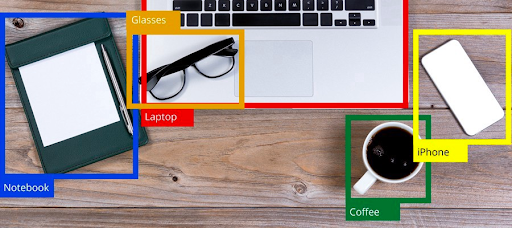
Multiple objects on a desk are classified and localized with bounding boxes.
2.2 Object Detection#
What it does
Object detection generalizes localization to multiple objects. The model predicts a set of bounding boxes, each with a class label and a confidence score.
Input / Output
Input: an image or video frame.
Output: a list of detections
(class, bounding box, confidence).
Examples
Detecting cars, cyclists, pedestrians, and traffic lights in a driving scene.
Automatically counting products on a supermarket shelf.
Detecting helmets, vests, or other safety equipment on workers.
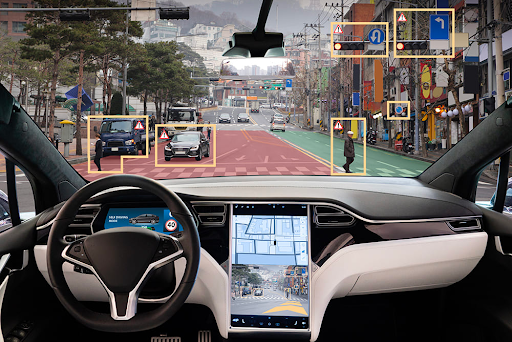
Bounding boxes highlight vehicles, pedestrians and traffic lights in a driving scene.
2.3 Relationship Detection#
What it does
Relationship (or visual relationship) detection goes one step further: it not only detects objects, but also predicts structured relationships between them, such as “person-playing-guitar” or “dog-on-sofa”.
Input / Output
Input: an image.
Output: objects + relationships, often expressed as triplets
(subject, relation, object).
Examples
Understanding interactions in sports: “player-passing-ball-to-teammate”.
Analysing customer behavior in stores: “person-reaching-for-product-on-shelf”.
Rich scene descriptions for accessibility or video analytics.
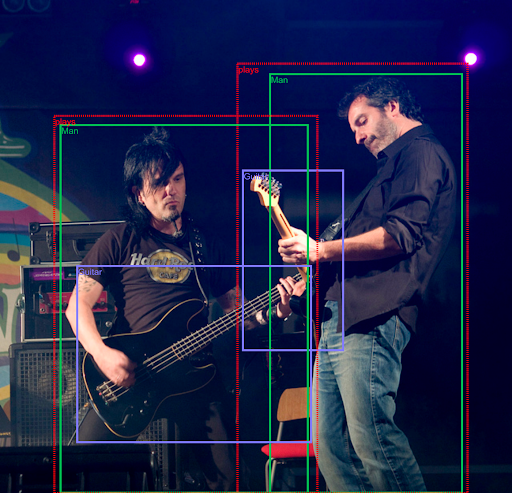
Bounding boxes and relational annotations capture interactions between people and objects.
2.4 Pose Estimation#
What it does
Pose estimation identifies the position of key points (joints or landmarks) on a body or object, such as shoulders, elbows, knees, or facial landmarks.
Input / Output
Input: image or video.
Output: a set of keypoints with coordinates and sometimes visibility scores.
Examples
Analysing the technique of cyclists, runners, or football players in sports performance tools.
Monitoring patient posture and movement in rehabilitation.
Powering AR filters and avatars that mimic a user’s body pose.
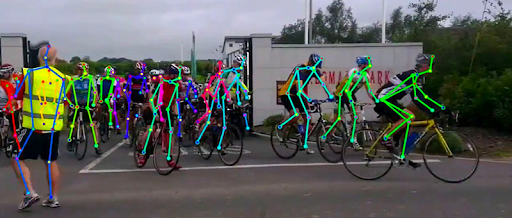
Each person is represented by a skeleton of keypoints overlaid on the image.
2.5 Object Tracking#
What it does
Object tracking keeps a consistent identity for detected objects over time in a video. It connects detections frame by frame and assigns IDs.
Input / Output
Input: video stream or sequence of frames.
Output: trajectories for each object: bounding boxes + IDs over time.
Examples
Counting people entering and exiting a metro station.
Tracking athletes in a race to compute speed and split times.
Following vehicles at a junction to analyse traffic flows.
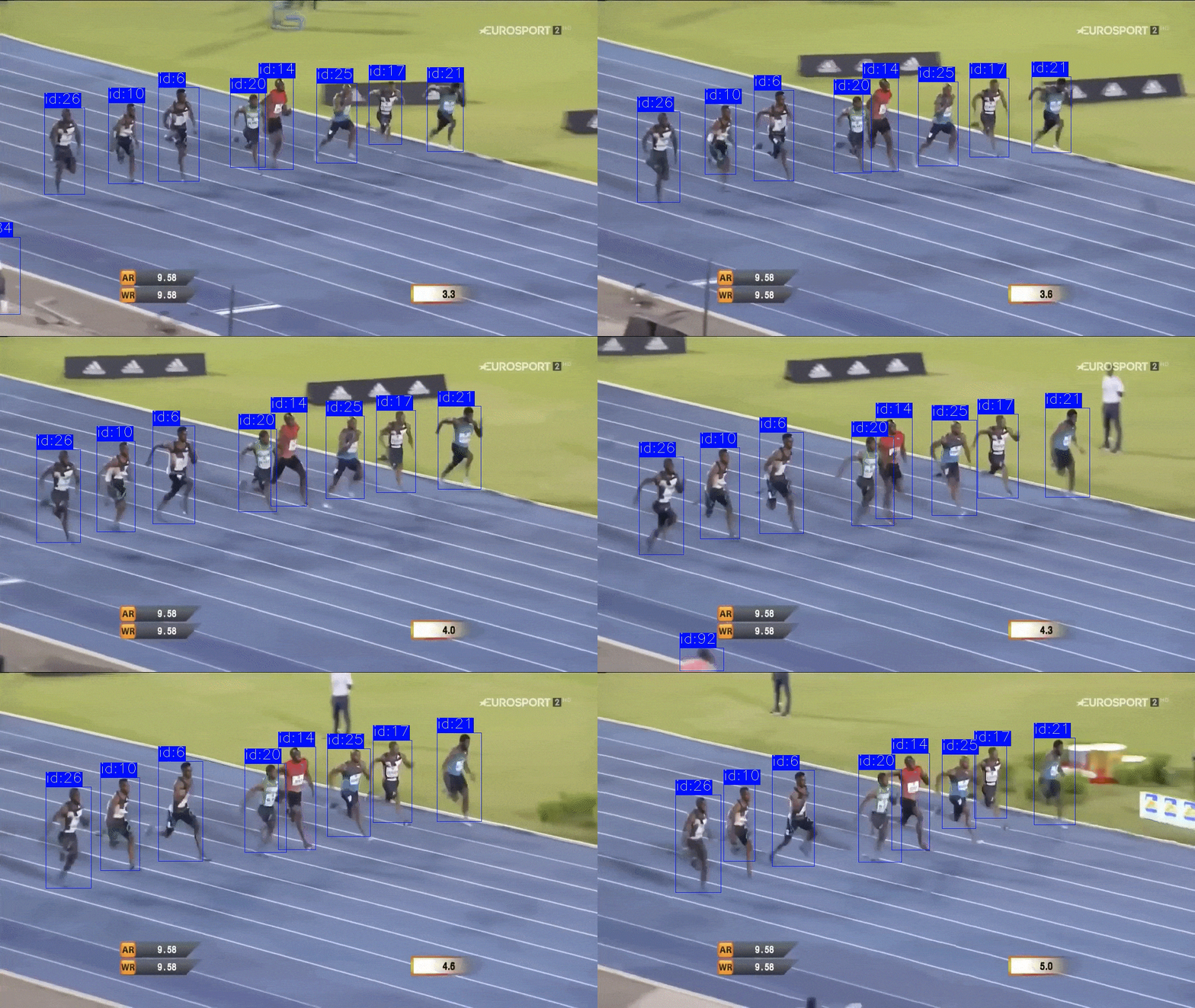
Each runner keeps a stable ID as they move across frames.
2.6 Image Segmentation#
What it does
Segmentation assigns a label to each pixel of the image:
Semantic segmentation: classify each pixel into a category (road, building, car, sky…).
Instance segmentation: separate different instances of the same class (car #1, car #2…).
Input / Output
Input: image.
Output: a label mask (or multiple masks) with the same spatial size as the image.
Examples
Medical image segmentation of organs and tumors in MRI or CT scans.
Separating foreground objects from the background for photo editing.
Understanding drivable area vs. obstacles in autonomous driving.
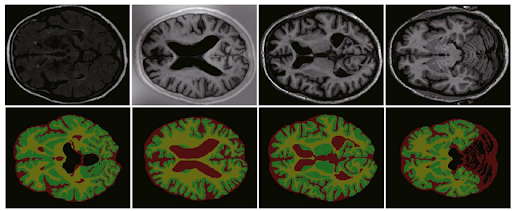
Different regions in the brain are assigned different labels, allowing detailed analysis of structures and lesions.
2.7 3D Reconstruction#
What it does
3D reconstruction builds a three-dimensional model of a scene or object from multiple 2D images or video. This process captures the geometry and structure of the scene, allowing it to be viewed from different angles or measured in 3D space.
Input / Output
Input: multiple 2D images or video of the same scene from different viewpoints.
Output: a 3D model (point cloud, mesh, or volumetric representation).
Techniques
Structure-from-motion (SfM) to estimate camera positions and 3D points.
Multi-view stereo (MVS) for dense 3D reconstruction.
Neural rendering methods like NeRF (Neural Radiance Fields) for photorealistic 3D scenes.
Examples
Creating 3D models of buildings or archaeological sites from drone footage.
Reconstructing crime scenes or accident sites for forensic analysis.
Building virtual replicas of real-world environments for AR/VR applications.
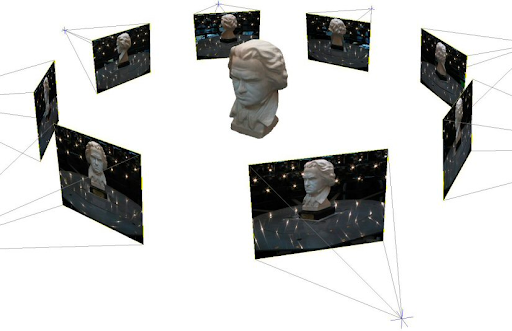
Images from multiple viewpoints are combined into a 3D model.
2.8 Super Resolution#
What it does
Super resolution enhances the resolution or quality of an image, recovering fine details that were lost due to low resolution, compression, or noise. Modern deep learning approaches can intelligently “fill in” missing details in a realistic way.
Input / Output
Input: one or more low-resolution images.
Output: a higher-resolution image with enhanced details.
Techniques
Single-image super resolution (SISR) using convolutional neural networks.
Multi-frame super resolution that combines information from multiple images.
Generative models that can hallucinate plausible high-frequency details.
Examples
Improving satellite or aerial images to see small objects more clearly.
Enhancing medical scans taken with lower dose or older hardware.
Upscaling old photographs or videos for modern high-resolution displays.
Zooming into specific regions of surveillance footage to identify details.
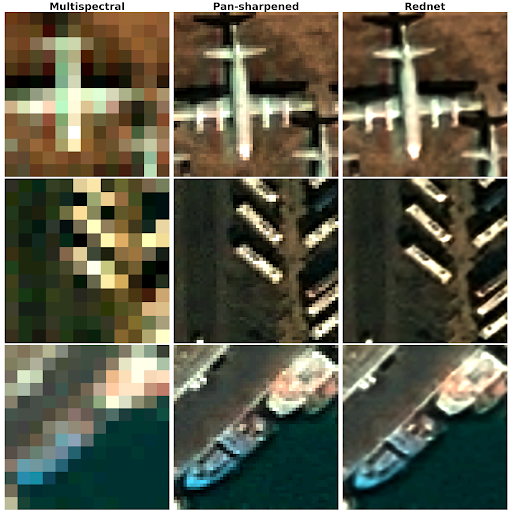
Super resolution can enhance details in low-resolution images, such as text and small objects in a street scene.
2.9 Image Generation and Captioning#
Image captioning and annotation#
Given an image, Computer Vision systems can automatically generate natural language descriptions (captions) and structured labels. For example, an image of a breakfast table might be described as “a dining table with breakfast items and a cup of coffee”.
Modern multimodal models that jointly process images and text have made this task more powerful and accurate. These systems can produce detailed descriptions that capture objects, actions, spatial relationships, and even abstract concepts.
Typical applications:
Automatically generating alt-text descriptions for images to improve web accessibility for visually impaired users.
Indexing large image collections (photo libraries, archives) to enable text-based search.
Summarising video content by generating captions for key frames.
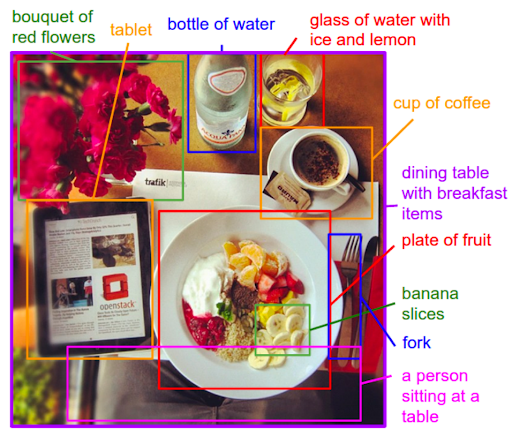
An image is annotated with objects and textual descriptions, enabling rich search and captioning.
Image search and similarity#
Image search systems retrieve images that are visually or semantically similar to a query. The query can be:
Another image (visual similarity): “find images that look like this”.
A text description (text-to-image search): “find me an image of a famous monument in India”.
Modern systems learn a shared embedding space where images and text descriptions are mapped to nearby points if they are semantically related. This enables powerful multimodal search across large collections.
Typical applications:
Searching large photo collections or stock image libraries by uploading an example image or typing a description.
E-commerce visual search: uploading a photo of a product to find similar items in a catalog.
Content moderation: finding visually similar images to detect duplicates or policy violations.
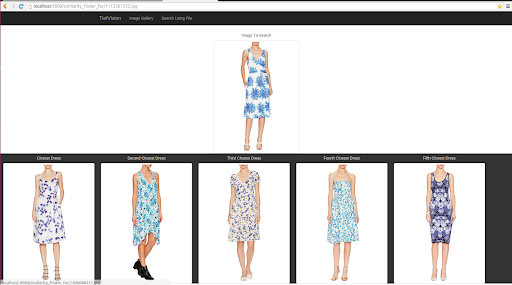
Given a query (image or text), the system retrieves visually or semantically similar images.
3. Real-World Applications by Domain#
Now we group these tasks into real application domains. In practice, most systems combine several tasks at once (for example, detection + tracking + segmentation).
3.1 Healthcare#
Medical imaging is one of the most impactful areas for Computer Vision. Clinicians have to interpret huge volumes of scans, often under time pressure.
Denoising and super resolution#
Low-dose imaging protocols reduce radiation exposure but often produce noisy or low-resolution scans. Denoising algorithms remove noise while preserving important diagnostic features. Super resolution methods enhance the spatial resolution, making it possible to see finer details without requiring a higher-dose scan.
Together, these techniques improve image quality and diagnostic confidence, especially when working with older equipment or when dose constraints are strict.
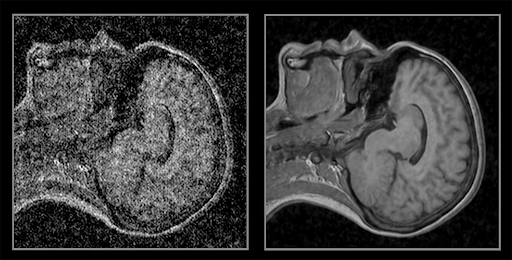
Denoising and super resolution can make low-dose or noisy scans clearer without repeating the acquisition.
These tools can support faster, more consistent diagnoses and help triage cases, while final responsibility and clinical judgment remain with medical professionals.
3.2 Autonomous Driving & Mobility#
Self-driving vehicles are a clear example of real-time Computer Vision in action.
Typical applications
Object detection of cars, trucks, bicycles, pedestrians, and animals.
Traffic sign and traffic light recognition for obeying rules and signals.
Lane detection and road segmentation to understand drivable space.
Tracking of nearby agents over time to predict collisions or risky interactions.
Similar techniques are used in drones, delivery robots, and advanced driver-assistance systems (ADAS).
3.3 Retail, E-commerce & Marketing#
Retailers and e-commerce platforms use vision models to understand products, customer behavior, and creative assets.
Typical applications
Visual search: upload a photo of a dress or pair of shoes and find similar products in the catalog.
Shelf monitoring: detection of products on shelves to track stock levels and planograms.
Personalized recommendations based on visual similarity (style, color, patterns).
Brand logo detection in social media images and videos to estimate brand visibility and share-of-voice.
Creative performance prediction: analysing ad images (layout, colors, objects, faces) to predict click-through rate or conversion and guide A/B testing.
These systems aim to increase conversion rates, reduce manual work, and provide better shopping and advertising experiences.
3.4 Security & Surveillance#
Security cameras generate huge amounts of video that cannot be monitored manually.
Typical applications
Object detection and tracking of people and vehicles in CCTV footage.
Counting and crowd analytics (e.g. occupancy limits, queue lengths).
Anomaly detection: spotting unusual events such as people entering restricted areas or abandoned objects.
Image enhancement with denoising and super-resolution to make low-light footage more usable.
Ethical and legal constraints (privacy, bias, proportionality) are particularly important in this domain.
3.5 Human–Computer Interaction & AR#
Computer Vision enables more natural ways to interact with machines and digital environments.
Typical applications
Gesture recognition: interpreting hand gestures (e.g. fist, open hand, pointing) to control interfaces or smart devices.
Body and face pose estimation for gaming, fitness apps, and motion capture.
3D reconstruction to build accurate AR/VR scenes from the real world.
Eye and head tracking for VR headsets and assistive technologies.
These systems bridge the gap between the physical and digital worlds, making interactions feel more intuitive.