
08 - Introduction to Ultralytics YOLO#
Ultralytics provides state-of-the-art object detection models through the YOLO (You Only Look Once) family. YOLO models are known for their speed and accuracy, making them suitable for real-time object detection tasks in applications like autonomous driving, surveillance, retail, and robotics.
In this notebook we take a high-level look at the Ultralytics ecosystem and run our first detections with modern YOLO models. We use YOLO11 as our primary example, but the concepts apply to the broader YOLO family.
Note: Ultralytics YOLO is a family of models (YOLOv3–YOLO11 and beyond). In this course we use YOLO11 models (e.g.,
yolo11n.pt) as a concrete example.
Table of Contents#
Setup and Imports#
First, let’s set up the environment and import the necessary libraries.
# Optional: install Ultralytics and OpenCV in fresh environments (e.g. Colab)
# %pip install ultralytics opencv-python torch
import os
import cv2
import numpy as np
import matplotlib.pyplot as plt
from ultralytics import YOLO
import time
import requests

%matplotlib inline

# Base URL for images hosted on GitHub
BASE_URL = "https://raw.githubusercontent.com/ezponda/ai-application-course-materials/main/images/"

def load_image_from_url(filename, flags=cv2.IMREAD_COLOR):
    """Load an image from GitHub repository using OpenCV."""
    url = BASE_URL + filename
    response = requests.get(url)
    image_array = np.asarray(bytearray(response.content), dtype=np.uint8)
    return cv2.imdecode(image_array, flags)
Download Example Images#
This section downloads the example images used throughout the Ultralytics notebooks. Images are saved locally in ../images/ so they only need to be downloaded once.
import urllib.request
import ssl

def download_images(image_urls, target_dir="../images"):
    """
    Download images from URLs to a local directory.

    Args:
        image_urls: List of (url, filename) tuples
        target_dir: Target directory for saving images

    Returns:
        List of local file paths
    """
    os.makedirs(target_dir, exist_ok=True)

    # Set up opener with User-Agent to avoid 403 errors
    opener = urllib.request.build_opener()
    opener.addheaders = [('User-Agent', 'Mozilla/5.0 (Windows NT 10.0; Win64; x64) AppleWebKit/537.36')]
    urllib.request.install_opener(opener)

    # Handle SSL certificate issues
    ssl._create_default_https_context = ssl._create_unverified_context

    downloaded_paths = []

    for url, filename in image_urls:
        file_path = os.path.join(target_dir, filename)

        if os.path.exists(file_path):
            size_mb = os.path.getsize(file_path) / (1024 * 1024)
            print(f"✓ {filename} already exists ({size_mb:.2f} MB)")
        else:
            try:
                print(f"Downloading {filename}...", end=" ")
                urllib.request.urlretrieve(url, file_path)
                size_mb = os.path.getsize(file_path) / (1024 * 1024)
                print(f"✓ ({size_mb:.2f} MB)")
            except Exception as e:
                print(f"✗ Failed: {e}")
                continue

        downloaded_paths.append(file_path)

    return downloaded_paths

# Define all example images for the Ultralytics notebooks
image_urls = [
    # Object detection examples
    ('https://akm-img-a-in.tosshub.com/indiatoday/images/story/201812/dogs_and_cats.jpeg?TAxD19DTCFE7WiSYLUdTu446cfW4AbuW&size=770:433', 'yolo_dog_cat.jpg'),
    ('https://i.ibb.co/R7pRTLy/beach-no-axis.png', 'yolo_beach_scene.jpg'),
    ('https://i.ibb.co/jL1kZRF/phones.png', 'yolo_phones_on_table.jpg'),
    ('https://i.ytimg.com/vi/1ZupwFOhjl4/maxresdefault.jpg', 'yolo_traffic.jpg'),
    # Segmentation example
    ('https://upload.wikimedia.org/wikipedia/commons/d/d3/Albert_Einstein_Head.jpg', 'yolo_einstein_head.jpg'),
    # Pose estimation examples
    ('https://images.unsplash.com/photo-1561049501-e1f96bdd98fd?q=80&w=2778&auto=format&fit=crop&ixlib=rb-4.0.3', 'yolo_yoga_1.jpg'),
    ('https://images.unsplash.com/photo-1545205597-3d9d02c29597?q=80&w=2940&auto=format&fit=crop&ixlib=rb-4.0.3', 'yolo_yoga_2.jpg'),
]

# Download all images
downloaded_paths = download_images(image_urls)
print(f"\nTotal images available: {len(downloaded_paths)}")
✓ yolo_dog_cat.jpg already exists (0.04 MB)
✓ yolo_beach_scene.jpg already exists (1.82 MB)
✓ yolo_phones_on_table.jpg already exists (1.61 MB)
✓ yolo_traffic.jpg already exists (0.17 MB)
✓ yolo_einstein_head.jpg already exists (2.20 MB)
✓ yolo_yoga_1.jpg already exists (2.02 MB)
✓ yolo_yoga_2.jpg already exists (0.76 MB)

Total images available: 7
Available Images#
Let’s verify that all images are available:
# List all downloaded YOLO images
image_dir = "../images"
yolo_images = sorted([f for f in os.listdir(image_dir) if f.startswith("yolo_")])

print("Available YOLO example images:")
print("-" * 45)
for img in yolo_images:
    img_path = os.path.join(image_dir, img)
    size_mb = os.path.getsize(img_path) / (1024 * 1024)
    print(f"  {img:<30} {size_mb:>6.2f} MB")
print("-" * 45)
print(f"Total: {len(yolo_images)} images")
Available YOLO example images:
---------------------------------------------
  yolo_beach_scene.jpg             1.82 MB
  yolo_dog_cat.jpg                 0.04 MB
  yolo_einstein_head.jpg           2.20 MB
  yolo_phones_on_table.jpg         1.61 MB
  yolo_traffic.jpg                 0.17 MB
  yolo_yoga_1.jpg                  2.02 MB
  yolo_yoga_2.jpg                  0.76 MB
---------------------------------------------
Total: 7 images
# Preview a few sample images
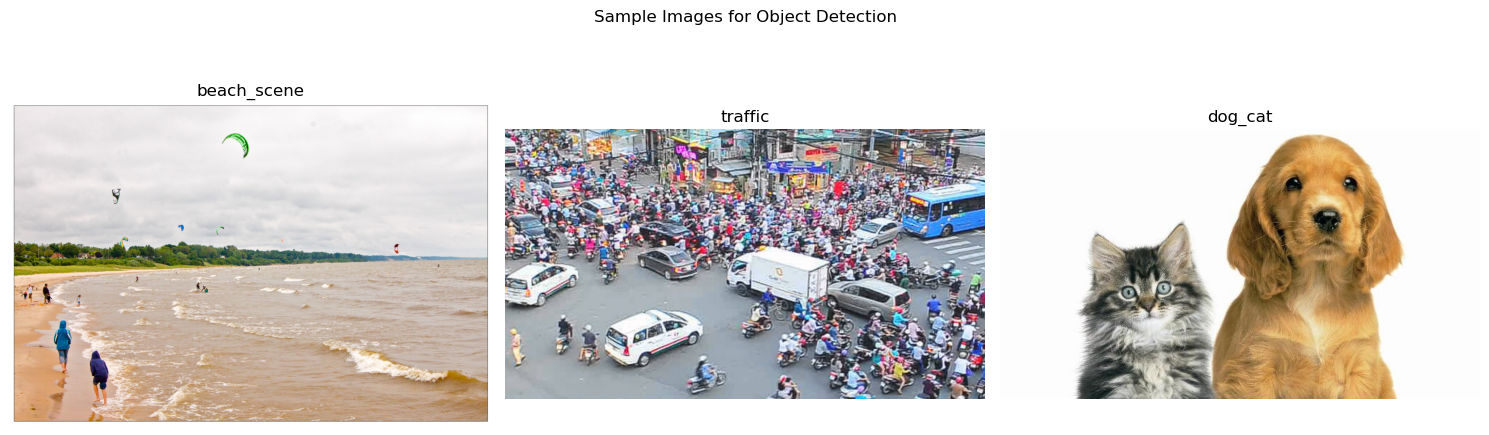
sample_images = ["yolo_beach_scene.jpg", "yolo_traffic.jpg", "yolo_dog_cat.jpg"]

fig, axes = plt.subplots(1, 3, figsize=(15, 5))

for i, img_name in enumerate(sample_images):
    ax = axes[i]
    img = load_image_from_url(img_name)
    img_rgb = cv2.cvtColor(img, cv2.COLOR_BGR2RGB)
    ax.imshow(img_rgb)
    ax.set_title(img_name.replace("yolo_", "").replace(".jpg", ""))
    ax.axis("off")

plt.suptitle("Sample Images for Object Detection", fontsize=12)
plt.tight_layout()
plt.show()
Evolution of the YOLO Family#
YOLO has evolved significantly since its introduction:
YOLOv1–YOLOv3 (2016–2018): Established real-time detection. YOLOv3 introduced multi-scale prediction.
YOLOv4 (2020): Improved training techniques (Bag of Specials/Freebies), better small object detection.
YOLOv5 (2020): First Ultralytics version, PyTorch-based, easy training and deployment.
YOLOv6–YOLOv7 (2022): Various improvements in architecture and efficiency.
YOLOv8 (2023): Ultralytics flagship, anchor-free detection, improved accuracy.
YOLOv9–YOLOv10 (2024): Further architectural improvements.
YOLO11 (2024): Current generation we use in this course.
Each version brings improvements in speed, accuracy, or ease of use. Ultralytics wraps these model families into a unified, user-friendly Python API that you will use throughout the rest of this course. This means you can switch between model versions or tasks (detection, segmentation, pose) with minimal code changes.
Ultralytics Framework Overview#
The Ultralytics framework provides a consistent API for working with YOLO models:
from ultralytics import YOLO

model = YOLO("model_file.pt")
results = model(source)
Supported Tasks#
The same API works for different computer vision tasks:
Object Detection: Locate and classify objects with bounding boxes
Instance Segmentation: Detect objects and their precise pixel masks
Image Classification: Classify entire images into categories
Pose Estimation: Detect human figures and key body points
Oriented Bounding Boxes (OBB): Rotated boxes for angled objects
Object Tracking: Track objects across video frames
Key Features#
Pre-trained models ready to use
Simple training and fine-tuning
Export to various formats (ONNX, TensorRT, CoreML, etc.)
Extensive documentation and community support
Loading a YOLO11 Detection Model#
Let’s load a YOLO11 detection model. Ultralytics provides different model sizes optimized for various use cases.
# Load YOLO11 nano model - fast and lightweight
model = YOLO("yolo11n.pt")

print(f"Model loaded: {model.model_name}")
Model loaded: yolo11n.pt
YOLO11 Model Variants#
YOLO11 comes in different sizes, each balancing speed and accuracy:
Model |
Size |
Speed |
Accuracy |
Best For |
|---|---|---|---|---|
|
Nano |
Fastest |
Good |
Edge devices, mobile, real-time apps |
|
Small |
Fast |
Better |
Balanced performance |
|
Medium |
Moderate |
High |
General-purpose detection |
|
Large |
Slower |
Higher |
Accuracy-focused applications |
|
Extra Large |
Slowest |
Highest |
Maximum accuracy, offline processing |
The trade-off is simple:
Smaller models → faster inference, lower accuracy, less memory
Larger models → slower inference, higher accuracy, more memory
First Detection on a Single Image#
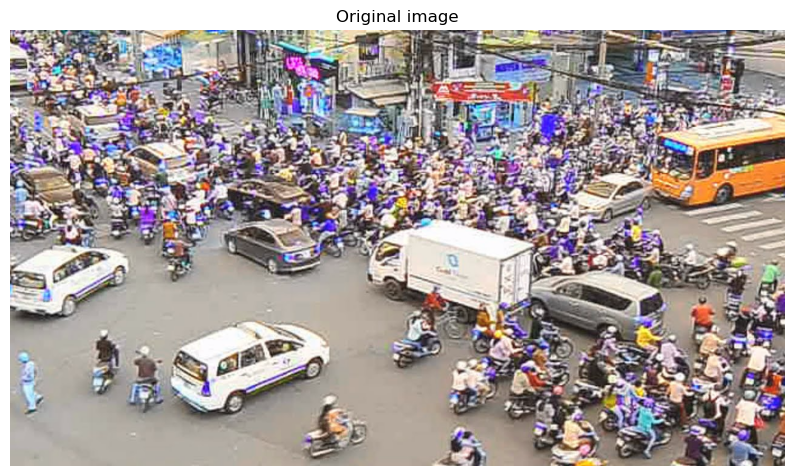
Let’s run our first object detection on a traffic scene image.
# Load image from GitHub
image_path = "yolo_traffic.jpg"

img_bgr = load_image_from_url(image_path)
img_rgb = cv2.cvtColor(img_bgr, cv2.COLOR_BGR2RGB)
# img_bgr = img_rgb[:, :, ::-1]
plt.figure(figsize=(10, 6))
plt.imshow(img_rgb)
plt.title("Original image")
plt.axis("off")
plt.show()
results[0].names
{0: 'person',
 1: 'bicycle',
 2: 'car',
 3: 'motorcycle',
 4: 'airplane',
 5: 'bus',
 6: 'train',
 7: 'truck',
 8: 'boat',
 9: 'traffic light',
 10: 'fire hydrant',
 11: 'stop sign',
 12: 'parking meter',
 13: 'bench',
 14: 'bird',
 15: 'cat',
 16: 'dog',
 17: 'horse',
 18: 'sheep',
 19: 'cow',
 20: 'elephant',
 21: 'bear',
 22: 'zebra',
 23: 'giraffe',
 24: 'backpack',
 25: 'umbrella',
 26: 'handbag',
 27: 'tie',
 28: 'suitcase',
 29: 'frisbee',
 30: 'skis',
 31: 'snowboard',
 32: 'sports ball',
 33: 'kite',
 34: 'baseball bat',
 35: 'baseball glove',
 36: 'skateboard',
 37: 'surfboard',
 38: 'tennis racket',
 39: 'bottle',
 40: 'wine glass',
 41: 'cup',
 42: 'fork',
 43: 'knife',
 44: 'spoon',
 45: 'bowl',
 46: 'banana',
 47: 'apple',
 48: 'sandwich',
 49: 'orange',
 50: 'broccoli',
 51: 'carrot',
 52: 'hot dog',
 53: 'pizza',
 54: 'donut',
 55: 'cake',
 56: 'chair',
 57: 'couch',
 58: 'potted plant',
 59: 'bed',
 60: 'dining table',
 61: 'toilet',
 62: 'tv',
 63: 'laptop',
 64: 'mouse',
 65: 'remote',
 66: 'keyboard',
 67: 'cell phone',
 68: 'microwave',
 69: 'oven',
 70: 'toaster',
 71: 'sink',
 72: 'refrigerator',
 73: 'book',
 74: 'clock',
 75: 'vase',
 76: 'scissors',
 77: 'teddy bear',
 78: 'hair drier',
 79: 'toothbrush'}
results[0].boxes
ultralytics.engine.results.Boxes object with attributes:

cls: tensor([5., 2., 2., 2., 2., 2., 0., 2., 3., 3., 7., 0., 3., 5., 0.])
conf: tensor([0.8861, 0.8546, 0.8284, 0.7083, 0.6888, 0.6450, 0.5995, 0.5514, 0.4746, 0.4659, 0.4188, 0.3595, 0.3322, 0.2741, 0.2530])
data: tensor([[1.0540e+03, 1.4322e+02, 1.2792e+03, 2.9448e+02, 8.8614e-01, 5.0000e+00],
        [2.6532e+02, 4.7765e+02, 5.2894e+02, 6.3421e+02, 8.5463e-01, 2.0000e+00],
        [3.5049e+02, 3.0936e+02, 5.1805e+02, 4.0656e+02, 8.2835e-01, 2.0000e+00],
        [8.5817e+02, 3.9707e+02, 1.0856e+03, 5.2037e+02, 7.0831e-01, 2.0000e+00],
        [0.0000e+00, 3.5331e+02, 1.9944e+02, 4.7659e+02, 6.8878e-01, 2.0000e+00],
        [9.2377e+02, 2.3456e+02, 1.0543e+03, 3.2188e+02, 6.4500e-01, 2.0000e+00],
        [1.1843e+01, 5.2959e+02, 5.3279e+01, 6.3344e+02, 5.9947e-01, 0.0000e+00],
        [3.4923e+02, 2.4437e+02, 5.0018e+02, 3.1603e+02, 5.5141e-01, 2.0000e+00],
        [4.8103e+02, 6.2224e+02, 5.9169e+02, 7.0774e+02, 4.7456e-01, 3.0000e+00],
        [7.2248e+02, 5.4986e+02, 8.0296e+02, 6.3264e+02, 4.6592e-01, 3.0000e+00],
        [5.9132e+02, 3.0975e+02, 8.7574e+02, 4.7309e+02, 4.1881e-01, 7.0000e+00],
        [1.9296e+02, 5.1913e+02, 2.4763e+02, 6.2111e+02, 3.5952e-01, 0.0000e+00],
        [6.2868e+02, 4.9823e+02, 7.1222e+02, 5.5940e+02, 3.3220e-01, 3.0000e+00],
        [5.8809e+02, 3.1003e+02, 8.7494e+02, 4.6470e+02, 2.7409e-01, 5.0000e+00],
        [1.1222e+03, 4.4036e+02, 1.1647e+03, 5.1432e+02, 2.5304e-01, 0.0000e+00]])
id: None
is_track: False
orig_shape: (720, 1280)
shape: torch.Size([15, 6])
xywh: tensor([[1166.5754,  218.8493,  225.1934,  151.2621],
        [ 397.1283,  555.9294,  263.6159,  156.5604],
        [ 434.2715,  357.9586,  167.5535,   97.1989],
        [ 971.9113,  458.7206,  227.4764,  123.2996],
        [  99.7194,  414.9504,  199.4387,  123.2816],
        [ 989.0602,  278.2225,  130.5750,   87.3176],
        [  32.5610,  581.5125,   41.4365,  103.8462],
        [ 424.7003,  280.2024,  150.9497,   71.6606],
        [ 536.3624,  664.9906,  110.6560,   85.5046],
        [ 762.7198,  591.2463,   80.4716,   82.7820],
        [ 733.5294,  391.4178,  284.4269,  163.3365],
        [ 220.2949,  570.1188,   54.6708,  101.9811],
        [ 670.4526,  528.8188,   83.5447,   61.1720],
        [ 731.5161,  387.3651,  286.8533,  154.6642],
        [1143.4714,  477.3409,   42.5176,   73.9562]])
xywhn: tensor([[0.9114, 0.3040, 0.1759, 0.2101],
        [0.3103, 0.7721, 0.2059, 0.2174],
        [0.3393, 0.4972, 0.1309, 0.1350],
        [0.7593, 0.6371, 0.1777, 0.1712],
        [0.0779, 0.5763, 0.1558, 0.1712],
        [0.7727, 0.3864, 0.1020, 0.1213],
        [0.0254, 0.8077, 0.0324, 0.1442],
        [0.3318, 0.3892, 0.1179, 0.0995],
        [0.4190, 0.9236, 0.0865, 0.1188],
        [0.5959, 0.8212, 0.0629, 0.1150],
        [0.5731, 0.5436, 0.2222, 0.2269],
        [0.1721, 0.7918, 0.0427, 0.1416],
        [0.5238, 0.7345, 0.0653, 0.0850],
        [0.5715, 0.5380, 0.2241, 0.2148],
        [0.8933, 0.6630, 0.0332, 0.1027]])
xyxy: tensor([[1053.9788,  143.2183, 1279.1721,  294.4803],
        [ 265.3203,  477.6492,  528.9362,  634.2097],
        [ 350.4948,  309.3592,  518.0482,  406.5580],
        [ 858.1731,  397.0709, 1085.6495,  520.3704],
        [   0.0000,  353.3096,  199.4387,  476.5912],
        [ 923.7727,  234.5637, 1054.3477,  321.8813],
        [  11.8427,  529.5894,   53.2792,  633.4355],
        [ 349.2255,  244.3721,  500.1752,  316.0327],
        [ 481.0344,  622.2383,  591.6904,  707.7429],
        [ 722.4840,  549.8553,  802.9556,  632.6373],
        [ 591.3159,  309.7495,  875.7428,  473.0861],
        [ 192.9595,  519.1283,  247.6303,  621.1094],
        [ 628.6802,  498.2328,  712.2249,  559.4048],
        [ 588.0895,  310.0330,  874.9427,  464.6972],
        [1122.2126,  440.3628, 1164.7302,  514.3190]])
xyxyn: tensor([[0.8234, 0.1989, 0.9994, 0.4090],
        [0.2073, 0.6634, 0.4132, 0.8808],
        [0.2738, 0.4297, 0.4047, 0.5647],
        [0.6704, 0.5515, 0.8482, 0.7227],
        [0.0000, 0.4907, 0.1558, 0.6619],
        [0.7217, 0.3258, 0.8237, 0.4471],
        [0.0093, 0.7355, 0.0416, 0.8798],
        [0.2728, 0.3394, 0.3908, 0.4389],
        [0.3758, 0.8642, 0.4623, 0.9830],
        [0.5644, 0.7637, 0.6273, 0.8787],
        [0.4620, 0.4302, 0.6842, 0.6571],
        [0.1507, 0.7210, 0.1935, 0.8627],
        [0.4912, 0.6920, 0.5564, 0.7770],
        [0.4594, 0.4306, 0.6835, 0.6454],
        [0.8767, 0.6116, 0.9099, 0.7143]])
# Run detection - pass the BGR image to the model
results = model(img_bgr)

# Get annotated image with bounding boxes
annotated = results[0].plot()

plt.figure(figsize=(10, 6))
plt.imshow(annotated[:, :, ::-1])
plt.title("YOLO11 detections")
plt.axis("off")
plt.show()
0: 384x640 3 persons, 6 cars, 3 motorcycles, 2 buss, 1 truck, 351.4ms
Speed: 4.5ms preprocess, 351.4ms inference, 0.5ms postprocess per image at shape (1, 3, 384, 640)
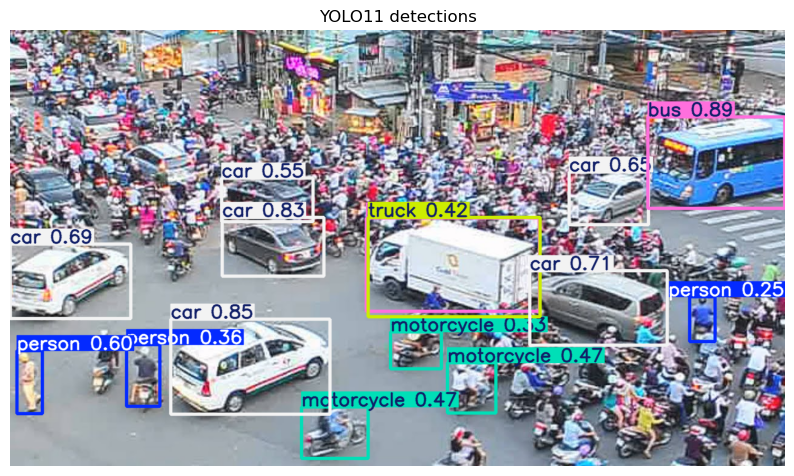
What we see:
Bounding boxes around detected objects (cars, trucks, buses, traffic lights, etc.)
Class labels showing what each object is
Confidence scores indicating model certainty
Multiple objects detected in a single pass
Inspecting the Results Object#
The results object contains detailed information about the detections. Let’s explore its structure.
# Get the first (and only) result
r = results[0]

# Show available class names (COCO dataset classes)
print("Available classes (first 10):")
for idx, name in list(r.names.items())[:10]:
    print(f"  {idx} → {name}")

print(f"\nTotal COCO classes: {len(r.names)}")
Available classes (first 10):
  0 → person
  1 → bicycle
  2 → car
  3 → motorcycle
  4 → airplane
  5 → bus
  6 → train
  7 → truck
  8 → boat
  9 → traffic light

Total COCO classes: 80
# List all detected objects with their confidence scores
print("Detected objects:")
print("-" * 40)

for i, box in enumerate(r.boxes):
    cls_id = int(box.cls)  # Class ID (integer)
    conf = float(box.conf)  # Confidence score (0-1)
    class_name = r.names[cls_id]  # Human-readable class name
    print(f"{i+1}. {class_name:15} (confidence: {conf:.2f})")

print("-" * 40)
print(f"Total detections: {len(r.boxes)}")
Detected objects:
----------------------------------------
1. bus             (confidence: 0.92)
2. car             (confidence: 0.83)
3. car             (confidence: 0.68)
4. person          (confidence: 0.63)
5. car             (confidence: 0.63)
6. car             (confidence: 0.61)
7. bus             (confidence: 0.55)
8. car             (confidence: 0.48)
9. motorcycle      (confidence: 0.43)
10. motorcycle      (confidence: 0.39)
11. person          (confidence: 0.34)
12. car             (confidence: 0.31)
13. truck           (confidence: 0.30)
14. motorcycle      (confidence: 0.30)
15. person          (confidence: 0.29)
16. motorcycle      (confidence: 0.25)
----------------------------------------
Total detections: 16
# Inspect bounding box coordinates
print("First bounding box details:")
print(f"  Format: xyxy (x1, y1, x2, y2)")
print(f"  Coordinates: {r.boxes.xyxy[0].cpu().numpy()}")
print(f"\nCoordinate meaning:")
print(f"  x1, y1 = top-left corner")
print(f"  x2, y2 = bottom-right corner")
First bounding box details:
  Format: xyxy (x1, y1, x2, y2)
  Coordinates: [     1054.9      141.65        1280      292.12]

Coordinate meaning:
  x1, y1 = top-left corner
  x2, y2 = bottom-right corner
Other YOLO Tasks#
Beyond object detection, Ultralytics YOLO supports several other computer vision tasks. The model file suffix indicates the task type.
Task-Specific Models#
Task |
Model File |
Description |
|---|---|---|
Detection |
|
Bounding boxes around objects |
Segmentation |
|
Pixel-level object masks |
Classification |
|
Image-level classification |
Pose |
|
Human keypoint detection |
OBB |
|
Oriented (rotated) bounding boxes |
Let’s try a quick segmentation example:
Recap and Exercises#
Key Takeaways#
YOLO (You Only Look Once) is a real-time object detection system that processes entire images in a single pass
Ultralytics provides a unified, easy-to-use API for YOLO models
Loading a model is simple:
model = YOLO("yolo11n.pt")Running detection:
results = model(image)returns detailed resultsInspecting results: Access bounding boxes (
.boxes.xyxy), confidence (.boxes.conf), and class names (.names)Multiple tasks: Same API supports detection, segmentation, pose estimation, and more
Model variants: Choose between nano (fast) to xlarge (accurate) based on your needs
# Exercise 1: Compare different model sizes

image_path = "yolo_traffic.jpg"
img = load_image_from_url(image_path)
img_rgb = cv2.cvtColor(img, cv2.COLOR_BGR2RGB)

model_names = ["yolo11n.pt", "yolo11s.pt"]

for model_name in model_names:
    # TODO: Load the model
    # Hint: Use YOLO(model_name)

    # TODO: Measure inference time
    # Hint: Use time.time() before and after model inference
    # Hint: Convert to milliseconds by multiplying by 1000

    # TODO: Count detections
    # Hint: len(results[0].boxes) gives the count

    # TODO: Print results
    # Hint: print(f"{model_name}: {time}ms, {count} detections")
    pass  # TODO: Replace with your implementation
Exercise 2: Count Unique Classes#
Choose another image and count how many different object classes appear in the predictions.
# Exercise 2: Count unique classes in detections

image_path = "yolo_beach_scene.jpg"

# TODO: Load and run detection
# Hint: Use load_image_from_url() to get the image (returns BGR)
# Hint: Then use model(img) to get results (pass BGR image to model)

# TODO: Extract unique classes
# Hint: results[0].boxes.cls gives class IDs as a tensor
# Hint: Use .cpu().numpy() to convert to numpy, then np.unique()

# TODO: Count unique classes
# Hint: len(unique_classes)

# TODO: Print class names
# Hint: Use model.names[int(class_id)] to get the name for each class