
09 - Object Detection with Ultralytics YOLO#
In this notebook we put Ultralytics YOLO11 into practice. We will detect objects in several images, explore confidence and IoU thresholds, and build intuition for Intersection over Union (IoU) and Non-Max Suppression (NMS) without going too deep into theory.
By the end of this notebook, you’ll understand how to:
Run detection on multiple images
Tune confidence and IoU thresholds
Understand what IoU measures and why it matters
Grasp the concept of Non-Max Suppression
Table of Contents#
Quick Recap: What is Object Detection?
Intersection over Union (IoU)
Non-Max Suppression (NMS)
Optional: Webcam Detection
Setup and Model Loading#
Let’s import the necessary libraries and load our YOLO11 detection model.
Note: This notebook loads all images directly from the course GitHub repository using the
load_image_from_url()helper function.
# Optional: install Ultralytics and OpenCV in fresh environments (e.g. Colab)
# %pip install ultralytics opencv-python
from ultralytics import YOLO
import cv2
import numpy as np
import matplotlib.pyplot as plt
import os
import requests

%matplotlib inline

# Base URL for images hosted on GitHub
BASE_URL = "https://raw.githubusercontent.com/ezponda/ai-application-course-materials/main/images/"

def load_image_from_url(filename, flags=cv2.IMREAD_COLOR):
    """Load an image from GitHub repository using OpenCV."""
    url = BASE_URL + filename
    response = requests.get(url)
    image_array = np.asarray(bytearray(response.content), dtype=np.uint8)
    return cv2.imdecode(image_array, flags)

# Load YOLO11 nano model for detection
model = YOLO("yolo11n.pt")
print(f"Model loaded: {model.model_name}")
Model loaded: yolo11n.pt
Quick Recap: What is Object Detection?#
Object detection goes beyond image classification. Instead of just saying “this image contains a dog,” detection tells you:
Where each object is (bounding box coordinates)
What each object is (class label)
How confident the model is (confidence score)
What the Detector Outputs#
For each detected object:
Bounding box: [x1, y1, x2, y2] coordinates defining the rectangle
Class label: The type of object (e.g., “person”, “car”, “dog”)
Confidence score: Probability that the detection is correct (0 to 1)
COCO Dataset#
Our model is pre-trained on the COCO dataset, which contains 80 common object categories including people, vehicles, animals, and everyday objects.
Detection on Multiple Images#
Let’s run detection on several images to see YOLO in action.
# List of image filenames on GitHub
image_paths = [
    "yolo_dog_cat.jpg",
    "yolo_beach_scene.jpg",
    "yolo_traffic.jpg",
    "yolo_phones_on_table.jpg",
    "yolo_einstein_head.jpg",
]

# Run detection on each image
for filename in image_paths:
    img_bgr = load_image_from_url(filename)
    img_rgb = cv2.cvtColor(img_bgr, cv2.COLOR_BGR2RGB)

    results = model(img_bgr)
    annotated = results[0].plot()

    # Count detections
    num_detections = len(results[0].boxes)

    plt.figure(figsize=(10, 6))
    plt.imshow(annotated[:, :, ::-1])
    plt.title(f"{filename} - {num_detections} objects detected")
    plt.axis("off")
    plt.show()
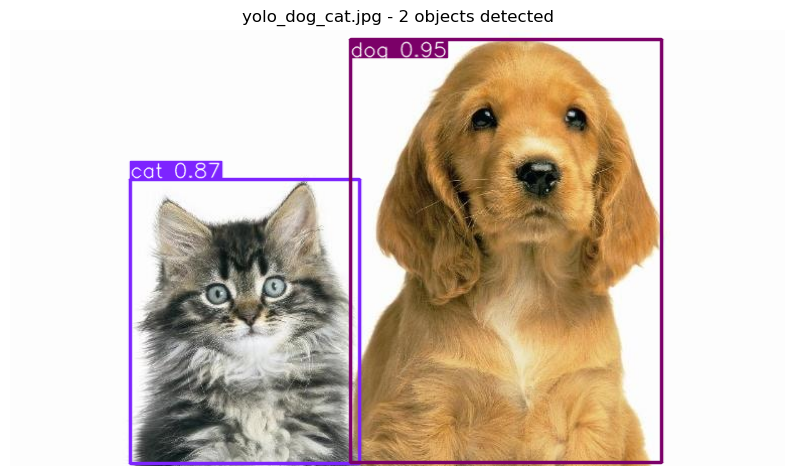
0: 384x640 1 cat, 1 dog, 61.6ms
Speed: 1.7ms preprocess, 61.6ms inference, 0.6ms postprocess per image at shape (1, 3, 384, 640)

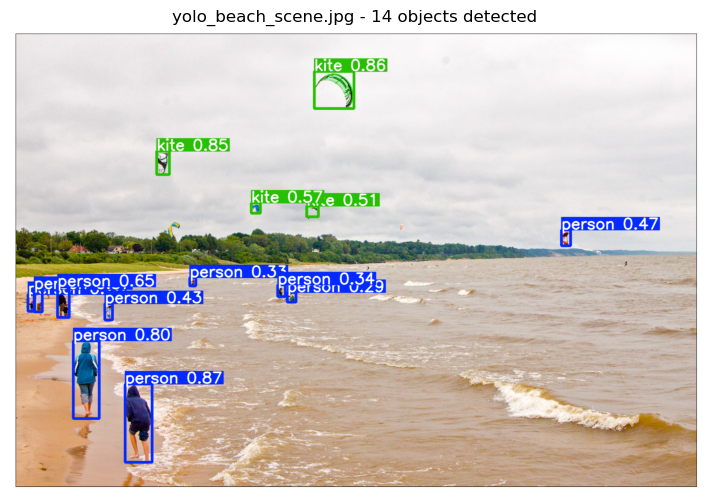
0: 448x640 10 persons, 4 kites, 69.9ms
Speed: 1.4ms preprocess, 69.9ms inference, 0.6ms postprocess per image at shape (1, 3, 448, 640)

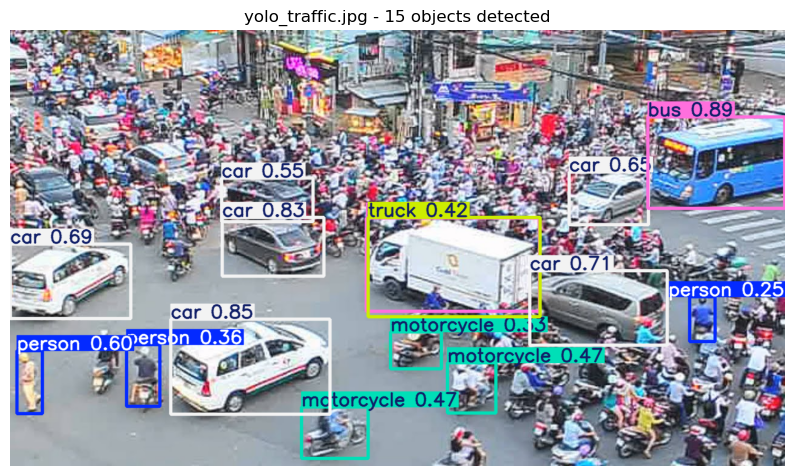
0: 384x640 3 persons, 6 cars, 3 motorcycles, 2 buss, 1 truck, 66.6ms
Speed: 1.8ms preprocess, 66.6ms inference, 0.5ms postprocess per image at shape (1, 3, 384, 640)

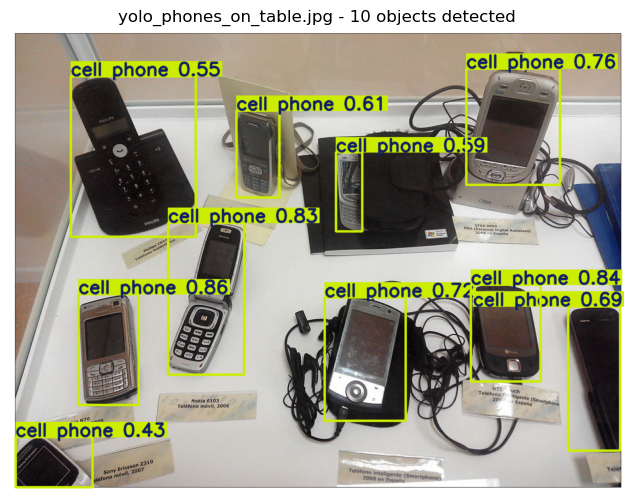
0: 512x640 10 cell phones, 76.5ms
Speed: 1.5ms preprocess, 76.5ms inference, 0.5ms postprocess per image at shape (1, 3, 512, 640)

0: 640x480 1 person, 70.7ms
Speed: 1.7ms preprocess, 70.7ms inference, 0.4ms postprocess per image at shape (1, 3, 640, 480)
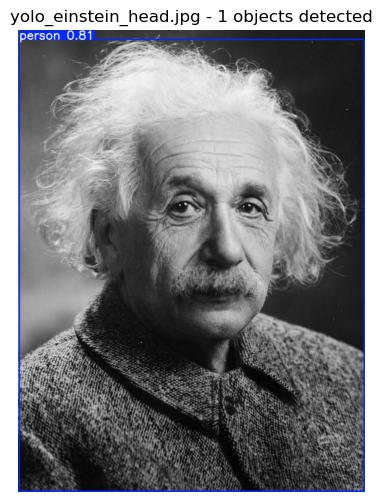
Observations:
Dogs and cats: Pets detected with high confidence
Beach scene: People, sports equipment, personal items
Traffic: Vehicles, pedestrians, traffic infrastructure
Phones: Electronic devices, sometimes mistaken for similar objects
Einstein portrait: Person detection (historical photos work too!)
Confidence and IoU Thresholds#
When running inference, two key parameters control the output:
conf(confidence threshold): Minimum confidence score for a detection to be keptiou(IoU threshold for NMS): Controls how overlapping boxes are filtered
Let’s see how these affect detection results.
Varying Confidence Threshold#
The confidence threshold filters out weak detections. Let’s see its effect:
# Load a test image
img_bgr = load_image_from_url("yolo_traffic.jpg")
img_rgb = cv2.cvtColor(img_bgr, cv2.COLOR_BGR2RGB)

# Test different confidence thresholds
conf_values = [0.02, 0.1, 0.5, 0.75]

fig, axes = plt.subplots(2, 2, figsize=(14, 12))
axes = axes.flatten()

for ax, conf in zip(axes, conf_values):
    results = model(img_bgr, conf=conf)
    num_det = len(results[0].boxes) if results[0].boxes is not None else 0

    ax.imshow(results[0].plot()[:, :, ::-1])
    ax.set_title(f"conf={conf}, detections={num_det}", fontsize=12)
    ax.axis("off")

plt.suptitle("Effect of Confidence Threshold", fontsize=14)
plt.tight_layout()
plt.show()
0: 384x640 63 persons, 19 cars, 86 motorcycles, 4 buss, 2 trucks, 5 traffic lights, 60.5ms
Speed: 1.0ms preprocess, 60.5ms inference, 0.6ms postprocess per image at shape (1, 3, 384, 640)

0: 384x640 14 persons, 9 cars, 17 motorcycles, 2 buss, 1 truck, 64.9ms
Speed: 1.0ms preprocess, 64.9ms inference, 0.6ms postprocess per image at shape (1, 3, 384, 640)

0: 384x640 1 person, 6 cars, 1 bus, 59.0ms
Speed: 0.9ms preprocess, 59.0ms inference, 0.6ms postprocess per image at shape (1, 3, 384, 640)

0: 384x640 2 cars, 1 bus, 57.8ms
Speed: 1.0ms preprocess, 57.8ms inference, 0.5ms postprocess per image at shape (1, 3, 384, 640)
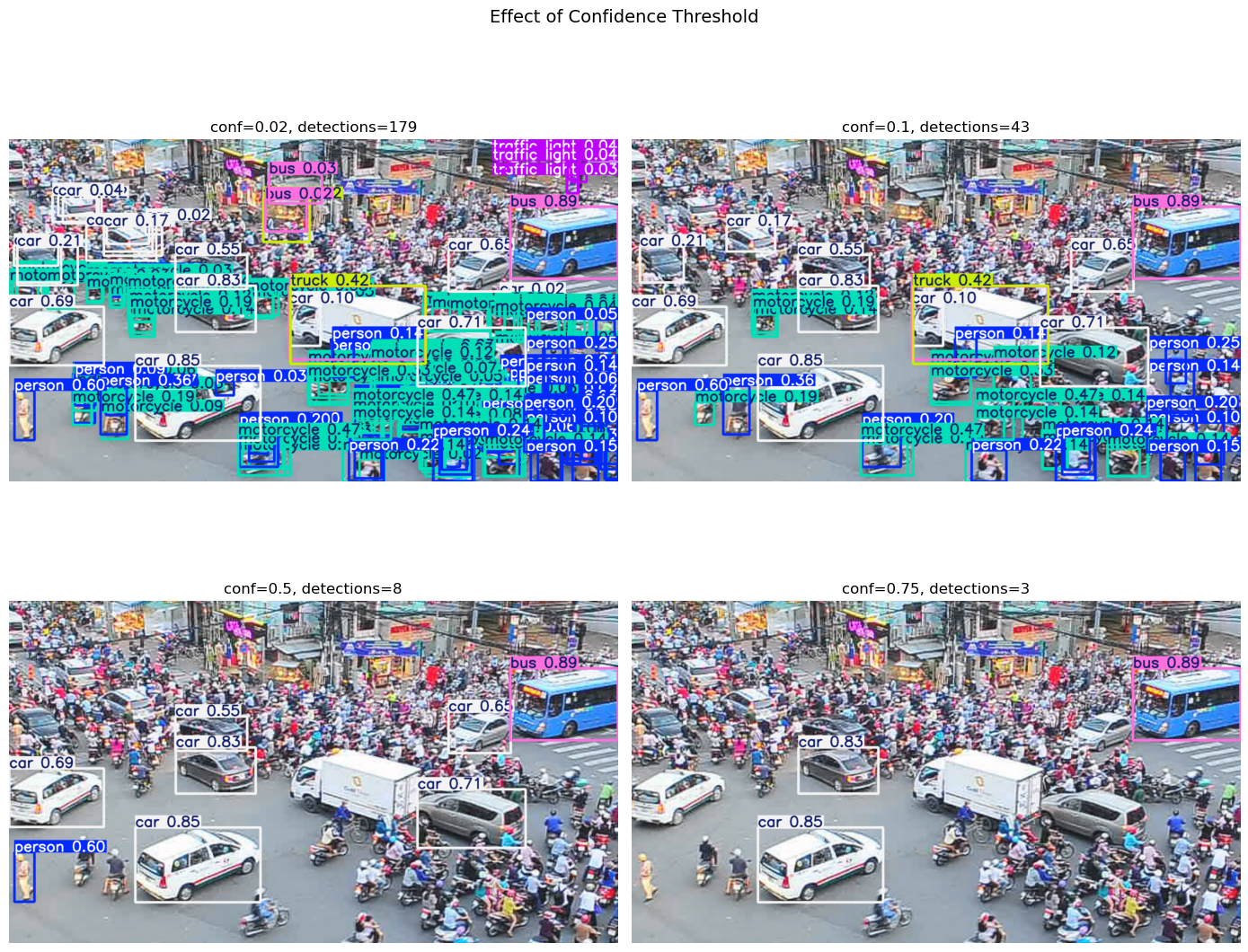
Key insights:
Lower
conf(e.g., 0.1): More detections, including uncertain ones (more false positives)Higher
conf(e.g., 0.75): Fewer detections, only high-confidence ones (more false negatives)Default
conf=0.25: Good balance for most applications
Performance note: For this course,
yolo11n.pt(nano) is usually sufficient on CPU. Larger models likeyolo11m.pt,yolo11l.pt, oryolo11x.ptprovide higher accuracy but are slower on CPU and benefit significantly from GPU acceleration.
Varying IoU Threshold#
The IoU threshold controls Non-Max Suppression (NMS), which removes duplicate detections of the same object:
# Test different IoU thresholds for NMS
iou_values = [0.05, 0.75, 0.95]

fig, axes = plt.subplots(1, 3, figsize=(15, 5))

for ax, iou in zip(axes, iou_values):
    results = model(img_bgr, conf=0.05, iou=iou)
    num_det = len(results[0].boxes) if results[0].boxes is not None else 0

    ax.imshow(results[0].plot()[:, :, ::-1])
    ax.set_title(f"iou={iou}, detections={num_det}", fontsize=12)
    ax.axis("off")

plt.suptitle("Effect of IoU Threshold (NMS)", fontsize=14)
plt.tight_layout()
plt.show()
0: 384x640 16 persons, 9 cars, 12 motorcycles, 2 buss, 1 truck, 64.2ms
Speed: 2.0ms preprocess, 64.2ms inference, 0.5ms postprocess per image at shape (1, 3, 384, 640)

0: 384x640 36 persons, 11 cars, 38 motorcycles, 2 buss, 1 truck, 58.0ms
Speed: 1.1ms preprocess, 58.0ms inference, 0.5ms postprocess per image at shape (1, 3, 384, 640)

0: 384x640 120 persons, 37 cars, 95 motorcycles, 2 buss, 4 trucks, 57.7ms
Speed: 1.0ms preprocess, 57.7ms inference, 0.6ms postprocess per image at shape (1, 3, 384, 640)
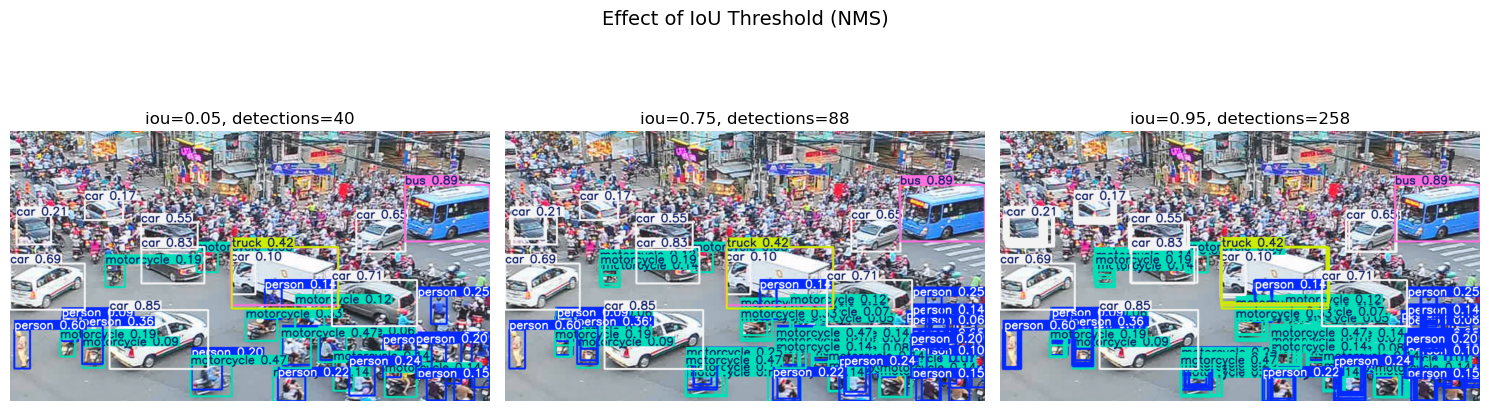
Key insights:
Lower
iou(e.g., 0.3): Stricter NMS, removes more overlapping boxesHigher
iou(e.g., 0.7): Relaxed NMS, keeps more overlapping boxesDefault
iou=0.7: Allows nearby but distinct objects to be detected
Intersection over Union (IoU)#
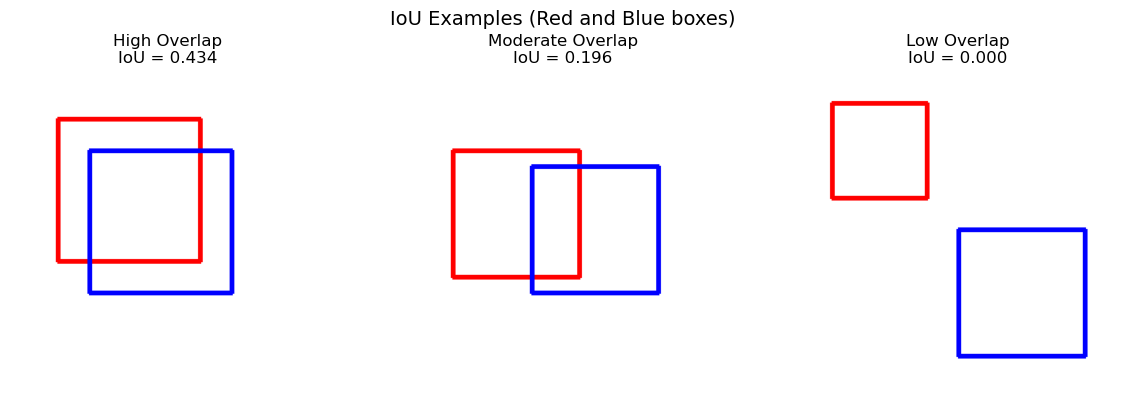
IoU (also called Jaccard Index) is a fundamental metric in object detection. It measures how much two bounding boxes overlap.
The Formula#
IoU = 1.0: Perfect overlap (identical boxes)
IoU = 0.0: No overlap at all
IoU ≈ 0.5: Moderate overlap
Let’s implement and visualize IoU:
def compute_iou(box1, box2):
    """
    Compute Intersection over Union between two boxes.
    Box format: [x1, y1, x2, y2]
    """
    # Calculate intersection coordinates
    x1 = max(box1[0], box2[0])
    y1 = max(box1[1], box2[1])
    x2 = min(box1[2], box2[2])
    y2 = min(box1[3], box2[3])

    # Calculate intersection area
    inter_w = max(0, x2 - x1)
    inter_h = max(0, y2 - y1)
    inter_area = inter_w * inter_h

    # Calculate union area
    area1 = (box1[2] - box1[0]) * (box1[3] - box1[1])
    area2 = (box2[2] - box2[0]) * (box2[3] - box2[1])
    union_area = area1 + area2 - inter_area

    # Return IoU
    return inter_area / union_area if union_area > 0 else 0.0
def visualize_iou(box1, box2, img_size=200):
    """
    Visualize two boxes and their IoU on a blank image.
    """
    # Create blank image
    img = np.ones((img_size, img_size, 3), dtype=np.uint8) * 255

    # Draw boxes (Red for box1, Blue for box2)
    cv2.rectangle(img, (int(box1[0]), int(box1[1])), (int(box1[2]), int(box1[3])), (255, 0, 0), 2)
    cv2.rectangle(img, (int(box2[0]), int(box2[1])), (int(box2[2]), int(box2[3])), (0, 0, 255), 2)

    # Calculate IoU
    iou = compute_iou(box1, box2)

    return img, iou

# Example 1: High overlap
box1_high = [30, 30, 120, 120]
box2_high = [50, 50, 140, 140]

# Example 2: Low overlap
box1_low = [20, 20, 80, 80]
box2_low = [100, 100, 180, 180]

# Example 3: Moderate overlap
box1_med = [30, 50, 110, 130]
box2_med = [80, 60, 160, 140]

fig, axes = plt.subplots(1, 3, figsize=(12, 4))

for ax, (b1, b2), title in zip(axes,
                                [(box1_high, box2_high), (box1_med, box2_med), (box1_low, box2_low)],
                                ["High Overlap", "Moderate Overlap", "Low Overlap"]):
    img, iou = visualize_iou(b1, b2)
    ax.imshow(img)
    ax.set_title(f"{title}\nIoU = {iou:.3f}", fontsize=12)
    ax.axis("off")

plt.suptitle("IoU Examples (Red and Blue boxes)", fontsize=14)
plt.tight_layout()
plt.show()
Why IoU Matters#
IoU is used in two critical ways:
Evaluation: Compare predicted boxes to ground truth boxes. An IoU > 0.5 is typically considered a correct detection.
Non-Max Suppression: When multiple boxes detect the same object, IoU determines which duplicates to remove.
Non-Max Suppression (NMS)#
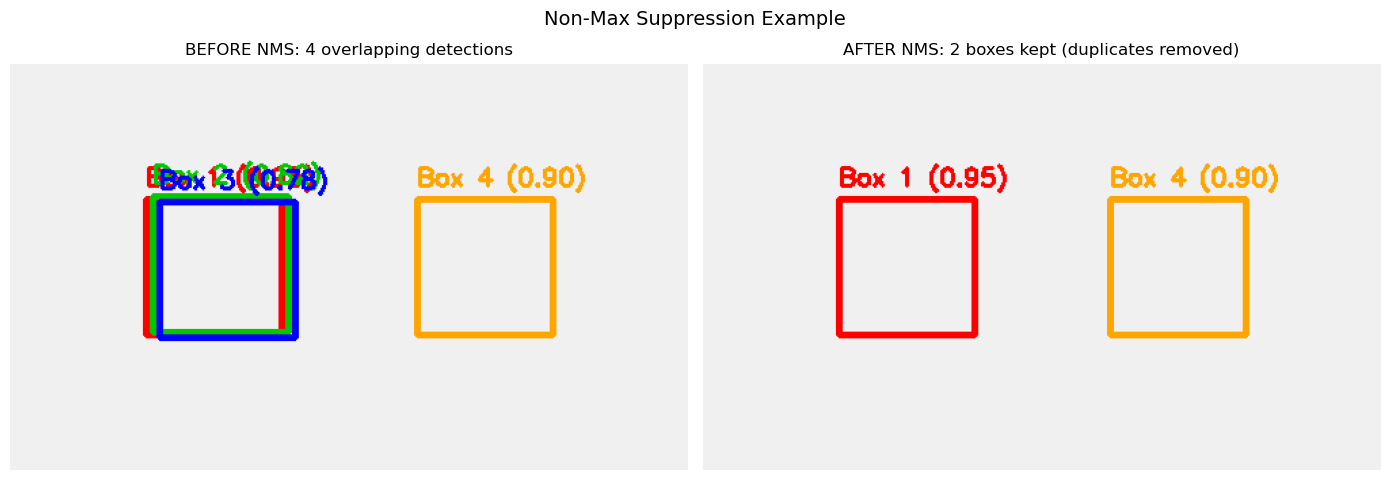
Object detection models often produce multiple overlapping boxes for the same object. Non-Max Suppression (NMS) removes these duplicates.
How NMS Works (Conceptual)#
Sort all detections by confidence score (highest first)
Select the box with highest confidence
Remove all other boxes that have IoU > threshold with the selected box
Repeat until no boxes remain
Example (Toy Data)#
# Simulate multiple overlapping detections for the same object
print("Simulated overlapping detections:")
print("-" * 50)

fake_boxes = [
    {"id": 1, "box": [100, 100, 200, 200], "conf": 0.95},  # Highest confidence
    {"id": 2, "box": [105, 98, 205, 198], "conf": 0.82},   # Overlaps with box 1
    {"id": 3, "box": [110, 102, 210, 202], "conf": 0.78},  # Overlaps with box 1
    {"id": 4, "box": [300, 100, 400, 200], "conf": 0.90},  # Different object
]

for det in fake_boxes:
    print(f"Box {det['id']}: conf={det['conf']:.2f}, coords={det['box']}")

# Visualize the overlapping boxes
fig, axes = plt.subplots(1, 2, figsize=(14, 5))

# Left plot: Before NMS (all boxes)
ax = axes[0]
img_before = np.ones((300, 500, 3), dtype=np.uint8) * 240  # Light gray background

colors = [(255, 0, 0), (0, 200, 0), (0, 0, 255), (255, 165, 0)]  # Red, Green, Blue, Orange
for i, det in enumerate(fake_boxes):
    box = det["box"]
    color = colors[i]
    cv2.rectangle(img_before, (box[0], box[1]), (box[2], box[3]), color, 3)
    # Add label with confidence
    label = f"Box {det['id']} ({det['conf']:.2f})"
    cv2.putText(img_before, label, (box[0], box[1] - 10),
                cv2.FONT_HERSHEY_SIMPLEX, 0.6, color, 2)

ax.imshow(img_before)
ax.set_title("BEFORE NMS: 4 overlapping detections", fontsize=12)
ax.axis("off")

# Right plot: After NMS (only kept boxes)
ax = axes[1]
img_after = np.ones((300, 500, 3), dtype=np.uint8) * 240

# Box 1 (highest conf, kept) and Box 4 (different object, kept)
kept_boxes = [fake_boxes[0], fake_boxes[3]]  # Box 1 and Box 4
kept_colors = [colors[0], colors[3]]

for det, color in zip(kept_boxes, kept_colors):
    box = det["box"]
    cv2.rectangle(img_after, (box[0], box[1]), (box[2], box[3]), color, 3)
    label = f"Box {det['id']} ({det['conf']:.2f})"
    cv2.putText(img_after, label, (box[0], box[1] - 10),
                cv2.FONT_HERSHEY_SIMPLEX, 0.6, color, 2)

ax.imshow(img_after)
ax.set_title("AFTER NMS: 2 boxes kept (duplicates removed)", fontsize=12)
ax.axis("off")

plt.suptitle("Non-Max Suppression Example", fontsize=14)
plt.tight_layout()
plt.show()

print("\nApplying NMS with IoU threshold = 0.5:")
print("-" * 50)

# Calculate IoUs between box 1 and others
for i in range(1, len(fake_boxes)):
    iou = compute_iou(fake_boxes[0]["box"], fake_boxes[i]["box"])
    status = "REMOVE" if iou > 0.5 else "KEEP"
    print(f"Box 1 vs Box {fake_boxes[i]['id']}: IoU={iou:.3f} → {status}")

print("\nResult: Keep Box 1 (highest conf) and Box 4 (different object)")
print("Remove Boxes 2 and 3 (duplicates of Box 1)")
Simulated overlapping detections:
--------------------------------------------------
Box 1: conf=0.95, coords=[100, 100, 200, 200]
Box 2: conf=0.82, coords=[105, 98, 205, 198]
Box 3: conf=0.78, coords=[110, 102, 210, 202]
Box 4: conf=0.90, coords=[300, 100, 400, 200]

Applying NMS with IoU threshold = 0.5:
--------------------------------------------------
Box 1 vs Box 2: IoU=0.871 → REMOVE
Box 1 vs Box 3: IoU=0.789 → REMOVE
Box 1 vs Box 4: IoU=0.000 → KEEP

Result: Keep Box 1 (highest conf) and Box 4 (different object)
Remove Boxes 2 and 3 (duplicates of Box 1)
NMS in Ultralytics YOLO#
Ultralytics applies NMS internally during inference. You control it with:
results = model(image, conf=0.25, iou=0.7)
conf=0.25: Discard detections with confidence < 0.25 before NMSiou=0.7: Remove overlapping boxes with IoU > 0.7 during NMS
Lower IoU threshold → more aggressive removal of overlapping boxes.
Optional: Webcam Detection#
If you have a webcam, you can try real-time detection. This may not work in all environments (hosted notebooks, remote servers, etc.).
# Optional: Real-time webcam detection
# Uncomment the code below to try it

import cv2
from ultralytics import YOLO

model = YOLO("yolo11n.pt")
cap = cv2.VideoCapture(0)  # Default webcam

print("Press 'q' to quit")
while True:
    ret, frame = cap.read()
    if not ret:
        break

    # Run detection
    results = model(frame, verbose=False)
    annotated = results[0].plot()

    # Display
    cv2.imshow("YOLO11 Webcam Detection", annotated)

    # Exit on 'q'
    if cv2.waitKey(1) & 0xFF == ord('q'):
        break

cap.release()
cv2.destroyAllWindows()

print("Webcam code is commented out. Uncomment to try real-time detection.")
print("Note: This requires a local environment with webcam access.")
Recap and Exercises#
Key Takeaways#
Object detection locates objects with bounding boxes, class labels, and confidence scores
Confidence threshold (
conf): Filters out weak detections before NMSIoU threshold (
iou): Controls how aggressively NMS removes overlapping boxesIoU formula: Intersection area / Union area (measures box overlap)
NMS: Removes duplicate detections by keeping only the highest-confidence box for overlapping detections
Trade-offs: Lower
conf→ more detections (more false positives); Loweriou→ stricter duplicate removalPixel-level segmentation and human pose estimation: See
07b_segmentation_and_pose_with_ultralytics.ipynbfor masks and keypoints
Exercise 1: Count Detections per Class#
Create a function that counts how many objects of each class were detected.
Key API:
results[0].boxes- list of detected boxesint(box.cls)- class ID for a boxresults[0].names[cls_id]- class name from ID
# Exercise 1: Count detections per class
# Best practice: Load the model once and reuse it for multiple images

def count_detections_per_class(image_filename, model):
    """
    Count how many objects of each class are detected.

    Args:
        image_filename: Name of the image file on GitHub
        model: Pre-loaded YOLO model instance (reuse for efficiency)

    Returns:
        Dictionary: {class_name: count}
    """
    # TODO: Load image and run detection
    # Hint: Use load_image_from_url() to load image (returns BGR)
    # Hint: Call model(img) to get results (pass BGR image to model)

    # TODO: Count objects per class
    # Hint: Loop over results[0].boxes
    # Hint: Use int(box.cls) to get class ID, r.names[cls_id] to get class name
    # Hint: Store counts in a dictionary

    # TODO: Print results
    # Hint: Print image name and counts for each class

    # TODO: Return the dictionary of counts
    pass  # Remove this when you complete the TODO

# Test the function - load model once, reuse for multiple calls
# model = YOLO("yolo11n.pt")
# count_detections_per_class("yolo_traffic.jpg", model)
# count_detections_per_class("yolo_beach_scene.jpg", model)
Exercise 2: Compare Model Variants#
Compare yolo11n.pt, yolo11s.pt, and yolo11m.pt on the same image.
Key API:
model = YOLO(model_name)- load modeltime.time()- measure inference timelen(results[0].boxes)- count detections
# Exercise 2: Compare model variants
import time

def compare_models(image_filename, model_names=["yolo11n.pt", "yolo11s.pt", "yolo11m.pt"]):
    """
    Compare different YOLO11 models on the same image.
    """
    # TODO: Load image once (outside the loop)
    # Hint: Use load_image_from_url() and cv2.cvtColor()

    print(f"Comparing models on {image_filename}")
    print("-" * 60)
    print(f"{'Model':<15} | {'Detections':<12} | {'Inference Time (ms)':<20}")
    print("-" * 60)

    for model_name in model_names:
        # TODO: Load model
        # Hint: model = YOLO(model_name)

        # TODO: Measure inference time
        # Hint: Use time.time() before and after model inference
        # Hint: Multiply by 1000 to convert to milliseconds

        # TODO: Count detections
        # Hint: len(results[0].boxes) gives the number of detections

        # TODO: Print results in the table format
        # Hint: Use f-string formatting with :<15, :<12, etc.
        pass  # Remove this when you complete the TODO

# Test the function
# compare_models("yolo_traffic.jpg")
Exercise 3: Count People Across Images#
Count total “person” detections across multiple images.
Key API:
Check class:
results[0].names[int(box.cls)] == "person"Sum counts across all images
# Exercise 3: Count people across multiple images
def count_people_in_images(image_filenames):
    """
    Count total number of 'person' detections across all images.
    """
    # TODO: Initialize model and counter
    # Hint: Load model once before the loop
    # Hint: Initialize total_people = 0

    for filename in image_filenames:
        # TODO: Load and detect
        # Hint: Use load_image_from_url(), convert to RGB, run model

        # TODO: Count people in this image
        # Hint: Loop over boxes and check if r.names[int(box.cls)] == "person"
        # Hint: Increment a counter for each person found

        # TODO: Add to total and print per-image count
        pass  # Remove this when you complete the TODO

    # TODO: Print total across all images
    # Hint: Return the total count
    pass

# Test the function
# images = [
#     "yolo_beach_scene.jpg",
#     "yolo_traffic.jpg",
#     "yolo_einstein_head.jpg",
# ]
# count_people_in_images(images)