
05 - CNN Theory and Implementation with Keras#
Convolutional Neural Networks (CNNs) are specialized neural networks designed for processing grid-structured data like images. Unlike fully connected networks that treat all pixels independently, CNNs exploit the spatial structure of images through local connectivity and weight sharing, making them far more efficient and effective for computer vision tasks.
We will build and train CNN models using Keras on a flowers classification dataset, exploring core concepts like convolution, pooling, and data augmentation.
Table of Contents#
Setup and Dataset Loading#
First, let’s import the necessary libraries and load our dataset.
import tensorflow as tf
from tensorflow import keras
from tensorflow.keras import layers
import numpy as np
import matplotlib.pyplot as plt
import pathlib
import os

# Set random seed for reproducibility
tf.random.set_seed(42)
np.random.seed(42)

%matplotlib inline
Loading the Flowers Dataset#
We use a dataset of approximately 3,700 flower photographs from 5 different species. This is a moderate-sized dataset perfect for learning CNNs.
# Download and extract the flowers dataset
dataset_url = 'https://storage.googleapis.com/download.tensorflow.org/example_images/flower_photos.tgz'
data_dir = tf.keras.utils.get_file('flower_photos', origin=dataset_url, untar=True)
data_dir = pathlib.Path(data_dir)

# Handle directory structure (Colab vs local)
contents = os.listdir(data_dir)
if 'flower_photos' in contents and len(contents) == 1:
    data_dir = os.path.join(data_dir, 'flower_photos')
    data_dir = pathlib.Path(data_dir)

# Count total images
image_count = len(list(data_dir.glob('*/*.jpg')))
print(f'Total images: {image_count}')
print(f'Categories: {sorted([item.name for item in data_dir.glob("*") if item.is_dir()])}')
Total images: 3670
Categories: ['daisy', 'dandelion', 'flower_photos', 'roses', 'sunflowers', 'tulips']
Creating Training and Validation Datasets#
We split the data into 80% training and 20% validation. Images are resized to 96×96 pixels for computational efficiency.
image_size = (96, 96)
batch_size = 64

# Create training dataset (80% of data)
train_ds = tf.keras.preprocessing.image_dataset_from_directory(
    data_dir,
    validation_split=0.2,
    subset='training',
    seed=42,
    image_size=image_size,
    batch_size=batch_size
)

# Create validation dataset (20% of data)
val_ds = tf.keras.preprocessing.image_dataset_from_directory(
    data_dir,
    validation_split=0.2,
    subset='validation',
    seed=42,
    image_size=image_size,
    batch_size=batch_size
)

class_names = train_ds.class_names
print(f'Classes: {class_names}')
Found 7340 files belonging to 6 classes.
Using 5872 files for training.
Found 7340 files belonging to 6 classes.
Using 1468 files for validation.
Classes: ['daisy', 'dandelion', 'flower_photos', 'roses', 'sunflowers', 'tulips']
Dataset Performance Optimization#
For better training performance, we’ll configure the datasets to use caching and prefetching. This ensures the GPU doesn’t wait for data loading.
# Optimize dataset performance with caching and prefetching
# This prevents the GPU from waiting for data
AUTOTUNE = tf.data.AUTOTUNE

train_ds = train_ds.cache().shuffle(1000).prefetch(buffer_size=AUTOTUNE)
val_ds = val_ds.cache().prefetch(buffer_size=AUTOTUNE)

print('Dataset optimization applied: caching + prefetching')
Dataset optimization applied: caching + prefetching
Visualizing Sample Images#
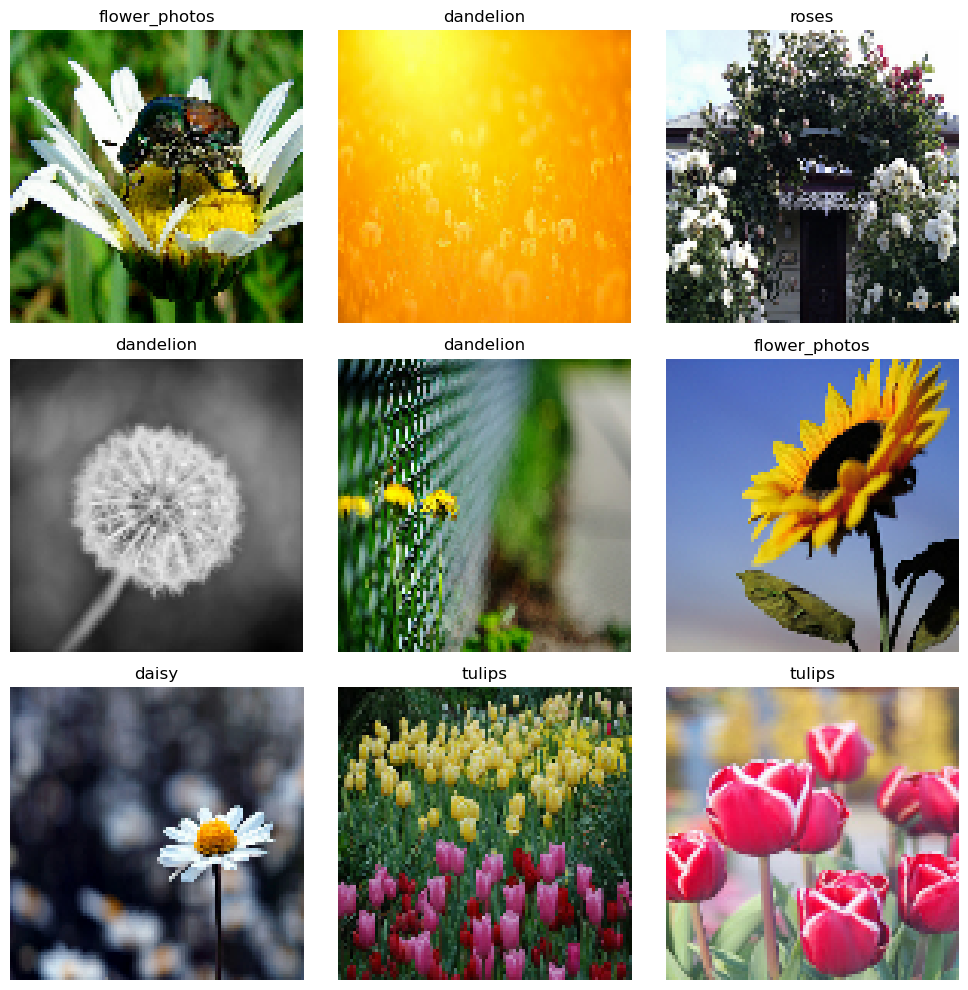
Let’s look at a few examples from our training dataset.
plt.figure(figsize=(10, 10))
for images, labels in train_ds.take(1):
    for i in range(9):
        ax = plt.subplot(3, 3, i + 1)
        plt.imshow(images[i].numpy().astype("uint8"))
        plt.title(class_names[labels[i]])
        plt.axis("off")
plt.tight_layout()
plt.show()
Why CNNs for Images?#
The Problem with Fully Connected Networks#
Consider using a standard fully connected (dense) neural network for image classification. A 96×96 RGB image has:
96 × 96 × 3 = 27,648 input features
If we connect this to a hidden layer with just 1,000 neurons:
Number of parameters: 27,648 × 1,000 = 27.6 million parameters
This creates several problems:
Too many parameters: Difficult to train, requires massive amounts of data
Ignores spatial structure: Treats pixels at position (10, 10) and (90, 90) as completely unrelated
Not translation invariant: Must learn the same pattern (e.g., an edge) at every position independently
CNNs as the Solution#
CNNs address these issues through:
Local connectivity: Neurons connect only to a small region of the input
Weight sharing: Same filter applied across the entire image
Translation invariance: Features learned at one location work at any location
This dramatically reduces parameters while improving performance.
CNN Architecture Components#
A typical CNN consists of several types of layers working together to extract and classify features.
1. Convolutional Layers#
Convolutional layers are the core building blocks of CNNs. They apply learned filters (kernels) that slide across the input image, detecting features like edges, textures, or more complex patterns.
Key parameters:
filters: Number of different feature maps to learnkernel_size: Size of the sliding window (commonly 3×3 or 5×5)padding:'valid'(no padding) or'same'(output same size as input)strides: How far the filter moves (default is 1)activation: Typically'relu'for non-linearity
Understanding Padding:
padding='same': Adds zeros around the input so output size equals input size. Example: 96×96 input with 3×3 kernel stays 96×96.padding='valid': No padding. Output shrinks. Example: 96×96 input with 3×3 kernel becomes 94×94.
Understanding Strides:
strides=1(default): Filter moves 1 pixel at a timestrides=2: Filter jumps 2 pixels, halving output size. Example: 96×96 → 48×48 (faster than pooling)
# Example: Convolution with different padding
sample_conv_same = layers.Conv2D(filters=32, kernel_size=3, activation='relu', padding='same')
sample_conv_valid = layers.Conv2D(filters=32, kernel_size=3, activation='relu', padding='valid')

# For a 96×96×3 input:
# - 'same' padding: output is 96×96×32
# - 'valid' padding: output is 94×94×32
# - Parameters: (3×3×3 input channels) × 32 filters + 32 biases = 896 parameters
print(f'Conv2D parameters: {(3*3*3) * 32 + 32}')
print("With 'same' padding: 96×96 → 96×96")
print("With 'valid' padding: 96×96 → 94×94")
Conv2D parameters: 896
With 'same' padding: 96×96 → 96×96
With 'valid' padding: 96×96 → 94×94
2. Pooling Layers#
Pooling layers reduce spatial dimensions while retaining important features. This reduces computation, adds robustness to small translations, and helps prevent overfitting.
MaxPooling vs AveragePooling:
MaxPooling2D: Takes the maximum value in each window
Preserves strongest features (e.g., edges, important patterns)
Most commonly used
Best for feature detection tasks
AveragePooling2D: Computes the average value
Smooths features
Less common, but useful for reducing noise
Best for smoother downsampling
Concrete Example:
Consider a 4×4 feature map with a 2×2 pooling window:
Input:          MaxPool Result:   AvgPool Result:
[1  2  | 5  6]   [4  | 8]         [2.5 | 6.5]
[3  4  | 7  8]   [---+---]        [----+----]
[----+----]      [12 | 16]        [10.5| 14.5]
[9  10 | 13 14]
[11 12 | 15 16]
GlobalAveragePooling2D:
Reduces entire feature map (H×W) to a single value per channel
Example: 12×12×128 → 1×1×128 (then squeezed to 128)
Alternative to Flatten, reduces parameters significantly
# Demonstrate pooling operations
# MaxPooling with 2×2 window reduces each dimension by half
pool_layer = layers.MaxPooling2D(pool_size=(2, 2))

# For a 96×96 input, this produces a 48×48 output
# Each 2×2 region becomes a single pixel (the maximum value)

# GlobalAveragePooling alternative to Flatten
# Reduces each entire feature map to one value
global_pool = layers.GlobalAveragePooling2D()

print("MaxPooling (2×2): 96×96 → 48×48 (keeps strongest features)")
print("AveragePooling (2×2): 96×96 → 48×48 (smooths features)")
print("GlobalAveragePooling: 12×12×128 → 128 (one value per channel)")
MaxPooling (2×2): 96×96 → 48×48 (keeps strongest features)
AveragePooling (2×2): 96×96 → 48×48 (smooths features)
GlobalAveragePooling: 12×12×128 → 128 (one value per channel)
3. Activation Functions#
Activation functions introduce non-linearity, allowing the network to learn complex patterns.
ReLU (Rectified Linear Unit) is the most common choice:
Formula:
f(x) = max(0, x)Advantages: Fast computation, helps avoid vanishing gradient, introduces sparsity
Applied after convolutional layers
4. Flatten and Dense Layers#
After extracting features with convolutional and pooling layers:
Flatten: Converts 3D feature maps to 1D vector
Dense layers: Fully connected layers that learn combinations of features
Output layer: Dense layer with
softmaxactivation for multi-class classification
# After convolutional layers, we have a 3D tensor (batch, height, width, channels)
# Flatten converts it to (batch, height × width × channels)

flatten_layer = layers.Flatten()  # Converts 3D to 1D
dense_layer = layers.Dense(64, activation='relu')  # Learns feature combinations
output_layer = layers.Dense(5, activation='softmax')  # 5 classes, produces probabilities

print("Flatten: 12×12×128 → 18,432 features")
print("Dense: Learns which feature combinations predict each class")
print("Output: Softmax produces class probabilities that sum to 1.0")
Flatten: 12×12×128 → 18,432 features
Dense: Learns which feature combinations predict each class
Output: Softmax produces class probabilities that sum to 1.0
Building a CNN with Keras#
Now we’ll build a complete CNN architecture using the Functional API. Our model will have:
Input layer (96×96×3)
Rescaling layer (normalize pixel values to 0-1)
Three convolutional blocks (Conv2D + MaxPooling)
Flatten layer
Dense layer
Output layer (5 classes)
Model Architecture#
# Input layer
inputs = keras.Input(shape=image_size + (3,), name='input')

# Rescaling to [0, 1] - normalizes pixel values for better training
x = layers.Rescaling(1./255)(inputs)

# First convolutional block: detect basic patterns (edges, colors)
x = layers.Conv2D(32, 3, padding='same', activation='relu', name='conv_1')(x)
x = layers.MaxPooling2D(pool_size=(2, 2), name='pool_1')(x)  # 96×96 → 48×48

# Second convolutional block: detect more complex patterns (textures)
x = layers.Conv2D(64, 3, padding='same', activation='relu', name='conv_2')(x)
x = layers.MaxPooling2D(pool_size=(2, 2), name='pool_2')(x)  # 48×48 → 24×24

# Third convolutional block: detect high-level patterns (petal shapes, flower parts)
x = layers.Conv2D(128, 3, padding='same', activation='relu', name='conv_3')(x)
x = layers.MaxPooling2D(pool_size=(2, 2), name='pool_3')(x)  # 24×24 → 12×12

# Flatten 3D features to 1D for classification
x = layers.Flatten(name='flatten')(x)

# Dense layer learns combinations of features
x = layers.Dense(128, activation='relu', name='dense')(x)

# Output layer with 5 neurons (one per flower class)
outputs = layers.Dense(len(class_names), activation='softmax', name='output')(x)

# Create model
model = keras.Model(inputs=inputs, outputs=outputs, name='flower_cnn')
Model Summary#
Let’s inspect the architecture and count parameters.
model.summary()
Model: "flower_cnn"
_________________________________________________________________
 Layer (type)                Output Shape              Param #
=================================================================
 input (InputLayer)          [(None, 96, 96, 3)]       0

 rescaling (Rescaling)       (None, 96, 96, 3)         0

 conv_1 (Conv2D)             (None, 96, 96, 32)        896

 pool_1 (MaxPooling2D)       (None, 48, 48, 32)        0

 conv_2 (Conv2D)             (None, 48, 48, 64)        18496

 pool_2 (MaxPooling2D)       (None, 24, 24, 64)        0

 conv_3 (Conv2D)             (None, 24, 24, 128)       73856

 pool_3 (MaxPooling2D)       (None, 12, 12, 128)       0

 flatten (Flatten)           (None, 18432)             0

 dense (Dense)               (None, 128)               2359424

 output (Dense)              (None, 6)                 774

=================================================================
Total params: 2453446 (9.36 MB)
Trainable params: 2453446 (9.36 MB)
Non-trainable params: 0 (0.00 Byte)
_________________________________________________________________
Visualizing Model Architecture#
A visual representation helps understand the flow of data through the network.
try:
    from tensorflow.keras.utils import plot_model
    # Visualize the model architecture
    plot_model(
        model,
        show_shapes=True,  # Display tensor shapes at each layer
        show_layer_names=True,  # Display layer names
        expand_nested=False,  # Don't expand nested models
        dpi=96  # Resolution
    )
except Exception as e:
    print("Note: plot_model requires pydot and graphviz.")
    print("Install with: pip install pydot && brew install graphviz (macOS)")
    print("Skipping model visualization - this doesn't affect training.")
You must install pydot (`pip install pydot`) and install graphviz (see instructions at https://graphviz.gitlab.io/download/) for plot_model to work.
Observations:
The spatial dimensions decrease progressively: 96×96 → 48×48 → 24×24 → 12×12
The number of feature maps increases: 32 → 64 → 128
Total parameters are much fewer than a fully connected network
Most parameters are in the dense layers, not the convolutional layers
Checking Data Shapes#
Verify the input data shape matches our model.
for image_batch, labels_batch in train_ds.take(1):
    print(f'Image batch shape: {image_batch.shape}')  # (batch_size, height, width, channels)
    print(f'Labels batch shape: {labels_batch.shape}')  # (batch_size,)
    print(f'\nFirst image min/max values: {image_batch[0].numpy().min():.0f}/{image_batch[0].numpy().max():.0f}')
Image batch shape: (64, 96, 96, 3)
Labels batch shape: (64,)

First image min/max values: 0/252
Training and Evaluating the Model#
Compiling the Model#
We configure the model for training with:
Optimizer: Adam (adaptive learning rate, works well by default)
Loss: Sparse categorical crossentropy (for integer labels, not one-hot)
Metrics: Accuracy (percentage of correct predictions)
model.compile(
    optimizer='adam',
    loss=tf.keras.losses.SparseCategoricalCrossentropy(),
    metrics=['accuracy']
)
Training#
Train the model for a modest number of epochs.
epochs = 10
history = model.fit(
    train_ds,
    validation_data=val_ds,
    epochs=epochs
)
Epoch 1/10
92/92 [==============================] - 6s 34ms/step - loss: 1.5185 - accuracy: 0.4704 - val_loss: 1.4483 - val_accuracy: 0.4959
Epoch 2/10
92/92 [==============================] - 2s 27ms/step - loss: 1.4494 - accuracy: 0.4668 - val_loss: 2.1204 - val_accuracy: 0.5177
Epoch 3/10
92/92 [==============================] - 2s 27ms/step - loss: 1.4531 - accuracy: 0.4716 - val_loss: 1.3361 - val_accuracy: 0.4973
Epoch 4/10
92/92 [==============================] - 2s 27ms/step - loss: 1.3347 - accuracy: 0.4828 - val_loss: 1.2937 - val_accuracy: 0.4925
Epoch 5/10
92/92 [==============================] - 2s 27ms/step - loss: 1.3232 - accuracy: 0.4573 - val_loss: 1.5497 - val_accuracy: 0.4319
Epoch 6/10
92/92 [==============================] - 2s 27ms/step - loss: 1.3155 - accuracy: 0.4639 - val_loss: 1.4125 - val_accuracy: 0.4612
Epoch 7/10
92/92 [==============================] - 2s 27ms/step - loss: 1.2954 - accuracy: 0.4615 - val_loss: 1.5142 - val_accuracy: 0.4571
Epoch 8/10
92/92 [==============================] - 2s 27ms/step - loss: 1.4352 - accuracy: 0.4545 - val_loss: 1.6645 - val_accuracy: 0.4421
Epoch 9/10
92/92 [==============================] - 2s 27ms/step - loss: 1.4296 - accuracy: 0.4699 - val_loss: 1.9710 - val_accuracy: 0.4101
Epoch 10/10
92/92 [==============================] - 2s 27ms/step - loss: 1.4446 - accuracy: 0.4636 - val_loss: 1.7497 - val_accuracy: 0.3747
Visualizing Training History#
Plot training and validation accuracy and loss to understand model behavior.
import pandas as pd

def plot_training_history(history):
    """Plot training and validation metrics."""
    hist = pd.DataFrame(history.history)
    hist['epoch'] = history.epoch

    fig, (ax1, ax2) = plt.subplots(1, 2, figsize=(14, 5))

    # Loss plot shows how well model fits the data
    ax1.plot(hist['epoch'], hist['loss'], label='Train Loss', marker='o')
    ax1.plot(hist['epoch'], hist['val_loss'], label='Val Loss', marker='s')
    ax1.set_xlabel('Epoch')
    ax1.set_ylabel('Loss')
    ax1.set_title('Training and Validation Loss')
    ax1.legend()
    ax1.grid(True, alpha=0.3)

    # Accuracy plot shows prediction correctness
    ax2.plot(hist['epoch'], hist['accuracy'], label='Train Accuracy', marker='o')
    ax2.plot(hist['epoch'], hist['val_accuracy'], label='Val Accuracy', marker='s')
    ax2.set_xlabel('Epoch')
    ax2.set_ylabel('Accuracy')
    ax2.set_title('Training and Validation Accuracy')
    ax2.legend()
    ax2.grid(True, alpha=0.3)

    plt.tight_layout()
    plt.show()

plot_training_history(history)
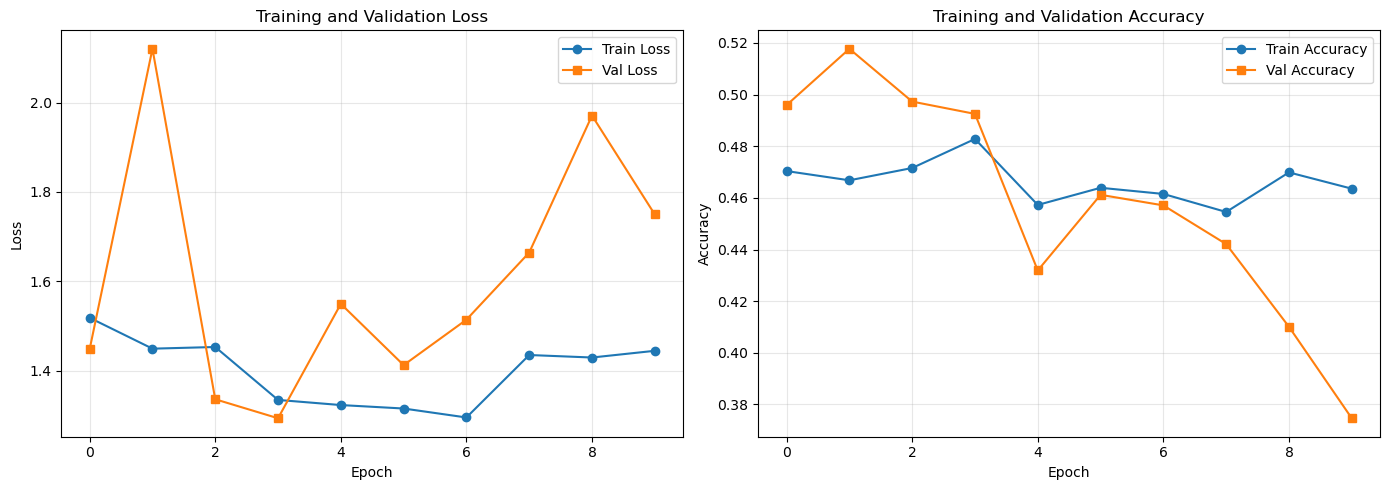
Interpretation:
If validation loss decreases with training loss: model is learning
If validation loss stops decreasing or increases: potential overfitting
Gap between training and validation accuracy indicates generalization performance
Evaluating on Validation Set#
Check final performance metrics.
val_loss, val_accuracy = model.evaluate(val_ds, verbose=0)
print(f'Validation Loss: {val_loss:.4f}')
print(f'Validation Accuracy: {val_accuracy:.4f}')
Validation Loss: 1.7497
Validation Accuracy: 0.3747
Data Augmentation#
Data augmentation artificially increases dataset diversity by applying random transformations to training images. This is crucial for preventing overfitting and improving generalization when training data is limited.
Why Data Augmentation?#
Prevents overfitting: Model sees variations of each image, not just memorizing exact examples
Improves generalization: Learns to be invariant to rotations, flips, zooms, etc.
Increases effective dataset size: No need to collect more images
Common Augmentation Techniques#
Keras provides built-in augmentation layers:
RandomFlip: Horizontal/vertical mirroring (useful when orientation doesn’t matter)
RandomRotation: Small rotations (realistic for flowers at different angles)
RandomZoom: Simulates different camera distances
RandomContrast: Handles varying lighting conditions
Creating an Augmentation Pipeline#
# Define augmentation pipeline - applied randomly during training only
data_augmentation = keras.Sequential([
    layers.RandomFlip("horizontal_and_vertical"),  # Mirrors image
    layers.RandomRotation(0.2),  # Rotate by ±20% of 360° = ±72°
    layers.RandomZoom(0.2),      # Zoom in/out by ±20%
    layers.RandomContrast(0.2),  # Adjust contrast for lighting variations
], name='data_augmentation')
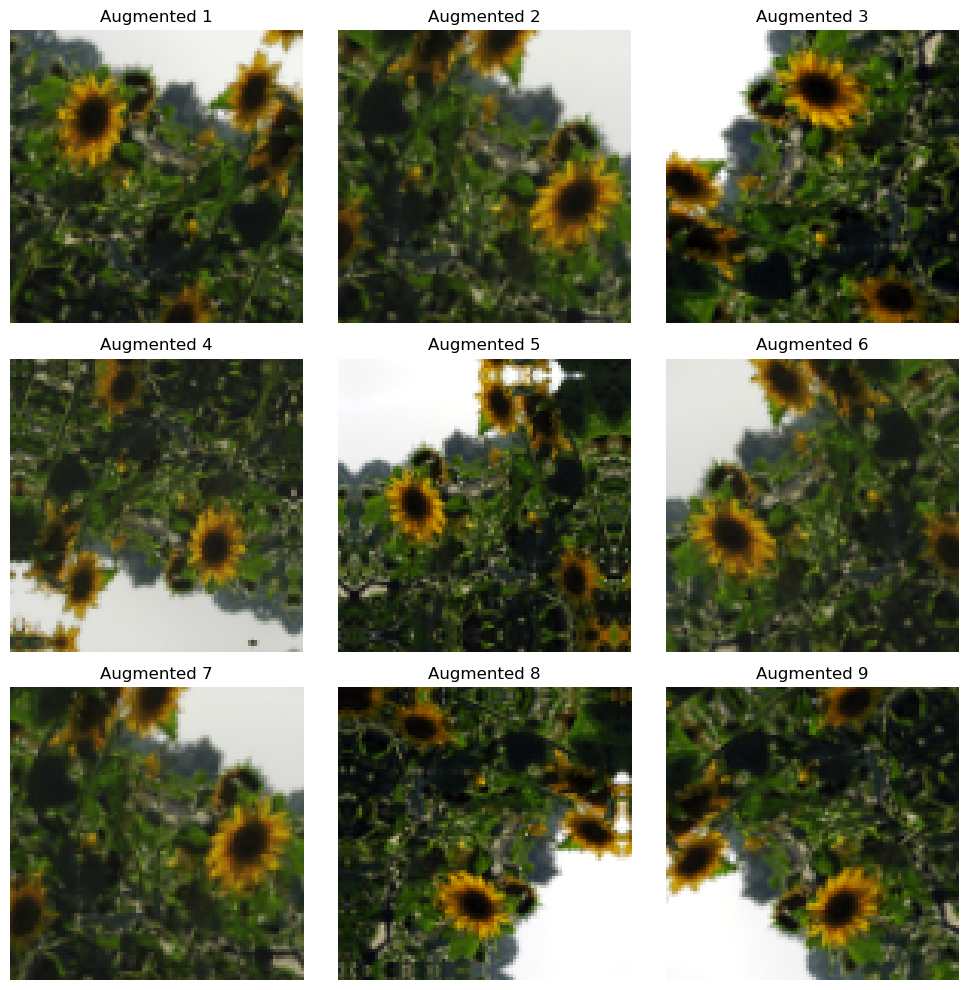
Visualizing Augmented Images#
Let’s see how augmentation transforms our images.
plt.figure(figsize=(10, 10))
for images, _ in train_ds.take(1):
    for i in range(9):
        # Apply augmentation - each call produces different transformations
        augmented_images = data_augmentation(images, training=True)
        ax = plt.subplot(3, 3, i + 1)
        plt.imshow(augmented_images[0].numpy().astype("uint8"))
        plt.title(f'Augmented {i+1}')
        plt.axis("off")
plt.tight_layout()
plt.show()

print("Notice: Each transformation is applied randomly with some probability")
Notice: Each transformation is applied randomly with some probability
Building a Model with Augmentation#
We integrate augmentation into the model architecture. It’s applied only during training, not during validation or prediction.
# Build model with augmentation at the beginning
inputs = keras.Input(shape=image_size + (3,), name='input')

# Data augmentation (only applied when training=True)
x = data_augmentation(inputs)

# Rescaling
x = layers.Rescaling(1./255)(x)

# Convolutional blocks (same architecture as before)
x = layers.Conv2D(32, 3, padding='same', activation='relu')(x)
x = layers.MaxPooling2D((2, 2))(x)

x = layers.Conv2D(64, 3, padding='same', activation='relu')(x)
x = layers.MaxPooling2D((2, 2))(x)

x = layers.Conv2D(128, 3, padding='same', activation='relu')(x)
x = layers.MaxPooling2D((2, 2))(x)

# Classifier
x = layers.Flatten()(x)
x = layers.Dense(128, activation='relu')(x)
outputs = layers.Dense(len(class_names), activation='softmax')(x)

model_aug = keras.Model(inputs=inputs, outputs=outputs, name='flower_cnn_aug')

# Compile
model_aug.compile(
    optimizer='adam',
    loss=tf.keras.losses.SparseCategoricalCrossentropy(),
    metrics=['accuracy']
)
Training with Augmentation#
epochs = 15
history_aug = model_aug.fit(
    train_ds,
    validation_data=val_ds,
    epochs=epochs
)
Epoch 1/15
 1/92 [..............................] - ETA: 59s - loss: 1.7647 - accuracy: 0.2656
 7/92 [=>............................] - ETA: 5s - loss: 1.9702 - accuracy: 0.4329
13/92 [===>..........................] - ETA: 4s - loss: 1.8572 - accuracy: 0.4792
17/92 [====>.........................] - ETA: 3s - loss: 1.7899 - accuracy: 0.4897
23/92 [======>.......................] - ETA: 3s - loss: 1.7298 - accuracy: 0.4863
29/92 [========>.....................] - ETA: 2s - loss: 1.6902 - accuracy: 0.4897
35/92 [==========>...................] - ETA: 2s - loss: 1.6619 - accuracy: 0.4888
39/92 [===========>..................] - ETA: 2s - loss: 1.6458 - accuracy: 0.4887
45/92 [=============>................] - ETA: 2s - loss: 1.6222 - accuracy: 0.4909
51/92 [===============>..............] - ETA: 1s - loss: 1.6031 - accuracy: 0.4895
57/92 [=================>............] - ETA: 1s - loss: 1.5887 - accuracy: 0.4901
63/92 [===================>..........] - ETA: 1s - loss: 1.5730 - accuracy: 0.4903
69/92 [=====================>........] - ETA: 0s - loss: 1.5554 - accuracy: 0.4932
75/92 [=======================>......] - ETA: 0s - loss: 1.5453 - accuracy: 0.4906
81/92 [=========================>....] - ETA: 0s - loss: 1.5444 - accuracy: 0.4863
87/92 [===========================>..] - ETA: 0s - loss: 1.5492 - accuracy: 0.4851
91/92 [============================>.] - ETA: 0s - loss: 1.5475 - accuracy: 0.4861
92/92 [==============================] - 5s 45ms/step - loss: 1.5462 - accuracy: 0.4865 - val_loss: 1.4851 - val_accuracy: 0.5170
Epoch 2/15
 5/92 [>.............................] - ETA: 3s - loss: 1.5209 - accuracy: 0.4812
 9/92 [=>............................] - ETA: 3s - loss: 1.4548 - accuracy: 0.5174
15/92 [===>..........................] - ETA: 3s - loss: 1.4937 - accuracy: 0.4947
21/92 [=====>........................] - ETA: 2s - loss: 1.5081 - accuracy: 0.4842
27/92 [=======>......................] - ETA: 2s - loss: 1.4955 - accuracy: 0.4871
33/92 [=========>....................] - ETA: 2s - loss: 1.4852 - accuracy: 0.4914
39/92 [===========>..................] - ETA: 2s - loss: 1.4761 - accuracy: 0.4899
45/92 [=============>................] - ETA: 1s - loss: 1.4832 - accuracy: 0.4878
51/92 [===============>..............] - ETA: 1s - loss: 1.4730 - accuracy: 0.4945
57/92 [=================>............] - ETA: 1s - loss: 1.4748 - accuracy: 0.4937
63/92 [===================>..........] - ETA: 1s - loss: 1.4674 - accuracy: 0.4965
69/92 [=====================>........] - ETA: 0s - loss: 1.4667 - accuracy: 0.4939
73/92 [======================>.......] - ETA: 0s - loss: 1.4608 - accuracy: 0.4955
79/92 [========================>.....] - ETA: 0s - loss: 1.4566 - accuracy: 0.4927
85/92 [==========================>...] - ETA: 0s - loss: 1.4486 - accuracy: 0.4895
91/92 [============================>.] - ETA: 0s - loss: 1.4412 - accuracy: 0.4876
92/92 [==============================] - 4s 42ms/step - loss: 1.4394 - accuracy: 0.4876 - val_loss: 1.3472 - val_accuracy: 0.4789
Epoch 3/15
 5/92 [>.............................] - ETA: 3s - loss: 1.3945 - accuracy: 0.4594
11/92 [==>...........................] - ETA: 3s - loss: 1.3874 - accuracy: 0.4688
15/92 [===>..........................] - ETA: 3s - loss: 1.3578 - accuracy: 0.4865
21/92 [=====>........................] - ETA: 2s - loss: 1.3694 - accuracy: 0.4777
27/92 [=======>......................] - ETA: 2s - loss: 1.3738 - accuracy: 0.4774
33/92 [=========>....................] - ETA: 2s - loss: 1.3845 - accuracy: 0.4740
39/92 [===========>..................] - ETA: 2s - loss: 1.3956 - accuracy: 0.4748
45/92 [=============>................] - ETA: 1s - loss: 1.3933 - accuracy: 0.4764
51/92 [===============>..............] - ETA: 1s - loss: 1.4035 - accuracy: 0.4773
57/92 [=================>............] - ETA: 1s - loss: 1.3993 - accuracy: 0.4764
63/92 [===================>..........] - ETA: 1s - loss: 1.3989 - accuracy: 0.4779
69/92 [=====================>........] - ETA: 0s - loss: 1.4017 - accuracy: 0.4746
75/92 [=======================>......] - ETA: 0s - loss: 1.4060 - accuracy: 0.4777
81/92 [=========================>....] - ETA: 0s - loss: 1.4071 - accuracy: 0.4734
87/92 [===========================>..] - ETA: 0s - loss: 1.4045 - accuracy: 0.4728
91/92 [============================>.] - ETA: 0s - loss: 1.4086 - accuracy: 0.4704
92/92 [==============================] - 4s 41ms/step - loss: 1.4078 - accuracy: 0.4707 - val_loss: 1.4063 - val_accuracy: 0.4802
Epoch 4/15
 5/92 [>.............................] - ETA: 3s - loss: 1.4586 - accuracy: 0.4469
11/92 [==>...........................] - ETA: 3s - loss: 1.4033 - accuracy: 0.4744
17/92 [====>.........................] - ETA: 2s - loss: 1.4183 - accuracy: 0.4513
23/92 [======>.......................] - ETA: 2s - loss: 1.4081 - accuracy: 0.4654
29/92 [========>.....................] - ETA: 2s - loss: 1.4016 - accuracy: 0.4639
35/92 [==========>...................] - ETA: 2s - loss: 1.3977 - accuracy: 0.4663
41/92 [============>.................] - ETA: 2s - loss: 1.4045 - accuracy: 0.4651
47/92 [==============>...............] - ETA: 1s - loss: 1.4129 - accuracy: 0.4636
53/92 [================>.............] - ETA: 1s - loss: 1.4134 - accuracy: 0.4618
59/92 [==================>...........] - ETA: 1s - loss: 1.4252 - accuracy: 0.4601
64/92 [===================>..........] - ETA: 1s - loss: 1.4234 - accuracy: 0.4620
69/92 [=====================>........] - ETA: 0s - loss: 1.4216 - accuracy: 0.4655
75/92 [=======================>......] - ETA: 0s - loss: 1.4170 - accuracy: 0.4678
81/92 [=========================>....] - ETA: 0s - loss: 1.4143 - accuracy: 0.4700
87/92 [===========================>..] - ETA: 0s - loss: 1.4099 - accuracy: 0.4703
91/92 [============================>.] - ETA: 0s - loss: 1.4070 - accuracy: 0.4697
92/92 [==============================] - 4s 42ms/step - loss: 1.4051 - accuracy: 0.4704 - val_loss: 1.3209 - val_accuracy: 0.4659
Epoch 5/15
 5/92 [>.............................] - ETA: 3s - loss: 1.3003 - accuracy: 0.4875
11/92 [==>...........................] - ETA: 3s - loss: 1.3350 - accuracy: 0.4972
17/92 [====>.........................] - ETA: 2s - loss: 1.3200 - accuracy: 0.4963
23/92 [======>.......................] - ETA: 2s - loss: 1.3691 - accuracy: 0.4898
29/92 [========>.....................] - ETA: 2s - loss: 1.3632 - accuracy: 0.4838
35/92 [==========>...................] - ETA: 2s - loss: 1.3674 - accuracy: 0.4712
41/92 [============>.................] - ETA: 2s - loss: 1.3727 - accuracy: 0.4636
47/92 [==============>...............] - ETA: 1s - loss: 1.3692 - accuracy: 0.4629
53/92 [================>.............] - ETA: 1s - loss: 1.3744 - accuracy: 0.4606
59/92 [==================>...........] - ETA: 1s - loss: 1.3811 - accuracy: 0.4559
65/92 [====================>.........] - ETA: 1s - loss: 1.3784 - accuracy: 0.4551
71/92 [======================>.......] - ETA: 0s - loss: 1.3721 - accuracy: 0.4583
77/92 [========================>.....] - ETA: 0s - loss: 1.3675 - accuracy: 0.4593
83/92 [==========================>...] - ETA: 0s - loss: 1.3621 - accuracy: 0.4611
89/92 [============================>.] - ETA: 0s - loss: 1.3573 - accuracy: 0.4602
91/92 [============================>.] - ETA: 0s - loss: 1.3589 - accuracy: 0.4604
92/92 [==============================] - 4s 41ms/step - loss: 1.3590 - accuracy: 0.4601 - val_loss: 1.3197 - val_accuracy: 0.4673
Epoch 6/15
 5/92 [>.............................] - ETA: 3s - loss: 1.3321 - accuracy: 0.4625
11/92 [==>...........................] - ETA: 3s - loss: 1.3198 - accuracy: 0.4616
17/92 [====>.........................] - ETA: 2s - loss: 1.3386 - accuracy: 0.4779
23/92 [======>.......................] - ETA: 2s - loss: 1.3619 - accuracy: 0.4674
29/92 [========>.....................] - ETA: 2s - loss: 1.3586 - accuracy: 0.4666
35/92 [==========>...................] - ETA: 2s - loss: 1.3424 - accuracy: 0.4737
41/92 [============>.................] - ETA: 2s - loss: 1.3461 - accuracy: 0.4714
45/92 [=============>................] - ETA: 1s - loss: 1.3512 - accuracy: 0.4698
51/92 [===============>..............] - ETA: 1s - loss: 1.3633 - accuracy: 0.4661
57/92 [=================>............] - ETA: 1s - loss: 1.3634 - accuracy: 0.4683
63/92 [===================>..........] - ETA: 1s - loss: 1.3651 - accuracy: 0.4639
69/92 [=====================>........] - ETA: 0s - loss: 1.3743 - accuracy: 0.4639
75/92 [=======================>......] - ETA: 0s - loss: 1.4132 - accuracy: 0.4590
81/92 [=========================>....] - ETA: 0s - loss: 1.5153 - accuracy: 0.4520
87/92 [===========================>..] - ETA: 0s - loss: 1.5892 - accuracy: 0.4398
91/92 [============================>.] - ETA: 0s - loss: 1.6549 - accuracy: 0.4329
92/92 [==============================] - 4s 42ms/step - loss: 1.6907 - accuracy: 0.4319 - val_loss: 4.8340 - val_accuracy: 0.1069
Epoch 7/15
 5/92 [>.............................] - ETA: 3s - loss: 3.7241 - accuracy: 0.2531
11/92 [==>...........................] - ETA: 3s - loss: 3.5369 - accuracy: 0.2713
17/92 [====>.........................] - ETA: 2s - loss: 3.2403 - accuracy: 0.3162
23/92 [======>.......................] - ETA: 2s - loss: 3.0130 - accuracy: 0.2974
29/92 [========>.....................] - ETA: 2s - loss: 2.7662 - accuracy: 0.3147
32/92 [=========>....................] - ETA: 2s - loss: 2.6798 - accuracy: 0.3243
38/92 [===========>..................] - ETA: 2s - loss: 2.5287 - accuracy: 0.3456
44/92 [=============>................] - ETA: 1s - loss: 2.4099 - accuracy: 0.3657
50/92 [===============>..............] - ETA: 1s - loss: 2.3275 - accuracy: 0.3700
56/92 [=================>............] - ETA: 1s - loss: 2.2594 - accuracy: 0.3756
62/92 [===================>..........] - ETA: 1s - loss: 2.2185 - accuracy: 0.3755
68/92 [=====================>........] - ETA: 0s - loss: 2.1833 - accuracy: 0.3743
74/92 [=======================>......] - ETA: 0s - loss: 2.1335 - accuracy: 0.3794
80/92 [=========================>....] - ETA: 0s - loss: 2.1007 - accuracy: 0.3854
86/92 [===========================>..] - ETA: 0s - loss: 2.0600 - accuracy: 0.3963
91/92 [============================>.] - ETA: 0s - loss: 2.0456 - accuracy: 0.3945
92/92 [==============================] - 4s 42ms/step - loss: 2.0442 - accuracy: 0.3949 - val_loss: 1.7516 - val_accuracy: 0.5170
Epoch 8/15
 5/92 [>.............................] - ETA: 3s - loss: 1.5998 - accuracy: 0.4875
11/92 [==>...........................] - ETA: 3s - loss: 1.5432 - accuracy: 0.5156
17/92 [====>.........................] - ETA: 2s - loss: 1.5415 - accuracy: 0.4963
23/92 [======>.......................] - ETA: 2s - loss: 1.5831 - accuracy: 0.4667
29/92 [========>.....................] - ETA: 2s - loss: 1.6339 - accuracy: 0.4571
35/92 [==========>...................] - ETA: 2s - loss: 1.6593 - accuracy: 0.4478
41/92 [============>.................] - ETA: 1s - loss: 1.6510 - accuracy: 0.4440
47/92 [==============>...............] - ETA: 1s - loss: 1.6299 - accuracy: 0.4579
52/92 [===============>..............] - ETA: 1s - loss: 1.6466 - accuracy: 0.4505
58/92 [=================>............] - ETA: 1s - loss: 1.6437 - accuracy: 0.4537
64/92 [===================>..........] - ETA: 1s - loss: 1.6310 - accuracy: 0.4551
70/92 [=====================>........] - ETA: 0s - loss: 1.6282 - accuracy: 0.4530
76/92 [=======================>......] - ETA: 0s - loss: 1.6256 - accuracy: 0.4540
82/92 [=========================>....] - ETA: 0s - loss: 1.6301 - accuracy: 0.4547
88/92 [===========================>..] - ETA: 0s - loss: 1.6306 - accuracy: 0.4493
92/92 [==============================] - ETA: 0s - loss: 1.6322 - accuracy: 0.4458
92/92 [==============================] - 4s 41ms/step - loss: 1.6322 - accuracy: 0.4458 - val_loss: 1.5655 - val_accuracy: 0.4080
Epoch 9/15
 5/92 [>.............................] - ETA: 3s - loss: 1.5871 - accuracy: 0.4563
11/92 [==>...........................] - ETA: 3s - loss: 1.5470 - accuracy: 0.4673
15/92 [===>..........................] - ETA: 3s - loss: 1.5556 - accuracy: 0.4677
21/92 [=====>........................] - ETA: 2s - loss: 1.6446 - accuracy: 0.4435
27/92 [=======>......................] - ETA: 2s - loss: 1.7242 - accuracy: 0.4416
33/92 [=========>....................] - ETA: 2s - loss: 1.7035 - accuracy: 0.4474
39/92 [===========>..................] - ETA: 2s - loss: 1.7158 - accuracy: 0.4499
45/92 [=============>................] - ETA: 1s - loss: 1.7027 - accuracy: 0.4486
51/92 [===============>..............] - ETA: 1s - loss: 1.6858 - accuracy: 0.4522
57/92 [=================>............] - ETA: 1s - loss: 1.6809 - accuracy: 0.4515
63/92 [===================>..........] - ETA: 1s - loss: 1.6683 - accuracy: 0.4524
69/92 [=====================>........] - ETA: 0s - loss: 1.6614 - accuracy: 0.4527
75/92 [=======================>......] - ETA: 0s - loss: 1.6599 - accuracy: 0.4542
81/92 [=========================>....] - ETA: 0s - loss: 1.6617 - accuracy: 0.4497
87/92 [===========================>..] - ETA: 0s - loss: 1.6683 - accuracy: 0.4411
91/92 [============================>.] - ETA: 0s - loss: 1.6728 - accuracy: 0.4406
92/92 [==============================] - 4s 41ms/step - loss: 1.6732 - accuracy: 0.4392 - val_loss: 1.5744 - val_accuracy: 0.4959
Epoch 10/15
 5/92 [>.............................] - ETA: 3s - loss: 1.6024 - accuracy: 0.5156
11/92 [==>...........................] - ETA: 3s - loss: 1.6007 - accuracy: 0.4564
17/92 [====>.........................] - ETA: 2s - loss: 1.6068 - accuracy: 0.4412
23/92 [======>.......................] - ETA: 2s - loss: 1.6396 - accuracy: 0.4203
29/92 [========>.....................] - ETA: 2s - loss: 1.6678 - accuracy: 0.4136
35/92 [==========>...................] - ETA: 2s - loss: 1.6726 - accuracy: 0.4200
41/92 [============>.................] - ETA: 2s - loss: 1.6626 - accuracy: 0.4264
47/92 [==============>...............] - ETA: 1s - loss: 1.6432 - accuracy: 0.4342
51/92 [===============>..............] - ETA: 1s - loss: 1.6350 - accuracy: 0.4363
57/92 [=================>............] - ETA: 1s - loss: 1.6250 - accuracy: 0.4372
63/92 [===================>..........] - ETA: 1s - loss: 1.6326 - accuracy: 0.4385
68/92 [=====================>........] - ETA: 0s - loss: 1.6429 - accuracy: 0.4387
74/92 [=======================>......] - ETA: 0s - loss: 1.6557 - accuracy: 0.4337
80/92 [=========================>....] - ETA: 0s - loss: 1.6602 - accuracy: 0.4336
86/92 [===========================>..] - ETA: 0s - loss: 1.6560 - accuracy: 0.4371
92/92 [==============================] - ETA: 0s - loss: 1.6460 - accuracy: 0.4412
92/92 [==============================] - 4s 41ms/step - loss: 1.6460 - accuracy: 0.4412 - val_loss: 1.5610 - val_accuracy: 0.5170
Epoch 11/15
 5/92 [>.............................] - ETA: 3s - loss: 1.4962 - accuracy: 0.4844
11/92 [==>...........................] - ETA: 3s - loss: 1.5790 - accuracy: 0.4205
17/92 [====>.........................] - ETA: 2s - loss: 1.6535 - accuracy: 0.4182
23/92 [======>.......................] - ETA: 2s - loss: 1.6870 - accuracy: 0.3970
29/92 [========>.....................] - ETA: 2s - loss: 1.7987 - accuracy: 0.3957
33/92 [=========>....................] - ETA: 2s - loss: 1.7811 - accuracy: 0.4117
39/92 [===========>..................] - ETA: 2s - loss: 1.7756 - accuracy: 0.4060
45/92 [=============>................] - ETA: 1s - loss: 1.7682 - accuracy: 0.4089
51/92 [===============>..............] - ETA: 1s - loss: 1.7644 - accuracy: 0.4184
57/92 [=================>............] - ETA: 1s - loss: 1.7484 - accuracy: 0.4188
63/92 [===================>..........] - ETA: 1s - loss: 1.7239 - accuracy: 0.4201
69/92 [=====================>........] - ETA: 0s - loss: 1.7107 - accuracy: 0.4232
74/92 [=======================>......] - ETA: 0s - loss: 1.7126 - accuracy: 0.4201
80/92 [=========================>....] - ETA: 0s - loss: 1.7149 - accuracy: 0.4254
86/92 [===========================>..] - ETA: 0s - loss: 1.7172 - accuracy: 0.4240
92/92 [==============================] - ETA: 0s - loss: 1.7058 - accuracy: 0.4319
92/92 [==============================] - 4s 41ms/step - loss: 1.7058 - accuracy: 0.4319 - val_loss: 1.6671 - val_accuracy: 0.5170
Epoch 12/15
 5/92 [>.............................] - ETA: 3s - loss: 1.6324 - accuracy: 0.3594
11/92 [==>...........................] - ETA: 3s - loss: 1.5620 - accuracy: 0.4375
17/92 [====>.........................] - ETA: 2s - loss: 1.5763 - accuracy: 0.4403
23/92 [======>.......................] - ETA: 2s - loss: 1.6103 - accuracy: 0.4280
28/92 [========>.....................] - ETA: 2s - loss: 1.6025 - accuracy: 0.4358
34/92 [==========>...................] - ETA: 2s - loss: 1.5744 - accuracy: 0.4444
39/92 [===========>..................] - ETA: 2s - loss: 1.5653 - accuracy: 0.4475
45/92 [=============>................] - ETA: 1s - loss: 1.5602 - accuracy: 0.4431
51/92 [===============>..............] - ETA: 1s - loss: 1.5585 - accuracy: 0.4360
57/92 [=================>............] - ETA: 1s - loss: 1.5483 - accuracy: 0.4422
63/92 [===================>..........] - ETA: 1s - loss: 1.5374 - accuracy: 0.4512
69/92 [=====================>........] - ETA: 0s - loss: 1.5354 - accuracy: 0.4509
75/92 [=======================>......] - ETA: 0s - loss: 1.5315 - accuracy: 0.4521
79/92 [========================>.....] - ETA: 0s - loss: 1.5377 - accuracy: 0.4502
85/92 [==========================>...] - ETA: 0s - loss: 1.5423 - accuracy: 0.4469
91/92 [============================>.] - ETA: 0s - loss: 1.5418 - accuracy: 0.4449
92/92 [==============================] - 4s 42ms/step - loss: 1.5416 - accuracy: 0.4438 - val_loss: 1.5174 - val_accuracy: 0.3699
Epoch 13/15
 5/92 [>.............................] - ETA: 3s - loss: 1.5187 - accuracy: 0.4906
11/92 [==>...........................] - ETA: 3s - loss: 1.6035 - accuracy: 0.4418
17/92 [====>.........................] - ETA: 2s - loss: 1.5555 - accuracy: 0.4577
23/92 [======>.......................] - ETA: 2s - loss: 1.5412 - accuracy: 0.4565
27/92 [=======>......................] - ETA: 2s - loss: 1.5419 - accuracy: 0.4427
33/92 [=========>....................] - ETA: 2s - loss: 1.5602 - accuracy: 0.4399
39/92 [===========>..................] - ETA: 2s - loss: 1.6086 - accuracy: 0.4191
43/92 [=============>................] - ETA: 1s - loss: 1.6185 - accuracy: 0.4070
49/92 [==============>...............] - ETA: 1s - loss: 1.6015 - accuracy: 0.4219
55/92 [================>.............] - ETA: 1s - loss: 1.6266 - accuracy: 0.4159
61/92 [==================>...........] - ETA: 1s - loss: 1.6466 - accuracy: 0.4070
66/92 [====================>.........] - ETA: 1s - loss: 1.6566 - accuracy: 0.4086
72/92 [======================>.......] - ETA: 0s - loss: 1.6533 - accuracy: 0.4056
78/92 [========================>.....] - ETA: 0s - loss: 1.6400 - accuracy: 0.4081
84/92 [==========================>...] - ETA: 0s - loss: 1.6262 - accuracy: 0.4120
90/92 [============================>.] - ETA: 0s - loss: 1.6245 - accuracy: 0.4102
92/92 [==============================] - 4s 42ms/step - loss: 1.6248 - accuracy: 0.4147 - val_loss: 2.1775 - val_accuracy: 0.5048
Epoch 14/15
 5/92 [>.............................] - ETA: 3s - loss: 1.5927 - accuracy: 0.4500
11/92 [==>...........................] - ETA: 3s - loss: 1.5188 - accuracy: 0.4716
15/92 [===>..........................] - ETA: 3s - loss: 1.4799 - accuracy: 0.4688
21/92 [=====>........................] - ETA: 2s - loss: 1.5317 - accuracy: 0.4449
27/92 [=======>......................] - ETA: 2s - loss: 1.5620 - accuracy: 0.4427
33/92 [=========>....................] - ETA: 2s - loss: 1.5963 - accuracy: 0.4337
39/92 [===========>..................] - ETA: 2s - loss: 1.5960 - accuracy: 0.4347
45/92 [=============>................] - ETA: 1s - loss: 1.5911 - accuracy: 0.4378
51/92 [===============>..............] - ETA: 1s - loss: 1.5635 - accuracy: 0.4455
56/92 [=================>............] - ETA: 1s - loss: 1.5467 - accuracy: 0.4501
62/92 [===================>..........] - ETA: 1s - loss: 1.5304 - accuracy: 0.4494
68/92 [=====================>........] - ETA: 0s - loss: 1.5191 - accuracy: 0.4483
74/92 [=======================>......] - ETA: 0s - loss: 1.5113 - accuracy: 0.4458
78/92 [========================>.....] - ETA: 0s - loss: 1.5098 - accuracy: 0.4463
84/92 [==========================>...] - ETA: 0s - loss: 1.5151 - accuracy: 0.4418
90/92 [============================>.] - ETA: 0s - loss: 1.5127 - accuracy: 0.4413
92/92 [==============================] - 4s 42ms/step - loss: 1.5070 - accuracy: 0.4436 - val_loss: 1.5571 - val_accuracy: 0.4271
Epoch 15/15
 5/92 [>.............................] - ETA: 3s - loss: 1.4019 - accuracy: 0.4875
11/92 [==>...........................] - ETA: 3s - loss: 1.3815 - accuracy: 0.4972
17/92 [====>.........................] - ETA: 2s - loss: 1.4219 - accuracy: 0.4605
23/92 [======>.......................] - ETA: 2s - loss: 1.4353 - accuracy: 0.4497
28/92 [========>.....................] - ETA: 2s - loss: 1.4490 - accuracy: 0.4330
34/92 [==========>...................] - ETA: 2s - loss: 1.4575 - accuracy: 0.4375
40/92 [============>.................] - ETA: 2s - loss: 1.4485 - accuracy: 0.4426
46/92 [==============>...............] - ETA: 1s - loss: 1.4332 - accuracy: 0.4433
51/92 [===============>..............] - ETA: 1s - loss: 1.4405 - accuracy: 0.4439
57/92 [=================>............] - ETA: 1s - loss: 1.4409 - accuracy: 0.4463
63/92 [===================>..........] - ETA: 1s - loss: 1.4341 - accuracy: 0.4482
69/92 [=====================>........] - ETA: 0s - loss: 1.4403 - accuracy: 0.4459
74/92 [=======================>......] - ETA: 0s - loss: 1.4359 - accuracy: 0.4462
80/92 [=========================>....] - ETA: 0s - loss: 1.4463 - accuracy: 0.4432
86/92 [===========================>..] - ETA: 0s - loss: 1.4477 - accuracy: 0.4419
92/92 [==============================] - ETA: 0s - loss: 1.4460 - accuracy: 0.4443
92/92 [==============================] - 4s 42ms/step - loss: 1.4460 - accuracy: 0.4443 - val_loss: 1.3256 - val_accuracy: 0.4728
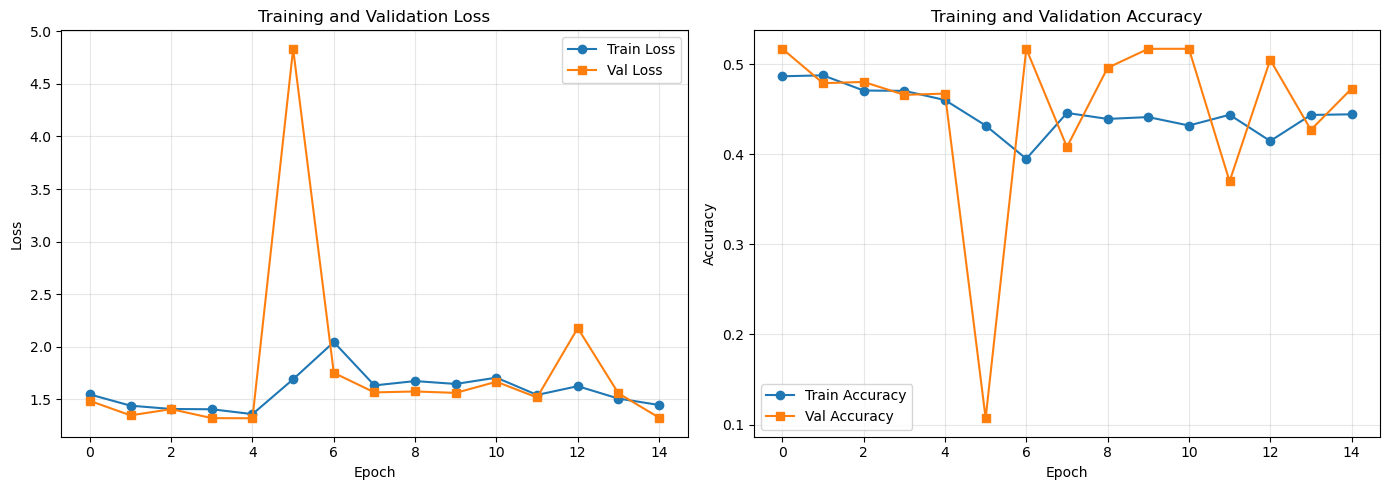
Comparing Results#
plot_training_history(history_aug)

val_loss_aug, val_accuracy_aug = model_aug.evaluate(val_ds, verbose=0)

print('\n' + '='*60)
print('COMPARISON: Without vs With Data Augmentation')
print('='*60)
print(f'Without augmentation: {val_accuracy:.4f}')
print(f'With augmentation:    {val_accuracy_aug:.4f}')
print(f'Improvement:          {(val_accuracy_aug - val_accuracy):.4f}')
print('='*60)

print('\nTypical behavior with data augmentation:')
print('• Training may converge more slowly (model sees more variations)')
print('• Training accuracy might be lower (augmented images are harder)')
print('• Validation accuracy often improves (better generalization)')
print('• Smaller gap between train/val metrics (less overfitting)')
============================================================
COMPARISON: Without vs With Data Augmentation
============================================================
Without augmentation: 0.3747
With augmentation:    0.4728
Improvement:          0.0981
============================================================

Typical behavior with data augmentation:
• Training may converge more slowly (model sees more variations)
• Training accuracy might be lower (augmented images are harder)
• Validation accuracy often improves (better generalization)
• Smaller gap between train/val metrics (less overfitting)
Expected observations:
Training may be slower (more data variations to process)
Training accuracy might be lower (task is harder with augmentation)
Validation accuracy often improves (better generalization)
Smaller gap between training and validation metrics
Exercises#
Exercise 1: Compute Output Shapes#
Given a Conv2D(32, (3,3), padding='valid') layer with input shape (28, 28, 1):
What is the output shape? (Use formula:
output = (input - kernel + 2*padding) / stride + 1)How many trainable parameters does this layer have?
Key API:
model.summary()shows shapes and parameter countsParameters =
kernel_h * kernel_w * input_channels * filters + filters(for bias)
# Exercise 1: Verify your calculations
# TODO: Create a simple model with one Conv2D layer and check the output
# from tensorflow.keras import layers, Model
#
# inputs = layers.Input(shape=(28, 28, 1))
# x = layers.Conv2D(32, (3, 3), padding='valid')(inputs)
# model = Model(inputs, x)
# model.summary()
Exercise 2: Augmentation Effects#
Modify the augmentation pipeline and observe the effect on training/validation curves.
Try:
Remove all augmentation - what happens to the gap between train and val accuracy?
Add aggressive augmentation (rotation_range=45, zoom_range=0.3) - does it help or hurt?
Key API:
ImageDataGenerator(rotation_range=..., zoom_range=..., horizontal_flip=...)
# Exercise 2: Experiment with augmentation
# TODO: Create two ImageDataGenerators - one with no augmentation, one with heavy augmentation
# Train short (5 epochs) and compare the training curves
#
# no_aug = ImageDataGenerator(rescale=1./255)
# heavy_aug = ImageDataGenerator(
#     rescale=1./255,
#     rotation_range=45,
#     zoom_range=0.3,
#     horizontal_flip=True
# )
Recap#
Why CNNs:
Fully connected networks have too many parameters for images
CNNs use local connectivity and weight sharing for efficiency
Translation invariance makes CNNs effective for vision tasks
CNN Components:
Conv2D: Extracts features using learned filters
MaxPooling: Reduces spatial dimensions, keeps strongest features
Padding=’same’: Maintains spatial dimensions
Stride: Controls filter movement and output size
ReLU: Introduces non-linearity
Dense layers: Learns feature combinations for classification
Keras Workflow:
Functional API for flexible model building
model.summary()shows architecture and parameterscompile(),fit(),evaluate()for training
Data Augmentation:
Random transformations prevent overfitting
Applied during training only (not validation/prediction)
Improves generalization with limited data